Seller Purchaser Affidavit of Exemption - Sold for Removal 2026

Get Form
dog adoption rehoming agreement Preview on Page 1

Here's how it works

01. Edit your dog adoption rehoming agreement online
Type text, add images, blackout confidential details, add comments, highlights and more.

02. Sign it in a few clicks
Draw your signature, type it, upload its image, or use your mobile device as a signature pad.

03. Share your form with others
Send it via email, link, or fax. You can also download it, export it or print it out.

How to use or fill out Seller Purchaser Affidavit of Exemption - Sold for Removal with our platform

Form edit decoration
9.5
Ease of Setup
DocHub User Ratings on G2
9.0
Ease of Use
DocHub User Ratings on G2
  1. Click ‘Get Form’ to open the Seller Purchaser Affidavit of Exemption - Sold for Removal in the editor.
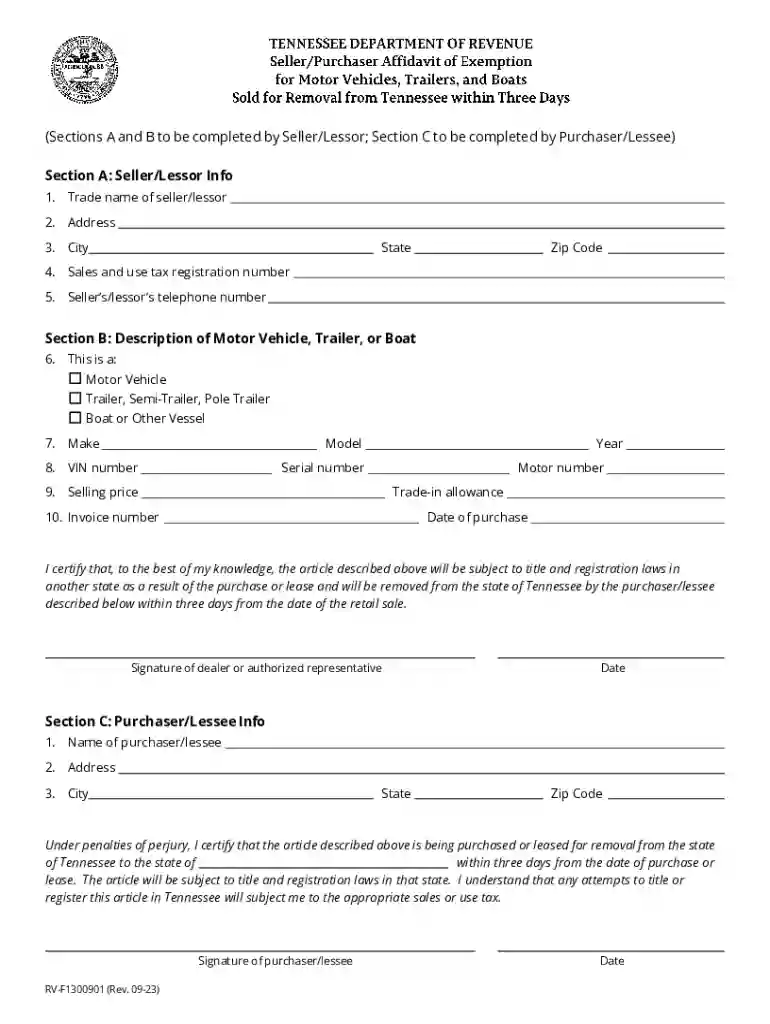
  2. In Section A, enter the Seller/Lessor information. Fill in the trade name, address, city, state, zip code, sales and use tax registration number, and telephone number.
  3. Move to Section B to describe the item being sold. Select whether it is a motor vehicle, trailer, or boat. Then provide details such as make, model, VIN number, year, serial number, motor number, selling price, trade-in allowance, invoice number, and date of purchase.
  4. In Section C, complete the Purchaser/Lessee information by entering their name and address details. Ensure that both parties sign and date the form.
  5. Review all entries for accuracy before saving your completed document. Utilize our platform’s features to easily share or print your affidavit.

Start using our platform today to streamline your document editing and signing process for free!

See more Seller Purchaser Affidavit of Exemption - Sold for Removal versions

We've got more versions of the Seller Purchaser Affidavit of Exemption - Sold for Removal form. Select the right Seller Purchaser Affidavit of Exemption - Sold for Removal version from the list and start editing it straight away!
Versions Form popularity Fillable & printable
2023 4.2 Satisfied (38 Votes)
2020 4.8 Satisfied (206 Votes)
2017 4.3 Satisfied (149 Votes)
2010 4.4 Satisfied (135 Votes)
be ready to get more

Complete this form in 5 minutes or less

Get form

Got questions?

We have answers to the most popular questions from our customers. If you can't find an answer to your question, please contact us.
Contact us

Yes, and it’s really straightforward! DocHub is a web-based PDF editor with advanced document management capabilities that allow you promptly adjust your forms, fill out blank fields and drop new ones for other people to fill out, and create eSignatures in several ways. Add your Seller Purchaser Affidavit of Exemption - Sold for Removal, give information as required, and select how you want to eSign your document - by typing your name, drawing your signature, uploading its image, or utilizing a QR code.

If you are searching for a state-specific Seller Purchaser Affidavit of Exemption - Sold for Removal sample, you can find it in our DocHub Forms & Templates catalog. Use the search field, enter your form’s name, and search through the results for your state. You can also filter out irrelevant results while exploring our catalog by groups.

To apply for tax exemptions, organizations have to apply for recognition of exemption. This results in the formal recognition of the organizations status by the IRS. Usually, organizations that dont operate for profit and provide valuable service to the communities can apply for tax exemption.
You need to speak to your GP or doctor to apply for a new certificate.
Exemptions, Certificates and Credits On the TNTAP homepage, click View Exemption Links. 2. On the next screen, click Apply for Sales Use Tax Exemption. Applications for the other sales and use tax exemptions must be made through the taxpayers TNTAP account.

Security and compliance

At DocHub, your data security is our priority. We follow HIPAA, SOC2, GDPR, and other standards, so you can work on your documents with confidence.

Learn more
ccpa2
pci-dss
gdpr-compliance
hipaa
soc-compliance

People also ask

Sales and use tax certificates can be verified using the Tennessee Taxpayer Access Point (TNTAP) under Information and Inquiries.

Related links