01. Edit your tupperware consultant login app online
Type text, add images, blackout confidential details, add comments, highlights and more.
02. Sign it in a few clicks
Draw your signature, type it, upload its image, or use your mobile device as a signature pad.
03. Share your form with others
Send tupperware consultant login via email, link, or fax. You can also download it, export it or print it out.
How to use or fill out tupperware form with our platform
Ease of Setup
DocHub User Ratings on G2
Ease of Use
DocHub User Ratings on G2
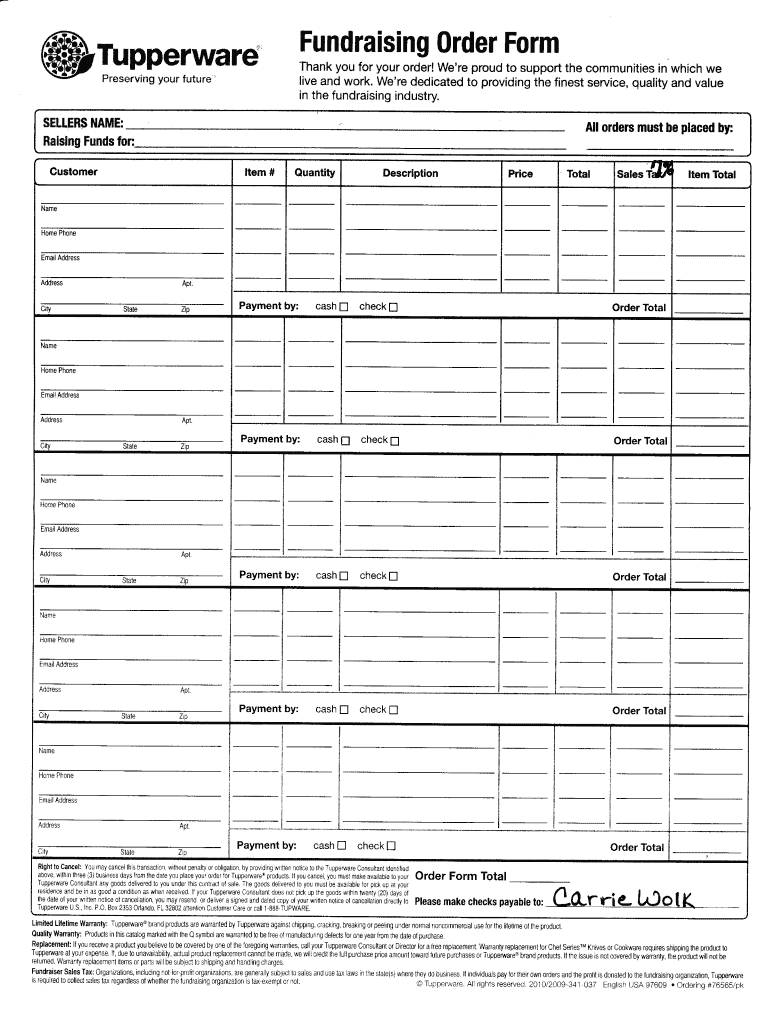
Click ‘Get Form’ to open the tupperware fundraising form in the editor.
Begin by entering your name in the designated field at the top of the form. This is essential for identifying your order.
Fill in your contact information, including home phone and email address, ensuring that all details are accurate for communication purposes.
In the item section, list each product you wish to order by entering the item number, quantity, description, and price. Make sure to double-check these entries for accuracy.
Calculate the total for each item and enter it in the 'Total' field provided. Repeat this for all items on your order.
Select your preferred payment method by checking either 'cash' or 'check' next to each order total.
Review your entries carefully before submitting. Ensure that all required fields are filled out correctly.
Start filling out your tupperware form today using our platform for a seamless experience!
From slag to swag: the story of Earl Tuppers fantastic
Aug 20, 2018 With their clean lines and elegant curves, they fused form and function. The plastic used in Tupperware products is top-shelf aestheticallyRead more
Cookie consent notice
This site uses cookies to enhance site navigation and personalize your experience.
By using this site you agree to our use of cookies as described in our Privacy Notice.
You can modify your selections by visiting our Cookie and Advertising Notice.