Type text, add images, blackout confidential details, add comments, highlights and more.
02. Sign it in a few clicks
Draw your signature, type it, upload its image, or use your mobile device as a signature pad.
03. Share your form with others
Send deficiency form via email, link, or fax. You can also download it, export it or print it out.
How to use or fill out deficiency slip with our platform
Ease of Setup
DocHub User Ratings on G2
Ease of Use
DocHub User Ratings on G2
Click ‘Get Form’ to open the deficiency slip in the editor.
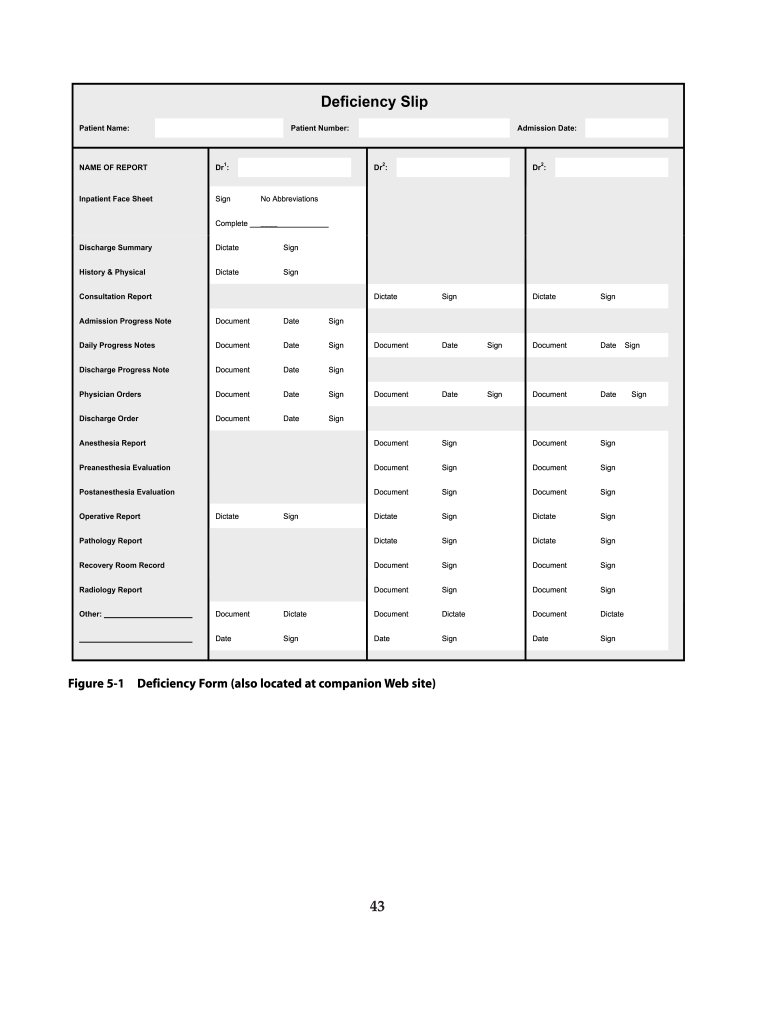
Begin by entering the Patient Name and Patient Number at the top of the form. This information is crucial for identifying the patient associated with the deficiency slip.
Fill in the Admission Date to document when the patient was admitted. This helps track their medical history accurately.
For each report listed, such as Discharge Summary and Anesthesia Report, indicate whether it has been dictated and signed by clicking on the respective fields. Ensure no abbreviations are used for clarity.
Complete all sections by signing where indicated. Each report requires a signature to confirm its completion and accuracy.
Review all entries for completeness before finalizing your document. Use our platform’s editing tools to make any necessary adjustments.
Start using our platform today to streamline your deficiency slip process for free!
Nov 9, 2015 Establishes evidence of a current or future transportation problem or deficiency slip) to each reviewing office. In addition, six copies ofRead more
A notice of deficiency is issued for unagreed deficiencies of income, estate, or gift tax liabilities as well as for certain excise taxes. See IRM 4.8.9.15 forRead more
DEFICIENCY SLIPSDuring midterm of each quarter you will receive a deficiency slip from an instructor if you are doing below average, or below.Read more
Cookie consent notice
This site uses cookies to enhance site navigation and personalize your experience.
By using this site you agree to our use of cookies as described in our Privacy Notice.
You can modify your selections by visiting our Cookie and Advertising Notice.