Rd108 2026

Get Form
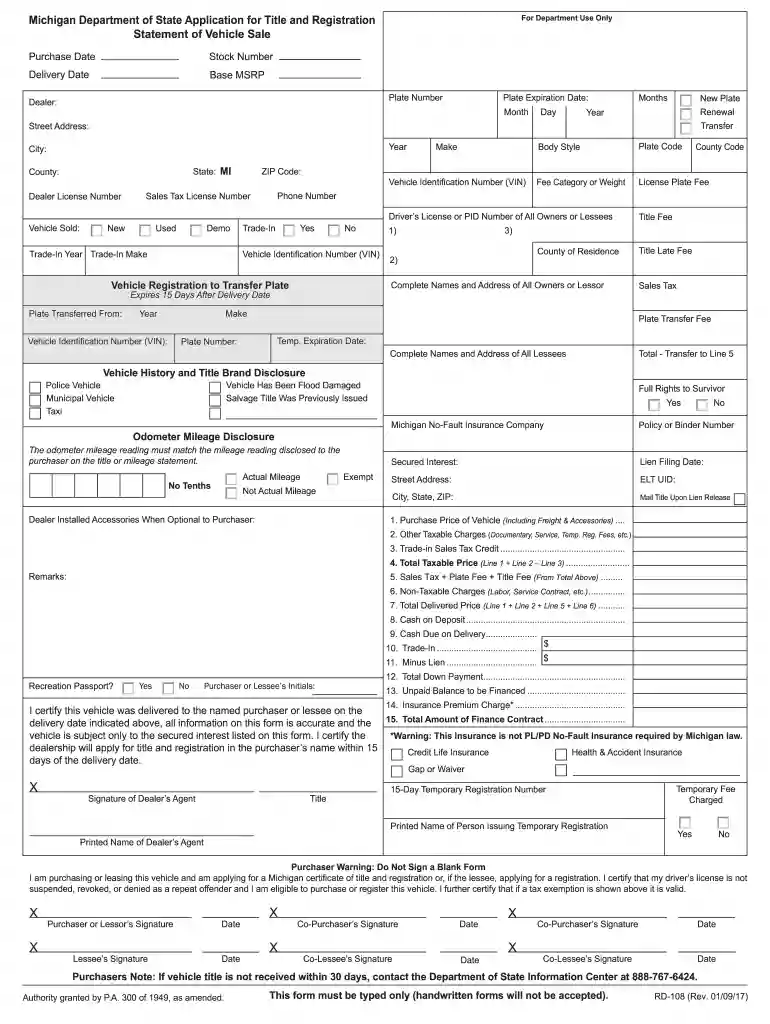
rd108 Preview on Page 1

Here's how it works

01. Edit your rd108 online
Type text, add images, blackout confidential details, add comments, highlights and more.

02. Sign it in a few clicks
Draw your signature, type it, upload its image, or use your mobile device as a signature pad.

03. Share your form with others
Send michigan rd 108 via email, link, or fax. You can also download it, export it or print it out.

How to use or fill out rd108 with our platform

Form edit decoration
9.5
Ease of Setup
DocHub User Ratings on G2
9.0
Ease of Use
DocHub User Ratings on G2
  1. Click ‘Get Form’ to open the rd108 in the editor.
  2. Begin by entering the 'Purchase Date' and 'Delivery Date' at the top of the form. Ensure these dates are accurate as they are crucial for processing.
  3. Fill in the 'Dealer' information, including 'Dealer License Number' and 'Street Address'. This section is essential for identifying the seller.
  4. Complete the vehicle details such as 'Vehicle Identification Number (VIN)', 'Make', and 'Body Style'. Accurate information here is vital for registration.
  5. Proceed to fill out financial details, including purchase price, trade-in value, and any applicable fees. Make sure to double-check calculations for accuracy.
  6. Sign and date where indicated at the bottom of the form. Both purchaser and dealer must provide signatures to validate the transaction.

Start using our platform today to streamline your rd108 completion process for free!

See more rd108 versions

We've got more versions of the rd108 form. Select the right rd108 version from the list and start editing it straight away!
Versions Form popularity Fillable & printable
2018 4.8 Satisfied (71 Votes)
2017 4.4 Satisfied (152 Votes)
2014 4 Satisfied (41 Votes)
2002 4.4 Satisfied (587 Votes)
be ready to get more

Complete this form in 5 minutes or less

Get form

Got questions?

We have answers to the most popular questions from our customers. If you can't find an answer to your question, please contact us.
Contact us
The RD-108 form is a combined tax collection, vehicle title and registration application, and statement of vehicle sale. Each RD-108 must be typed and completed in full, with the exception of the BFS-4 Temporary Registration number. The Department will not accept handwritten RD-108 documents.
Section 217 of the Code (MCL 257.217) requires a dealer to apply for title and registration on the retail purchasers behalf within 21 days of vehicle delivery.
A signed Application for Missouri Title and License (Form 108); An identification number and odometer (ID/OD) inspection, if ownership of the motor vehicle was transferred to you on a title issued by another state or country.
It was mandatory as of October 1st 2023 that all titles with a lien recorded must be electronic. This is to help with the efficiency of handling titles subject to financing transactions. This also helps to prevent fraud associated with titles that have wreaked havoc on the vehicle titling industry.
The RD-108 form is essential for vehicle title and registration in Michigan. It combines tax collection, vehicle registration, and sales statements. Use this form to ensure compliance with state vehicle regulations.

Security and compliance

At DocHub, your data security is our priority. We follow HIPAA, SOC2, GDPR, and other standards, so you can work on your documents with confidence.

Learn more