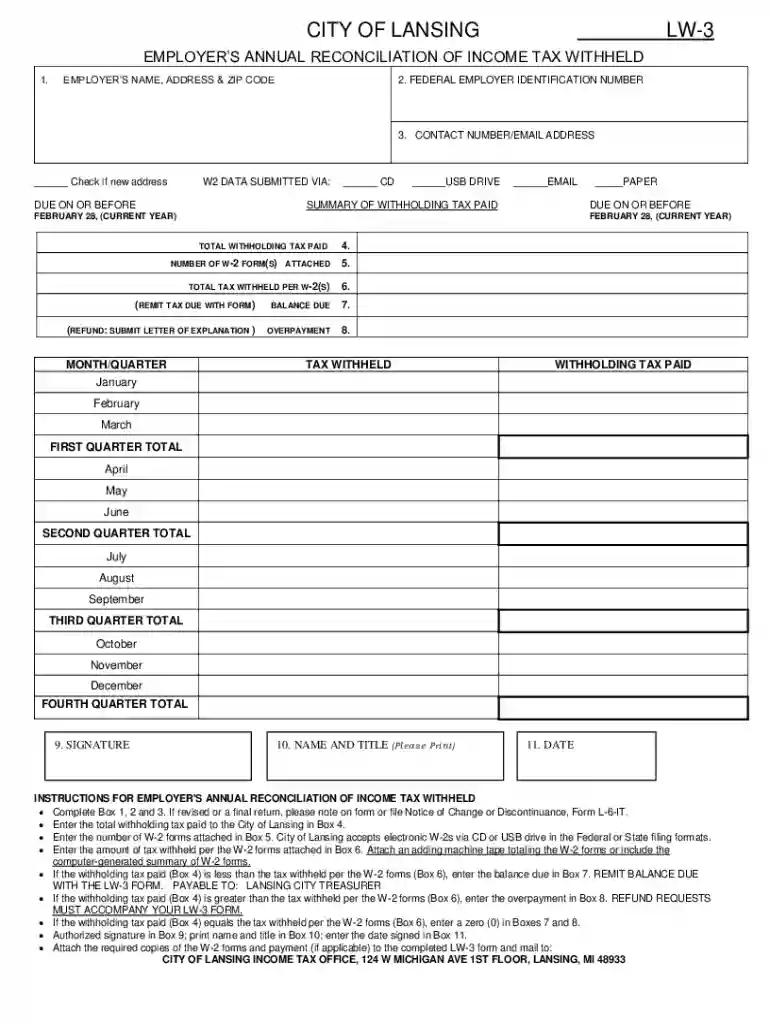
EMPLOYERS ANNUAL RECONCILIATION OF INCOME TAX WITHHELD 2026

Get Form
employer number Preview on Page 1

Here's how it works

01. Edit your employer number online
Type text, add images, blackout confidential details, add comments, highlights and more.

02. Sign it in a few clicks
Draw your signature, type it, upload its image, or use your mobile device as a signature pad.

03. Share your form with others
Send box 14 via email, link, or fax. You can also download it, export it or print it out.

How to use or fill out EMPLOYERS ANNUAL RECONCILIATION OF INCOME TAX WITHHELD with our platform

Form edit decoration
9.5
Ease of Setup
DocHub User Ratings on G2
9.0
Ease of Use
DocHub User Ratings on G2
  1. Click ‘Get Form’ to open the EMPLOYERS ANNUAL RECONCILIATION OF INCOME TAX WITHHELD in the editor.
  2. Begin by filling out Box 1, 2, and 3 with your employer’s name, address, and federal employer identification number. If this is a revised or final return, indicate that on the form.
  3. In Box 4, enter the total withholding tax paid to the City of Lansing. This is crucial for accurate reporting.
  4. Indicate the number of W-2 forms attached in Box 5. Remember that electronic W-2s can be submitted via CD or USB drive.
  5. For Box 6, input the total tax withheld as per the attached W-2 forms. Ensure you attach an adding machine tape or a summary of these forms.
  6. If there’s a balance due (Box 7), enter it here and remit payment with your LW-3 form. For overpayments (Box 8), include a refund request letter.
  7. Complete Boxes 9 through 11 with your signature, printed name and title, and date signed.
  8. Finally, attach all required documents and mail them to the City of Lansing Income Tax Office.

Start using our platform today for free to streamline your document editing and submission process!

See more EMPLOYERS ANNUAL RECONCILIATION OF INCOME TAX WITHHELD versions

We've got more versions of the EMPLOYERS ANNUAL RECONCILIATION OF INCOME TAX WITHHELD form. Select the right EMPLOYERS ANNUAL RECONCILIATION OF INCOME TAX WITHHELD version from the list and start editing it straight away!
Versions Form popularity Fillable & printable
2014 4.9 Satisfied (32 Votes)
2013 4.8 Satisfied (119 Votes)
be ready to get more

Complete this form in 5 minutes or less

Get form

Got questions?

We have answers to the most popular questions from our customers. If you can't find an answer to your question, please contact us.
Contact us

Many software applications are available out there for document editing and signing. DocHub is one of the most widely used online solutions that comply with all data protection and compliance standards and guarantees your eSigned documentation is legally enforceable. All you need to try it out is to register an account, upload your box 13 14, fill out the requested details, and click Sign. Generate your electronic signature by typing, drawing it, uploading its image to your template, or scanning a unique QR code.

You can easily edit and complete your EMPLOYERS ANNUAL RECONCILIATION OF INCOME TAX WITHHELD on any iOS gadget. Open an internet browser of your liking, go to the DocHub website, authorize or create a new account, add your file for editing, and make your desired changes. Our service is mobile-friendly, so utilizing its functions on your smartphone will be a no-brainer, even on the first try.

Its a process that makes it easier to identify discrepancies in sales tax matters and assess the accuracy and reliability of sales tax management in a company. Sales tax reconciliation is done in periodic intervals, either monthly, quarterly, or annually, depending on which tax jurisdictions youre in.
For employees, withholding is the amount of federal income tax withheld from your paycheck. The amount of income tax your employer withholds from your regular pay depends on two things: The amount you earn. The information you give your employer on Form W4.
If youre an employee, your employer probably withholds income tax from your paycheck and pays it to the IRS in your name.

Security and compliance

At DocHub, your data security is our priority. We follow HIPAA, SOC2, GDPR, and other standards, so you can work on your documents with confidence.

Learn more
ccpa2
pci-dss
gdpr-compliance
hipaa
soc-compliance
be ready to get more

Complete this form in 5 minutes or less

Get form

People also ask

Form 944 is designed so the smallest employers (those whose annual liability for social security, Medicare, and withheld federal income taxes is $1,000 or less) will file and pay these taxes only once a year instead of every quarter.
Form 941 reconciliation compares your quarterly payroll data with what youve reported to the IRS on Form 941. To reconcile, total all wages paid and taxes withheld for the quarter, then compare these sums with your Form 941 entries, investigating any discrepancies before filing.
Employers withhold (or deduct) some of their employees pay in order to cover payroll taxes and income tax. Money may also be deducted, or subtracted, from a paycheck to pay for retirement or health benefits.
Withholding tax, also known as retention tax or source tax, is a taxation system where a payer deducts a certain amount of tax from the payments it makes to a payee and remits that amount directly to the government on behalf of the payee.
As an employer, youre responsible for withholding the right amounts from employee paychecks and sending those funds to the appropriate tax authorities. Annual withholding reconciliation is the process where you compare all those withheld taxes with the amounts youve actually submitted throughout the year.

Related links