




Here's how it works



How to use or fill out Student Residency Questionnaire NEW doc with our platform

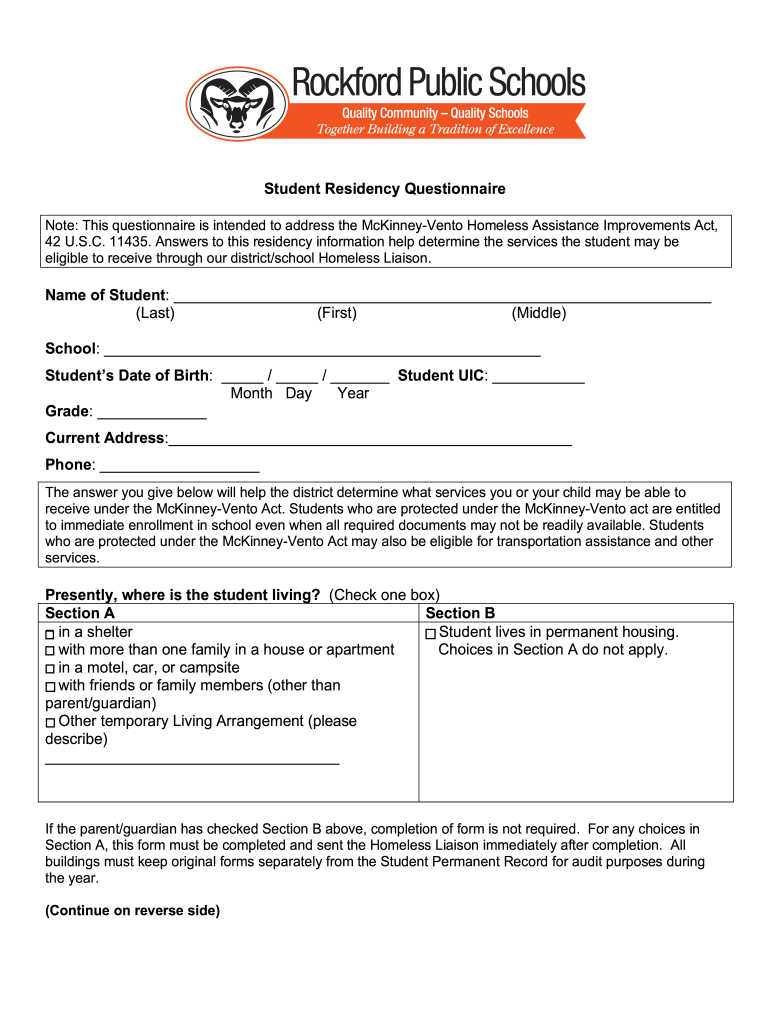
- Click ‘Get Form’ to open the Student Residency Questionnaire NEW doc in the editor.
- Begin by entering the student's name, including last, first, and middle names in the designated fields.
- Fill in the school name and the student's date of birth using the provided format (Month/Day/Year).
- Enter the student’s unique identification code (UIC) and grade level in their respective fields.
- Provide the current address and phone number of the student or guardian.
- In Section A, check one box that best describes where the student is currently living. If applicable, describe any other temporary living arrangements.
- If Section B is checked indicating permanent housing, you may skip further completion of this form.
- Have the parent/legal guardian or unaccompanied youth sign and date at the bottom of the form to attest that all information is accurate.
Start filling out your Student Residency Questionnaire NEW doc for free today!
It's free
See more Student Residency Questionnaire NEW doc versions
| Versions | Form popularity | Fillable & printable |
|---|---|---|
| 2019 | 4.9 Satisfied (40 Votes) |
Got questions?
What do I need to sign my Student Residency Questionnaire NEW doc electronically?
Electronic document signing demands a software solution that complies with data protection and eSignature regulations. DocHub is an excellent tool for that, since it fulfills all the above mentioned requirements. Whatever method you like to sign your Student Residency Questionnaire NEW doc in DocHub, your eSignature will be legally binding and court-admissible.
How to complete Student Residency Questionnaire NEW doc on the internet for free in 2024?
With a swift editing system like DocHub, you do not need anything but a web browser and connection to the internet to edit your Student Residency Questionnaire NEW doc online swiftly. Add your document or find the relevant form in DocHub’s catalog, open our editor with one click, and complete it digitally. To edit your forms anytime, register a free profile with DocHub.
Security and compliance
At DocHub, your data security is our priority. We follow HIPAA, SOC2, GDPR, and other standards, so you can work on your documents with confidence.
Learn more




