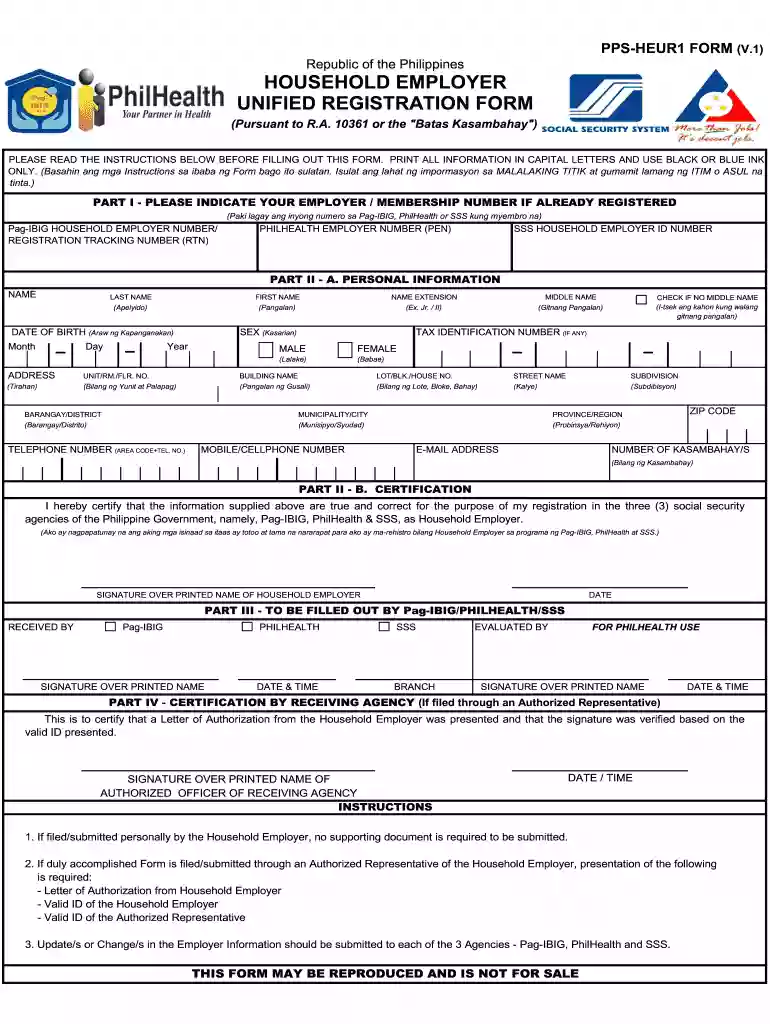
Employment application 2026

Get Form
employment application work Preview on Page 1

Here's how it works

01. Edit your employment application work online
Type text, add images, blackout confidential details, add comments, highlights and more.

02. Sign it in a few clicks
Draw your signature, type it, upload its image, or use your mobile device as a signature pad.

03. Share your form with others
Send application job via email, link, or fax. You can also download it, export it or print it out.

How to use or fill out employment application with our platform

Form edit decoration
9.5
Ease of Setup
DocHub User Ratings on G2
9.0
Ease of Use
DocHub User Ratings on G2
  1. Click ‘Get Form’ to open the employment application in the editor.
  2. Begin with Part I by entering your Employer/Membership Number if you are already registered. This includes your Pag-IBIG, PhilHealth, or SSS numbers.
  3. Proceed to Part II - A for Personal Information. Fill in your name, address, contact details, and other personal identifiers. Ensure all information is printed in capital letters.
  4. In Part II - B, certify that the information provided is accurate by signing over your printed name and including the date.
  5. If applicable, complete Parts III and IV as required by Pag-IBIG/PhilHealth/SSS for submission verification.

Start filling out your employment application today for free using our platform!

be ready to get more

Complete this form in 5 minutes or less

Get form

Got questions?

We have answers to the most popular questions from our customers. If you can't find an answer to your question, please contact us.
Contact us
Completeness : Ensure all sections of the application are filled out, even if some fields are optional. Correct Information : Double-check that all personal information, employment history, and qualifications are accurate and up to date. Tailoring Your Application Professional Language Follow Instructions
Depending on the employer and the job, you may be required to complete an online application, a paper application, an application at a store kiosk, or you could be asked to apply via email. The employer may ask you to submit a job application even if you have applied for a position with a resume and cover letter.
10 Dos and Donts of Applying for Jobs Online Research the company before applying. Read the job description carefully. Apply as soon as you can. Follow all instructions in the posting. Write a cover letter. Include your LinkedIn profile. Review your social media accounts. Dont get too personal.
Table of contents Being overly formal. Being too informal. Using a stock cover letter. Saying too much. Forgetting to proofread. Bragging. Focusing too much on yourself. Clumsy language.
You should: Read over the job application. Use a professional name and email address. Follow the instructions. Tailor your cover letter to the job. Include keywords in your resume. Check your responses for errors. Track your applications when applying for multiple jobs. Tidy your social media profiles. 10 Tips for Completing a Job Application to Get an Interview indeed.com career-advice finding-a-job indeed.com career-advice finding-a-job

Security and compliance

At DocHub, your data security is our priority. We follow HIPAA, SOC2, GDPR, and other standards, so you can work on your documents with confidence.

Learn more
ccpa2
pci-dss
gdpr-compliance
hipaa
soc-compliance

People also ask

If a question does not apply to you, draw a line or write N/A in the space. Use only positive information. Avoid negative words such as quit or fired. Use positive phrases such as better opportunity or potential for advancement.

employment application job