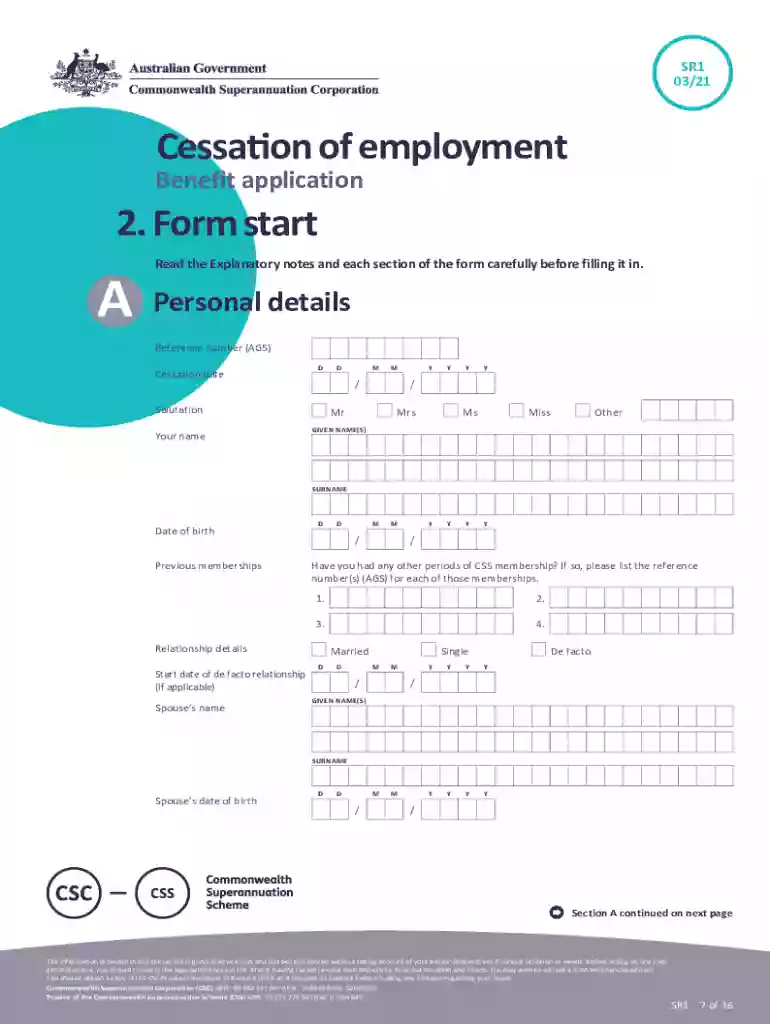
Cessation of employment benefit application form 2026

Get Form
sr1 benefit Preview on Page 1

Here's how it works

01. Edit your sr1 benefit online
Type text, add images, blackout confidential details, add comments, highlights and more.

02. Sign it in a few clicks
Draw your signature, type it, upload its image, or use your mobile device as a signature pad.

03. Share your form with others
Send it via email, link, or fax. You can also download it, export it or print it out.

How to use or fill out Cessation of employment benefit application form with our platform

Form edit decoration
9.5
Ease of Setup
DocHub User Ratings on G2
9.0
Ease of Use
DocHub User Ratings on G2
  1. Click ‘Get Form’ to open the Cessation of employment benefit application form in the editor.
  2. Begin by filling out your personal details in Section A. Ensure you provide your reference number, cessation date, and full name using capital letters.
  3. In Section B, complete the identification requirements. You can authorize electronic verification or submit certified copies of your identification documents.
  4. Proceed to Section C to indicate your employment status. Select whether you are permanently retired or will be employed elsewhere.
  5. In Section D, choose your benefit option carefully. You can opt to preserve your entire benefit or request a refund of accumulated components.
  6. If applicable, complete Sections E and F for immediate payment details and pension preferences. Make sure to provide accurate account information.
  7. Finally, review all sections for accuracy before signing the declaration in Section K and submitting the form through your personnel section.

Start using our platform today for free to streamline your document editing and submission process!

See more Cessation of employment benefit application form versions

We've got more versions of the Cessation of employment benefit application form form. Select the right Cessation of employment benefit application form version from the list and start editing it straight away!
Versions Form popularity Fillable & printable
2021 4.8 Satisfied (187 Votes)
2017 4.4 Satisfied (35 Votes)
be ready to get more

Complete this form in 5 minutes or less

Get form

Got questions?

We have answers to the most popular questions from our customers. If you can't find an answer to your question, please contact us.
Contact us
The form can be completed online, printed, and mailed or faxed to EDD.
Benefits termination letter sample We regret to inform you that on [date], you will no longer be eligible for [coverage or benefit]. The reason for this termination of benefits is [dismissal/departure/change in service provider]. You can expect additional information to be sent by [communication method] by [date].
The EDD created the DE 2320 - For Your Benefit, Californias Program for the Unemployed to explain employees rights to UI, SDI and paid family leave (PFL).
Claim for Disability Insurance (DI) Benefits (DE 2501) English: You must submit an original form provided by the EDD, either electronically or through US mail. It cannot be downloaded or reproduced.
To complete forms, you may need to download and save them on the computer, then open them with the no-cost Adobe Reader. To search and order brochures and forms from the EDD, visit Online Forms and Publications. All are available at no cost, whether you download or order for delivery by mail.

Security and compliance

At DocHub, your data security is our priority. We follow HIPAA, SOC2, GDPR, and other standards, so you can work on your documents with confidence.

Learn more
ccpa2
pci-dss
gdpr-compliance
hipaa
soc-compliance
be ready to get more

Complete this form in 5 minutes or less

Get form

People also ask

Will sometimes be mailed with a Continued Claim Form (DE 4581). It is a reminder that you are required to report all work and wages while receiving benefits. It also tells our customers that we check data from the California Department of Child Support Services to make sure work and wages are reported correctly.
You have to order online or go to local Edd office. Form needs to be original. You cannot use copy of any sort. Had to be original red form.
To inspect or request a copy of EDD public records, contact us in one of the following ways: Submit a request online. Mail a request to EDD Legal Office, 800 Capitol Mall, MIC 53, Sacramento, CA 95814-4703. Make a request at any EDD public office.

Related links