




Here's how it works

01. Edit your form online
Type text, add images, blackout confidential details, add comments, highlights and more.

02. Sign it in a few clicks
Draw your signature, type it, upload its image, or use your mobile device as a signature pad.

03. Share your form with others
Send it via email, link, or fax. You can also download it, export it or print it out.
How to use or fill out auto insurance quest with our platform

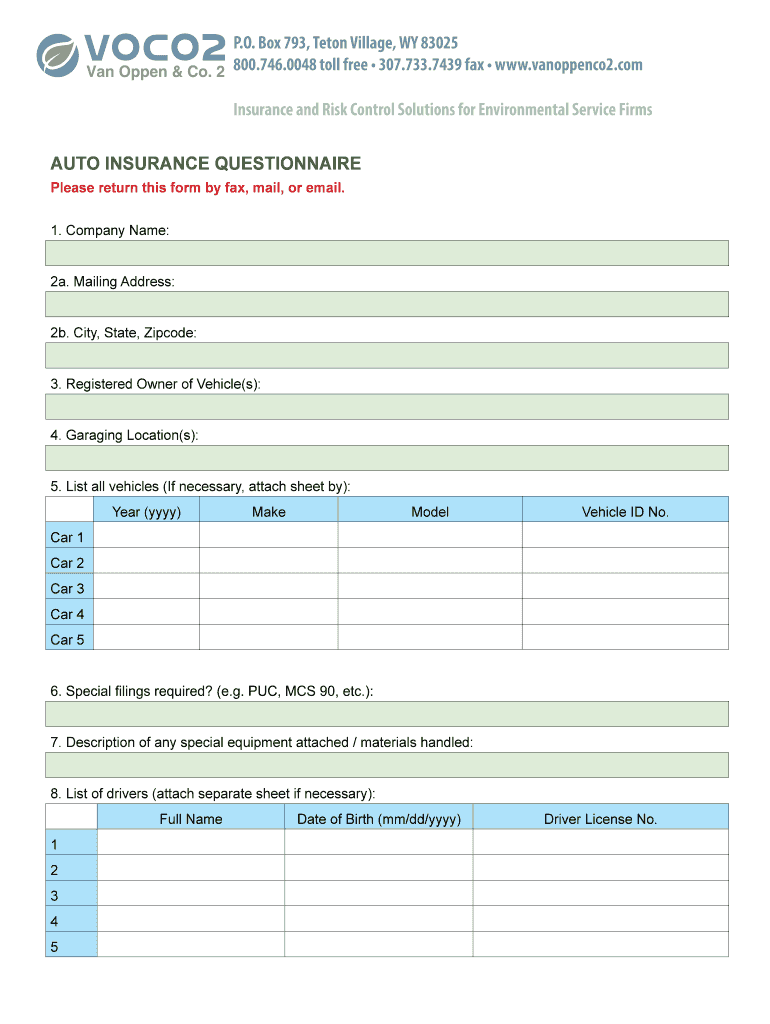
- Click ‘Get Form’ to open the auto insurance questionnaire in the editor.
- Begin by entering your Company Name in the designated field. This is essential for identifying your business.
- Fill in your Mailing Address, including City, State, and Zipcode. Ensure accuracy for correspondence purposes.
- List the Registered Owner of Vehicle(s) and provide Garaging Location(s) to clarify vehicle management.
- Detail all vehicles by entering Year, Make, Model, and Vehicle ID No. for each car listed. If you have more than five vehicles, attach a separate sheet.
- Describe any special equipment attached or materials handled by your vehicles in the provided section.
- Identify your Auto insurer for the past five years along with policy numbers and expiration dates.
- Complete details of any claims over the past five years, including dates and amounts of loss. Attach additional sheets if necessary.
- Specify desired limits of liability, uninsured motorist limit, medical payments limit, and physical damage preferences.
- Indicate current employee numbers and confirm policies regarding driver qualifications and personal use of autos.
- Finally, sign over your printed name, provide contact information, and date the form before submission.
Start filling out your auto insurance quest today on our platform for free!
Fill out auto insurance quest online
It's free
It's free
See more auto insurance quest versions
We've got more versions of the auto insurance quest form. Select the right auto insurance quest version from the list and start editing it straight away!
| Versions | Form popularity | Fillable & printable |
|---|---|---|
| 2016 | 4.8 Satisfied (81 Votes) |
Security and compliance
At DocHub, your data security is our priority. We follow HIPAA, SOC2, GDPR, and other standards, so you can work on your documents with confidence.
Learn more




