SUNY Morrisville FERPA Authorization Form to Release Student Educational Records 2026

Get Form
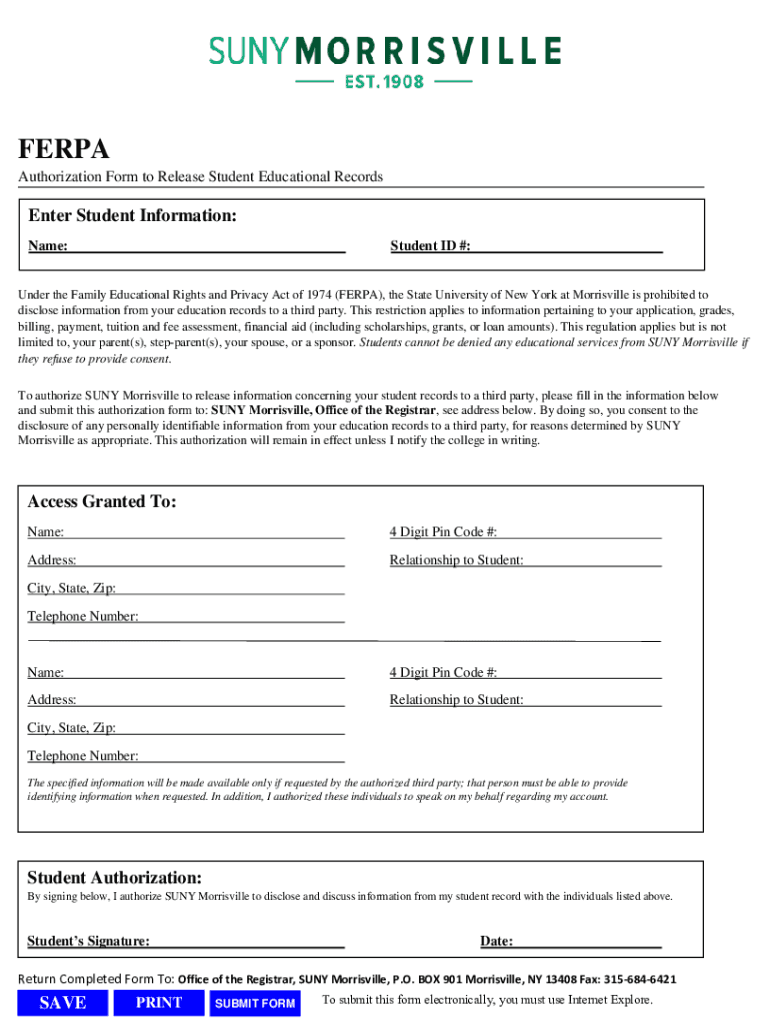
SUNY Morrisville FERPA Authorization Form to Release Student Educational Records Preview on Page 1

Here's how it works

01. Edit your form online
Type text, add images, blackout confidential details, add comments, highlights and more.
02. Sign it in a few clicks
Draw your signature, type it, upload its image, or use your mobile device as a signature pad.
03. Share your form with others
Send it via email, link, or fax. You can also download it, export it or print it out.

How to use or fill out SUNY Morrisville FERPA Authorization Form to Release Student Educational Records with DocHub

Form edit decoration
9.5
Ease of Setup
DocHub User Ratings on G2
9.0
Ease of Use
DocHub User Ratings on G2
  1. Click ‘Get Form’ to open the SUNY Morrisville FERPA Authorization Form in our platform.
  2. Begin by entering your personal information in the 'Enter Student Information' section. Fill in your Name and Student ID # accurately.
  3. In the 'Access Granted To' section, provide the names and details of individuals you wish to authorize. Include their 4 Digit Pin Code #, Address, Relationship to you, City, State, Zip, and Telephone Number.
  4. Review the authorization statement carefully. By signing below, you consent to disclose your educational records as specified.
  5. Sign and date the form in the 'Student Authorization' section. Ensure that all fields are completed before submission.
  6. Once completed, save your document. You can print or submit it electronically as instructed at the bottom of the form.

Start using our platform today for free to streamline your form completion process!

See more SUNY Morrisville FERPA Authorization Form to Release Student Educational Records versions

We've got more versions of the SUNY Morrisville FERPA Authorization Form to Release Student Educational Records form. Select the right SUNY Morrisville FERPA Authorization Form to Release Student Educational Records version from the list and start editing it straight away!
Versions Form popularity Fillable & printable
2019 4.8 Satisfied (203 Votes)
be ready to get more

Complete this form in 5 minutes or less

Get form

Got questions?

We have answers to the most popular questions from our customers. If you can't find an answer to your question, please contact us.
Contact us
A FERPA release form authorizes a college or university to share a students records with third parties. The document outlines which individuals or entities will be able to access the students personal information, academic records, transcripts, and bursar records.
Click on any college in your list to open its application details. Then, select the Recommenders and FERPA section. If you have not already added your High School in the My Common Application section, you will be prompted to do this first. Click the Complete Release Authorization button to begin.
If you dont waive the FERPA, colleges may be skeptical about the authenticity of your college recommendations. They might think that you helped your teachers write them, or that you pressured them into writing positive things. This will hurt your application and might even result in the school declining you.
If a student accidentally granted FERPA waiver or FERPA release and would like to unsign it, you as a counselor can do so by going to the students profile. Students cannot change status of their FERPA release or waiver after its signed/withheld. Only counselors can do so.
The FERPA release authorization is found within the Recommenders and FERPA section of the my colleges tab, and the release authorization link must be checked with the FERPA decision. Students can only see the Recommenders and FERPA section once theyve added at least one school to their application.

Security and compliance

At DocHub, your data security is our priority. We follow HIPAA, SOC2, GDPR, and other standards, so you can work on your documents with confidence.

Learn more
ccpa2
pci-dss
gdpr-compliance
hipaa
soc-compliance