Uh incident report 2026

Get Form
uh incident report Preview on Page 1

Here's how it works

01. Edit your uh incident report online
Type text, add images, blackout confidential details, add comments, highlights and more.
02. Sign it in a few clicks
Draw your signature, type it, upload its image, or use your mobile device as a signature pad.
03. Share your form with others
Send student visitor incident via email, link, or fax. You can also download it, export it or print it out.

How to use or fill out the UH Incident Report with Our Platform

Form edit decoration
9.5
Ease of Setup
DocHub User Ratings on G2
9.0
Ease of Use
DocHub User Ratings on G2
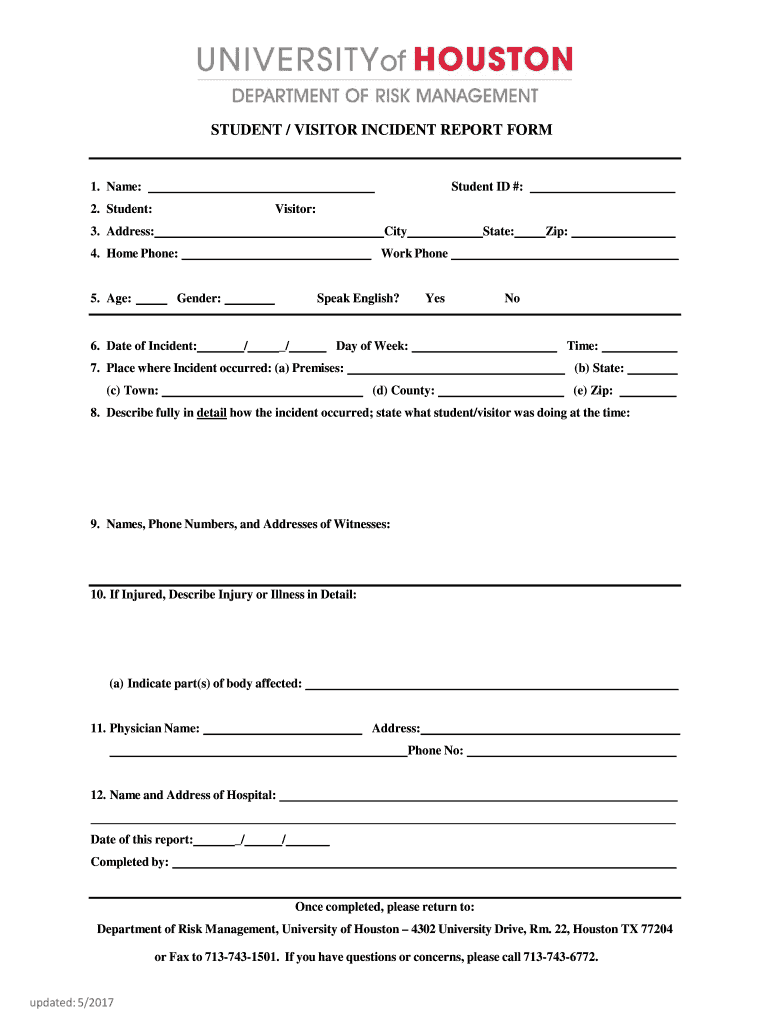
  1. Click ‘Get Form’ to open the UH Incident Report in our editor.
  2. Begin by entering the Student ID number at the top of the form. This helps identify the individual involved in the incident.
  3. Fill in the name and status (Student or Visitor) of the individual involved. Ensure accuracy for proper documentation.
  4. Provide the address, including city, state, and zip code. This information is crucial for follow-up and record-keeping.
  5. Enter home and work phone numbers for easy contact. Include age and gender to complete personal details.
  6. Document the date and time of the incident, along with the day of the week. This establishes a timeline for events.
  7. Specify where the incident occurred by filling out all relevant location fields, including premises, town, county, and zip code.
  8. In detail, describe how the incident occurred. Include what actions were taking place at that moment.
  9. List names, phone numbers, and addresses of any witnesses to provide additional context to your report.
  10. If there was an injury or illness, describe it thoroughly. Indicate which parts of the body were affected.
  11. Include physician's name and contact information if medical attention was sought after the incident.
  12. Finally, provide details about any hospital visited and complete your report with your name and date before submission.

Start using our platform today to easily fill out your UH Incident Report online for free!

See more uh incident report versions

We've got more versions of the uh incident report form. Select the right uh incident report version from the list and start editing it straight away!
Versions Form popularity Fillable & printable
2017 4.8 Satisfied (107 Votes)
be ready to get more

Complete this form in 5 minutes or less

Get form

Got questions?

We have answers to the most popular questions from our customers. If you can't find an answer to your question, please contact us.
Contact us
Here are the main types of incident reports: Security Incident: This involves bdocHubes of physical or information security. Injury and Lost Time Incident Report: This involves documenting instances where employees are injured on the job, leading to time away from work. Exposure Incident Report: Sentinel Event Report:
An important aspect of the report is to categorise the incident in terms of its severity. This is usually done by an Incident Severity Matrix that should be embedded in the incident report, where the incident may be categorised as ISL (Incident Severity Level) 1,2,3 or 4. ISL 1 being the most severe.
What Happens After an Incident is Reported? After an incident is reported, it goes through a thorough investigation process to identify the root cause behind what happened and gather evidence to determine who was at fault. Relevant stakeholders are informed, and necessary support is offered to those involved.
What are the five rules of incident report writing? Timeliness: Always report the incident as soon as possible. Accuracy: Make sure all information provided is accurate and detailed. Completeness: Be thorough and provide all important details. Confidentiality: Handle sensitive and personal information carefully.
Incident reports are a powerful tool and are goldmines of valuable data that can transform business practices and provide the rationale for business decisions moving forward following the resolution of an incident.

Security and compliance

At DocHub, your data security is our priority. We follow HIPAA, SOC2, GDPR, and other standards, so you can work on your documents with confidence.

Learn more
ccpa2
pci-dss
gdpr-compliance
hipaa
soc-compliance

People also ask

Incident reports provide a record of an unexpected occurrence, such as a fall or administration of a wrong medication dose, that involved a patient, a family member, or an employee. These reports can be used to identify areas of safety improvement and to educate others about how to avoid similar events in the future.
- It helps the management know the docHub problems in the workplace and develop improved processes and safe procedures for workers. Incident reports should be completed immediately after a near miss, unexpected, awareness, or adverse events have occurred.

Related links