Authorization Forms - University of Oklahoma 2026

Get Form
Authorization Forms - University of Oklahoma Preview on Page 1

Here's how it works

01. Edit your form online
Type text, add images, blackout confidential details, add comments, highlights and more.

02. Sign it in a few clicks
Draw your signature, type it, upload its image, or use your mobile device as a signature pad.

03. Share your form with others
Send it via email, link, or fax. You can also download it, export it or print it out.

How to use or fill out Authorization Forms - University of Oklahoma with our platform

Form edit decoration
9.5
Ease of Setup
DocHub User Ratings on G2
9.0
Ease of Use
DocHub User Ratings on G2
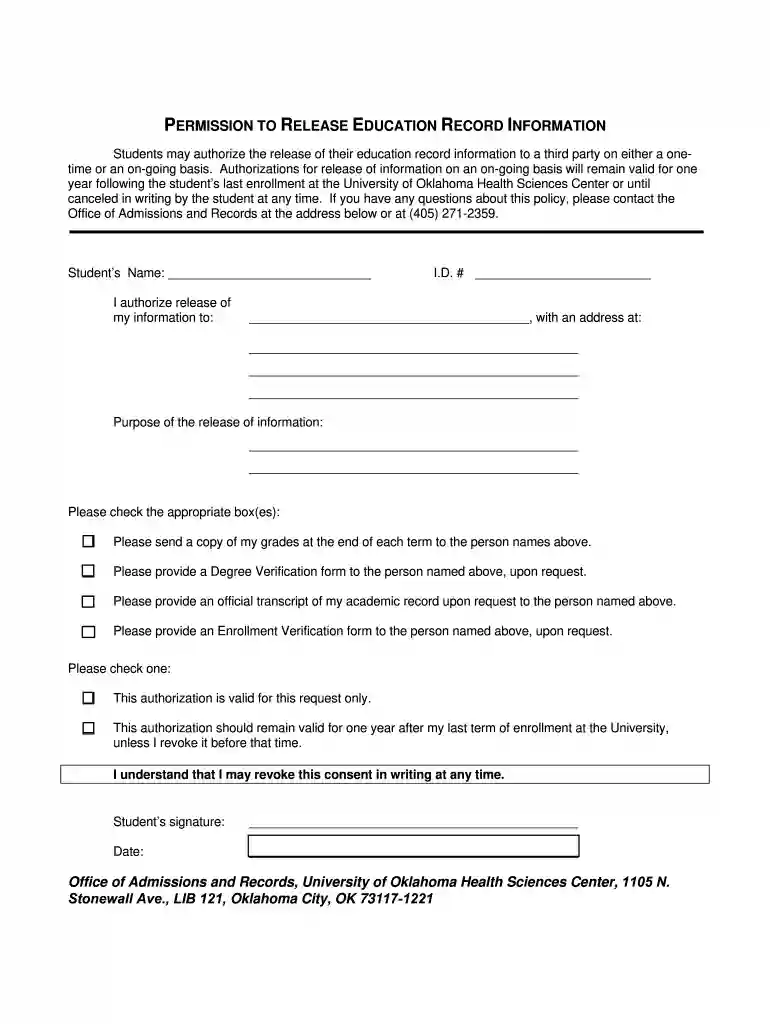
  1. Click ‘Get Form’ to open the Authorization Form in the editor.
  2. Begin by entering your name in the designated field labeled 'Student’s Name'. This identifies you as the authorizing student.
  3. Fill in your Student ID number in the 'I.D. #' section to link your authorization to your academic records.
  4. Specify the third party you are authorizing by writing their name and address in the provided fields. Ensure accuracy for proper communication.
  5. Clearly state the purpose of releasing your information in the corresponding section, detailing why this authorization is necessary.
  6. Select any applicable checkboxes regarding what information should be sent, such as grades or transcripts, ensuring you choose all that apply.
  7. Indicate whether this authorization is valid for a one-time request or for one year after your last enrollment by checking the appropriate box.
  8. Sign and date the form at the bottom to validate your authorization before submitting it through our platform.

Start using our platform today to easily complete and manage your Authorization Forms for free!

be ready to get more

Complete this form in 5 minutes or less

Get form

Got questions?

We have answers to the most popular questions from our customers. If you can't find an answer to your question, please contact us.
Contact us
There are three ways to submit letters of recommendation: Submit your application, pay the $50 application fee, and upload letters directly to the application. Email letters to oardocuments@ou.edu. Mail letters to: University of Oklahoma Office of Admissions. 550 Parrington Oval. Norman, OK 73019.
If you need to send in a transcript from another university, please have the institution send an official electronic transcript to oardocuments@ou.edu on your behalf or you can drop off a sealed official copy to Buchanan Hall (1000 Asp Ave), on the 3rd floor in the TE drop box outside of Room 330.
The University of Oklahoma Majors Business, Management, Marketing, and Related Support Services. 29% Engineering. 10% Communication, Journalism, and Related Programs. 8% Psychology. 7% Social Sciences.
Recommendation Letters. Most graduate schools require 3 letters of recommendation. However, you should double-check how many each school requires, and do NOT send more than asked for. Sending too many letters or information not requested by the school, can actually HURT your candidacy.
The acceptance rate at University of Oklahoma (OU) is 77.2%. This means the school is lightly selective. The school will have their expected requirements for GPA and SAT/ACT scores. If you meet their requirements, youre almost certain to get an offer of admission.

Security and compliance

At DocHub, your data security is our priority. We follow HIPAA, SOC2, GDPR, and other standards, so you can work on your documents with confidence.

Learn more
ccpa2
pci-dss
gdpr-compliance
hipaa
soc-compliance

People also ask

How many letters do I need? The University of Oklahoma will accept up to three letters of recommendation, and we recommend at least one letter come from a high school official such as your principal, counselor, or teacher.
OU IT assigns all students, faculty, and staff an @OU.edu e-mail address and Microsoft 365 mailbox upon creation of the their OUNet Account. This email address will also act as your log in username for many OU sites and applications. This address is commonly called the dotted email address.

Related links