Request for Incident Records 2026

Get Form
Request for Incident Records Preview on Page 1

Here's how it works

01. Edit your form online
Type text, add images, blackout confidential details, add comments, highlights and more.

02. Sign it in a few clicks
Draw your signature, type it, upload its image, or use your mobile device as a signature pad.

03. Share your form with others
Send it via email, link, or fax. You can also download it, export it or print it out.

How to use or fill out Request for Incident Records with our platform

Form edit decoration
9.5
Ease of Setup
DocHub User Ratings on G2
9.0
Ease of Use
DocHub User Ratings on G2
  1. Click ‘Get Form’ to open the Request for Incident Records in the editor.
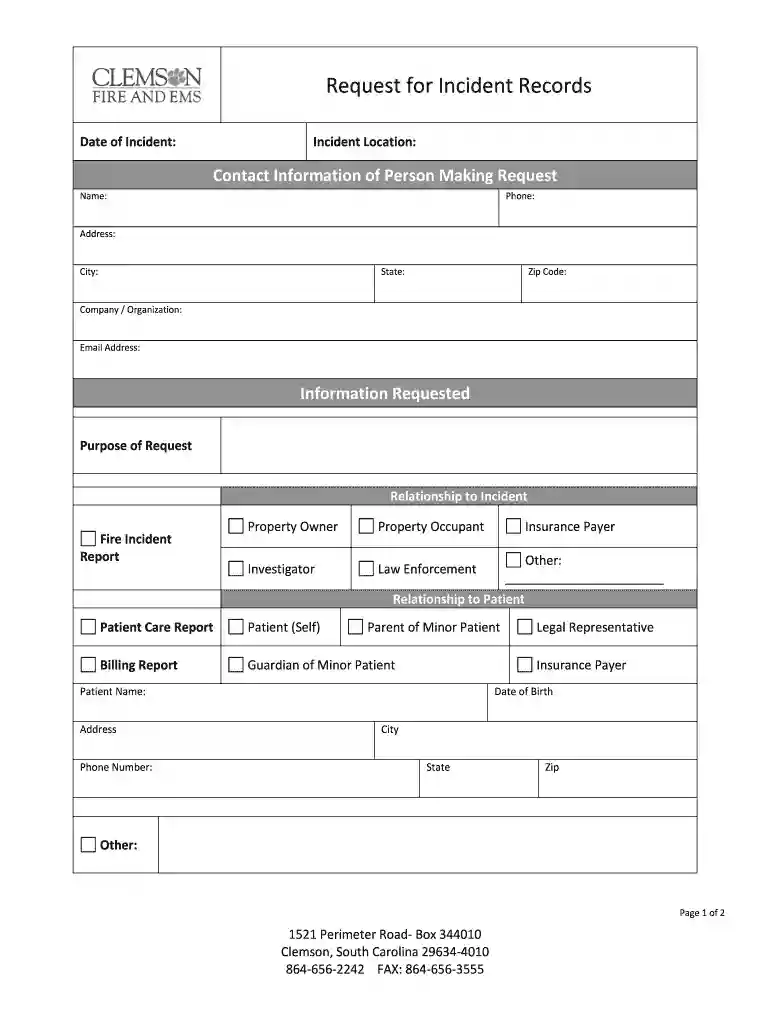
  2. Begin by entering the Date of Incident and Incident Location at the top of the form. This information is crucial for processing your request.
  3. Fill out your Contact Information, including Name, Phone, Address, City, State, Zip Code, Company/Organization, and Email Address. Ensure all details are accurate to avoid delays.
  4. In the Information Requested section, specify the Purpose of Request and select your Relationship to the Incident from options like Property Owner or Law Enforcement.
  5. If applicable, provide details regarding your Relationship to Patient by selecting from options such as Patient Care Report or Legal Representative.
  6. Indicate how you would like to receive access to the requested information by choosing options like In Person or Mail. Fill in any additional required fields based on your selection.
  7. Finally, sign and date the form at the bottom before submitting it through our platform for processing.

Start using our platform today to easily fill out and submit your Request for Incident Records online for free!

be ready to get more

Complete this form in 5 minutes or less

Get form

Got questions?

We have answers to the most popular questions from our customers. If you can't find an answer to your question, please contact us.
Contact us
While police reports remain optional for filing claims, Pennsylvania does require drivers to report crashes to police when they involve injury, death, or property damage exceeding $1,000.
Online Request The Pennsylvania State Police (PSP) offers an online portal to search for and request accident reports. To access the report, youll need specific information such as the incident number, date of the accident, or the names of the individuals involved.
In most instances, any member of the public can go to the main office of the county sheriff or city police department to make a request for an incident report. Many agencies will have information about this process posted within their office or on their Web site, or have a brochure available.
To request a crash report online, complete the following steps: Visit the Pennsylvania State Police Departments Online Crash Report Requests website. Search for your report using your name and the date of the accident. Fill out and submit the online Application To Obtain Copy of Police Report form.
0:24 3:44 And data both documents are important for law enforcement. But they serve different purposes. AndMoreAnd data both documents are important for law enforcement. But they serve different purposes. And contain different information an incident report is a document that records an event or situation.

Security and compliance

At DocHub, your data security is our priority. We follow HIPAA, SOC2, GDPR, and other standards, so you can work on your documents with confidence.

Learn more
ccpa2
pci-dss
gdpr-compliance
hipaa
soc-compliance
be ready to get more

Complete this form in 5 minutes or less

Get form