Type text, add images, blackout confidential details, add comments, highlights and more.
02. Sign it in a few clicks
Draw your signature, type it, upload its image, or use your mobile device as a signature pad.
03. Share your form with others
Send it via email, link, or fax. You can also download it, export it or print it out.
How to use or fill out Textbook Review Form with our platform
Ease of Setup
DocHub User Ratings on G2
Ease of Use
DocHub User Ratings on G2
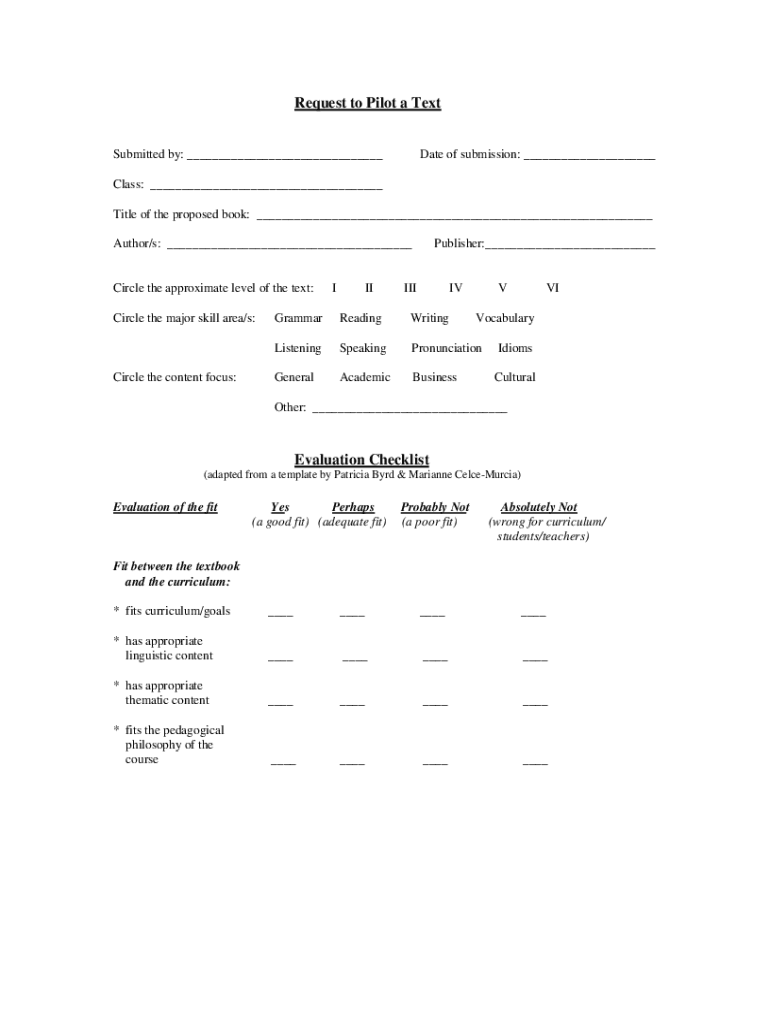
Click ‘Get Form’ to open the Textbook Review Form in the editor.
Begin by filling in your name and the date of submission at the top of the form. This ensures that your review is properly attributed.
In the 'Class' section, specify the class for which you are proposing the textbook. This helps contextualize your review.
Enter the title and author(s) of the proposed book in their respective fields. Accurate information here is crucial for identification.
Circle the appropriate level of the text and major skill areas relevant to your review. This provides clarity on where the textbook fits within educational standards.
Complete the evaluation checklist by circling 'Yes', 'Perhaps', 'Probably Not', or 'Absolutely Not' for each criterion regarding fit between the textbook, curriculum, students, and teachers.
Finally, add any additional comments that may support your evaluation at the end of the form.
Start using our platform today to streamline your Textbook Review Form process for free!
We provide inspection copies (sometimes referred to as exam or examination copies, review copies, and evaluation copies) to educators so they can evaluate whether theyd like to adopt a book in one of their courses.
Is it okay to use an older edition of a textbook?
If you talk to the professor about how much the book will be used, you may be able to determine if it is okay to use an older book. Generally, an older book may be a good option if the book is used scarcely.
How to request an instructor copy of a textbook from Sage?
Sign in and complete the brief request form. New Sage users should set up an account and allow 48 business hours for instructor qualification. We will notify you once your sample copy is available. Fill out the sample request form.
What are the criteria for reviewing a text book?
It refers to a complimentary copy of a book provided by a publisher or distributor on request to an academic who is considering adopting the text for educational purposes.
What is a desk copy of a textbook?
A desk copy is a gratis copy of a book that is required for a course taught by a professor, lecturer, graduate student instructor, and/or teaching assistants.
Related Searches
Printable textbook review formTextbook review form pdfTextbook evaluation checklistFree textbook review formTextbook review form for studentsBook evaluation form pdfchecklist for textbook evaluation (cunningsworth 1995)
Security and compliance
At DocHub, your data security is our priority. We follow HIPAA, SOC2, GDPR, and other standards, so you can work on your documents with confidence.
Open Textbooks Review Criteria Content is accurate, error-free and unbiased. Content is up-to-date, but not in a way that will quickly make the text obsolete within a short period of time. The text is written and/or arranged in such a way that necessary updates will be relatively easy and straightforward to implement.
How to write a textbook review?
Organizing the Review All reviews begin with bibliographic information: the authors name, the books full title, place of publication, publisher, edition, date, pagination, and cost, if known. In no more than two paragraphs, introduce the book. Follow with descriptive analysis and evaluation of the text. Conclude.
Related links
III-A. Assessing Learner Needs in the Adult ESL Classroom
by T Guide This workshop module contains detailed instructions and all of the materials necessary to con- duct a training session on assessing learner needs in the
Cookie consent notice
This site uses cookies to enhance site navigation and personalize your experience.
By using this site you agree to our use of cookies as described in our Privacy Notice.
You can modify your selections by visiting our Cookie and Advertising Notice.