Return to work clearance letter 2026

Get Form
medical clearance form to return to work Preview on Page 1

Here's how it works

01. Edit your medical clearance form to return to work online
Type text, add images, blackout confidential details, add comments, highlights and more.

02. Sign it in a few clicks
Draw your signature, type it, upload its image, or use your mobile device as a signature pad.

03. Share your form with others
Send return to work clearance letter sample via email, link, or fax. You can also download it, export it or print it out.

How to use or fill out return to work clearance letter with our platform

Form edit decoration
9.5
Ease of Setup
DocHub User Ratings on G2
9.0
Ease of Use
DocHub User Ratings on G2
  1. Click ‘Get Form’ to open the return to work clearance letter in the editor.
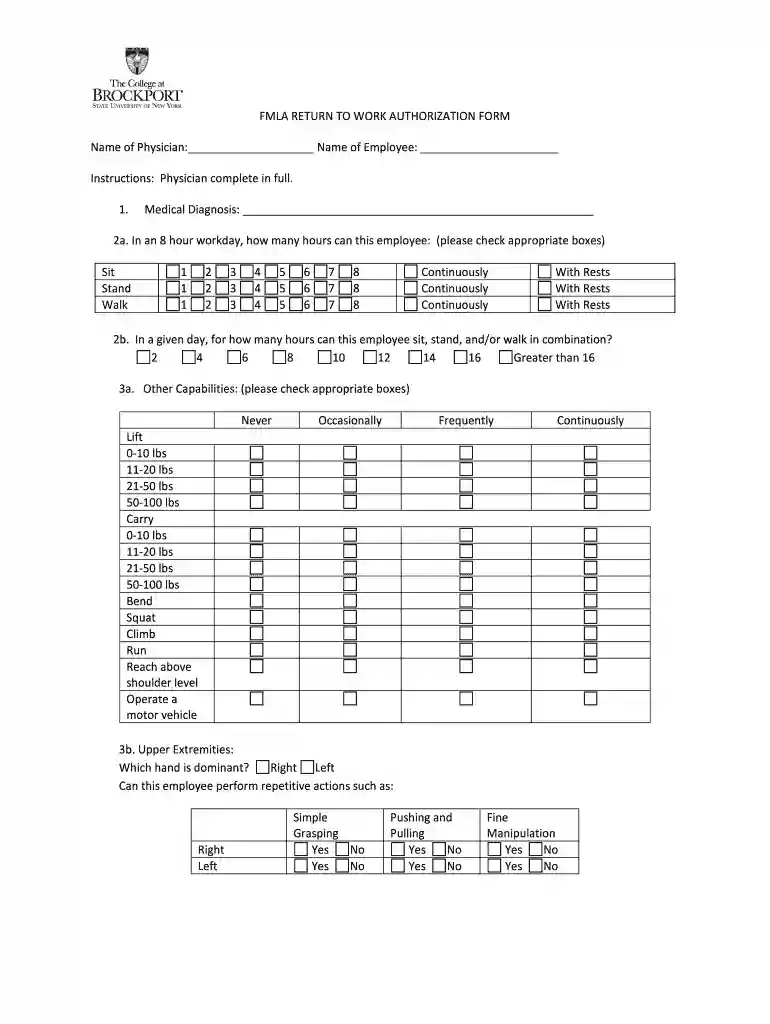
  2. Begin by entering the physician's name and the employee's name at the top of the form. This identifies who is completing the assessment and who it pertains to.
  3. In section 1, provide a detailed medical diagnosis. This is crucial for understanding the employee's health status.
  4. For section 2a, check the appropriate boxes indicating how many hours the employee can sit, stand, and walk during an 8-hour workday. Be sure to include both continuous and rest periods.
  5. In section 2b, specify how many hours can be spent sitting, standing, or walking in combination throughout a day.
  6. Complete section 3a by checking off capabilities such as lifting and carrying weights. This helps outline physical limitations.
  7. Fill out sections 3b and 3c regarding upper and lower extremities, indicating dominance and ability for repetitive actions.
  8. In section 4, assess any work environment restrictions that may affect the employee’s ability to perform their job safely.
  9. Section 5 allows you to explain any additional restrictions that may apply based on your examination.
  10. Finally, indicate whether the employee can return with or without restrictions in sections 7 and 8. Ensure you sign and date at the bottom before submitting.

Start using our platform today for free to streamline your document editing process!

be ready to get more

Complete this form in 5 minutes or less

Get form

Security and compliance

At DocHub, your data security is our priority. We follow HIPAA, SOC2, GDPR, and other standards, so you can work on your documents with confidence.

Learn more
ccpa2
pci-dss
gdpr-compliance
hipaa
soc-compliance
be ready to get more

Complete this form in 5 minutes or less

Get form