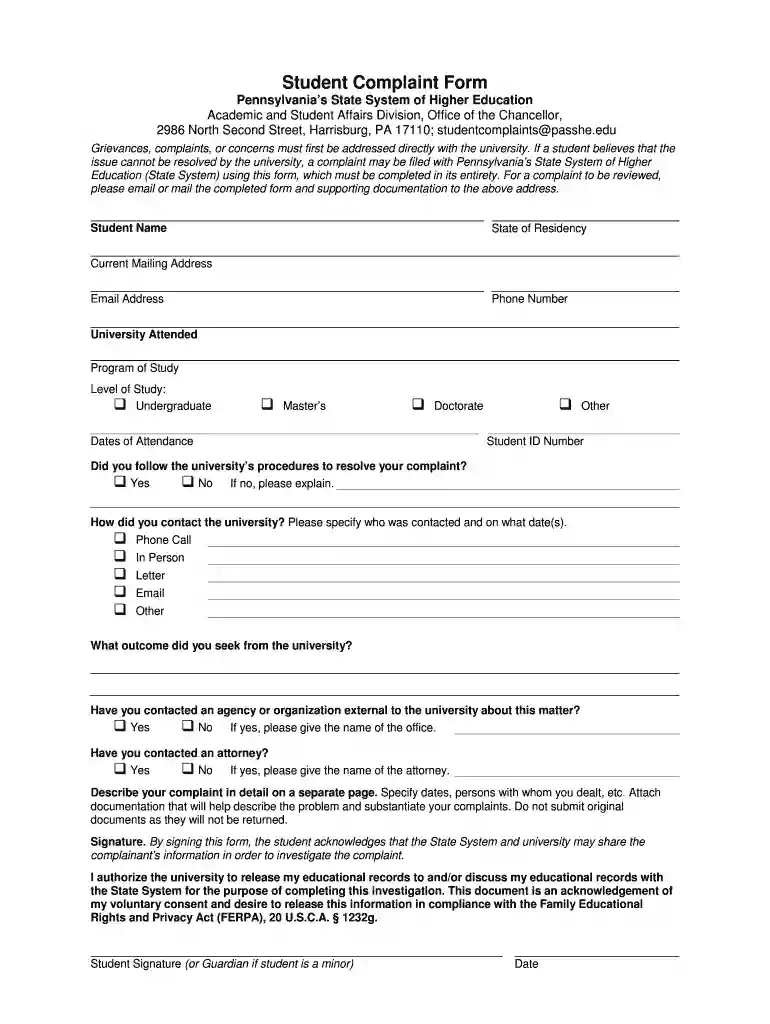
System's official complaint form 2026

Get Form
System's official complaint form Preview on Page 1

Here's how it works

01. Edit your form online
Type text, add images, blackout confidential details, add comments, highlights and more.

02. Sign it in a few clicks
Draw your signature, type it, upload its image, or use your mobile device as a signature pad.

03. Share your form with others
Send it via email, link, or fax. You can also download it, export it or print it out.

How to use or fill out System's official complaint form with our platform

Form edit decoration
9.5
Ease of Setup
DocHub User Ratings on G2
9.0
Ease of Use
DocHub User Ratings on G2
  1. Click ‘Get Form’ to open the System's official complaint form in the editor.
  2. Begin by entering your personal information, including your name, state of residency, current mailing address, email address, and phone number. This ensures that the system can contact you regarding your complaint.
  3. Fill in the details about your university attendance. Specify the university attended, program of study, level of study (Undergraduate, Master’s, Doctorate), dates of attendance, and student ID number.
  4. Indicate whether you followed the university’s procedures to resolve your complaint by selecting 'Yes' or 'No'. If 'No', provide an explanation in the designated field.
  5. Detail how you contacted the university regarding your issue. Choose from options like Phone Call, In Person, Letter, Email, or Other and specify who was contacted and on what date(s).
  6. Describe the outcome you sought from the university and indicate if you have contacted any external agency or organization about this matter.
  7. If applicable, provide details about any attorney you have contacted regarding this issue.
  8. In a separate document, describe your complaint in detail. Include relevant dates and individuals involved. Attach any supporting documentation but avoid submitting original documents as they will not be returned.
  9. Finally, sign and date the form to acknowledge consent for information sharing as per FERPA regulations.

Start using our platform today to easily complete and submit your System's official complaint form for free!

be ready to get more

Complete this form in 5 minutes or less

Get form

Got questions?

We have answers to the most popular questions from our customers. If you can't find an answer to your question, please contact us.
Contact us

Of course, you’ll find numerous apps for this on the web. Nonetheless, if you need to eSign your System's official complaint form without installing extra software, DocHub is the best choice you can make. This robust editor works on mobile devices just as on desktops. Open our editor in your preferred internet browser, register or log in to your account, and start managing your forms.

Having a swift editing platform like DocHub, you do not require anything but a browser and internet connection to modify your System's official complaint form on the internet easily. Upload your document or get the relevant form in DocHub’s catalog, open our editor with a single click, and complete it digitally. To revise your forms anytime, register a free profile with DocHub.

The Office of Civil Rights (OCR) is a federal agency that investigates complaints of discrimination on the basis of race, color, national origin, sex, disability and age in public schools.
The Office for Civil Rights (OCR) is the agency within the U. S. Department of Health and Human Services (HHS) that investigates and reviews complaints about failures to protect the privacy of health information complaints alleging violations of HIPAA rules.
Put it in writing It is helpful to put your complaint in writing if you can. If this isnt something you feel comfortable doing, you could ask a friend, carer, family member or an organisation like Citizens Advice to help you. Make sure to write complaint at the top of your letter or email, so there can be no doubt.

Security and compliance

At DocHub, your data security is our priority. We follow HIPAA, SOC2, GDPR, and other standards, so you can work on your documents with confidence.

Learn more
ccpa2
pci-dss
gdpr-compliance
hipaa
soc-compliance

People also ask

Consistent with applicable law, we securely share complaints with other state and federal agencies to, among other things, facilitate: supervision activities, enforcement activities, and. monitor the market for consumer financial products and services.
During the investigation, OCR is a neutral fact-finder. OCR will collect and analyze relevant evidence from the complainant, the recipient, and other sources, as appropriate. OCR will ensure that the actions it takes in investigations are legally sufficient, and that its determinations are support by the evidence.
If you believe that a Civil Rights covered entity discriminated against you or someone else because of your or someones race, color, national origin, disability, age, sex, or religion in violation of federal civil rights laws under HHS jurisdiction or has otherwise violated federal provider conscience laws, you may
completing investigations? within 180 calendar days after the date a complaint is filed.
By filing a consumer complaint with the FCC, you contribute to federal enforcement and consumer protection efforts on a national scale and help us identify trends and track the issues that matter most. The FCC does not resolve all individual complaints.

Related links