




Here's how it works



How to use or fill out the tornado drill evaluation form with our platform

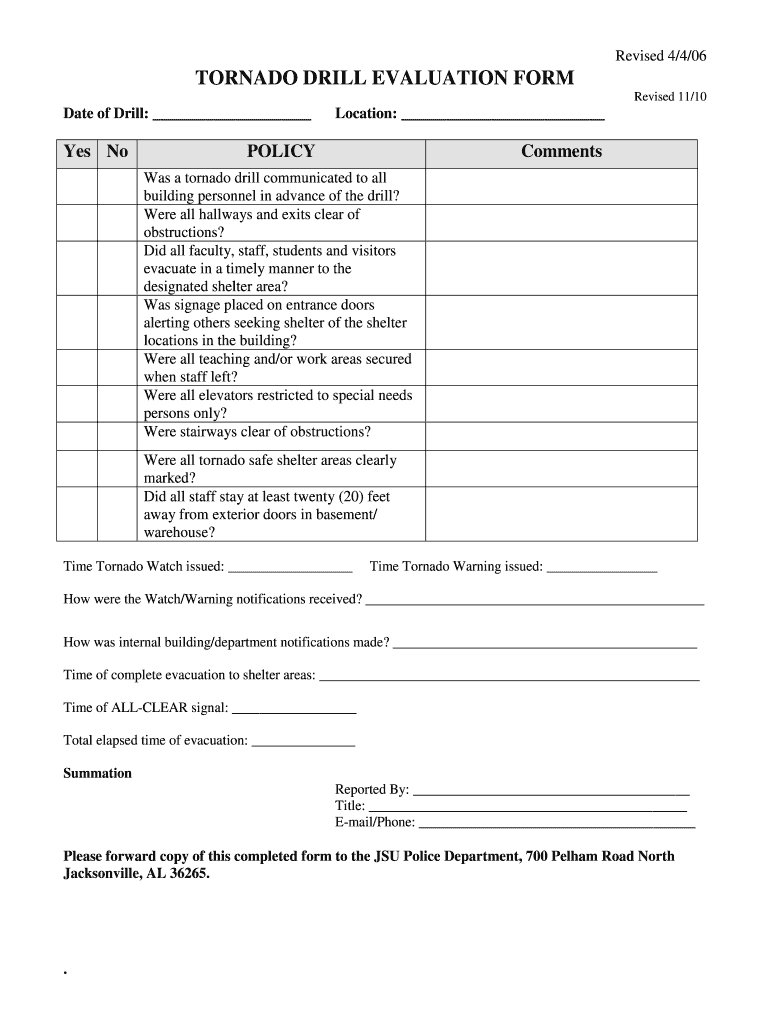
- Click ‘Get Form’ to open the tornado drill evaluation form in the editor.
- Begin by entering the 'Date of Drill' in the designated field at the top of the form.
- Fill in the 'Location' where the drill took place, ensuring accuracy for future reference.
- For each question under 'POLICY', mark 'Yes' or 'No' based on your observations during the drill. Provide comments where necessary to elaborate on your responses.
- Record the times for 'Tornado Watch issued' and 'Tornado Warning issued' in their respective fields to document critical moments.
- Detail how notifications were received and how internal communications were made regarding the drill.
- Document the time taken for complete evacuation and when the ALL-CLEAR signal was given, along with total elapsed time.
- Finally, fill out your name, title, and contact information before submitting. Ensure you forward a copy to the JSU Police Department as instructed.
Start using our platform today to efficiently complete your tornado drill evaluation form online for free!
It's free
See more tornado drill evaluation form versions
| Versions | Form popularity | Fillable & printable |
|---|---|---|
| 2006 | 4.8 Satisfied (181 Votes) |
Got questions?
Can I use DocHub to generate legal eSignatures on my form shelter?
Yes, you can utilize DocHub for signing any business and personal paperwork, including your form shelter. All eSignatures you generate with our service are legally binding and court-admissible, as DocHub complies with criteria required by ESIGN and UETA. Save your accomplished document with a detailed Audit Trail if necessary.
How do you fill out odjfs fire drill log on Android?
It is a no-brainer on a computer or via a mobile device to fill out a odjfs fire drill log with DocHub. All you need to do is open any installed web browser on your smartphone and proceed to the DocHub site. Once authenticated, add your document and open it in editing mode. Use our toolbar to make your edits and save adjustments. Optionally, keep your document in your files or send it to a recipient on the spot.
What should someone do if they are caught inside a tornado?
What is the best method to seek protection from a tornado?
Why do schools do tornado drills?
Security and compliance
At DocHub, your data security is our priority. We follow HIPAA, SOC2, GDPR, and other standards, so you can work on your documents with confidence.
Learn more


