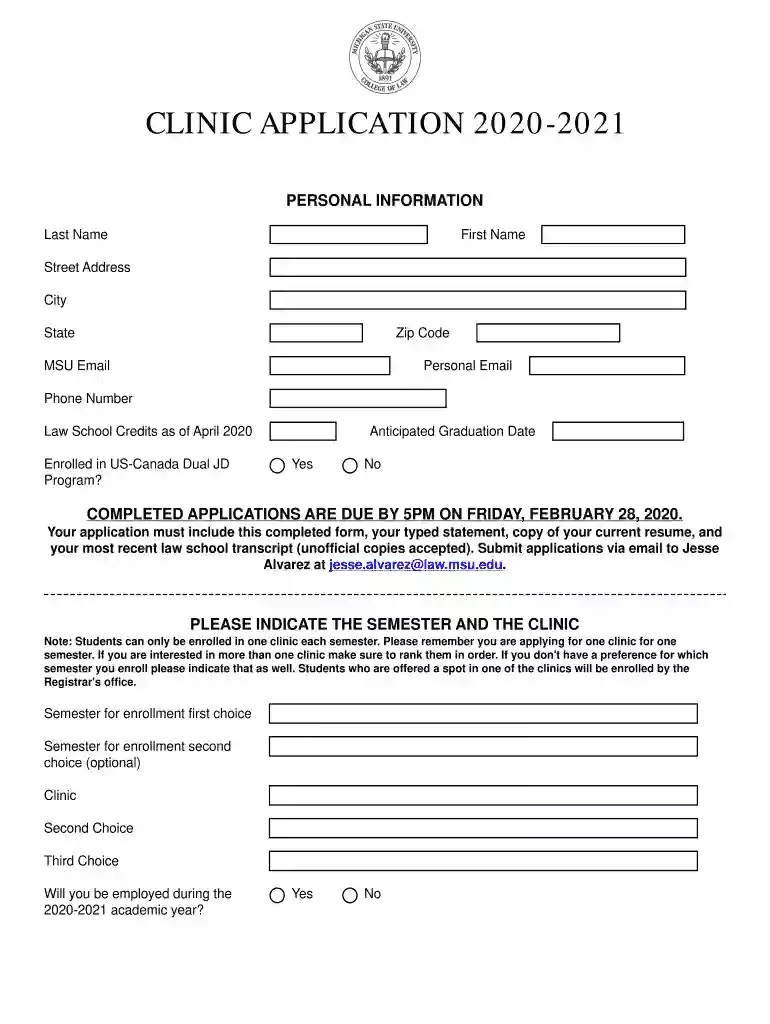
Law School Credits as of April 2020-2026

Get Form
Law School Credits as of April 2020 Preview on Page 1

Here's how it works

01. Edit your form online
Type text, add images, blackout confidential details, add comments, highlights and more.

02. Sign it in a few clicks
Draw your signature, type it, upload its image, or use your mobile device as a signature pad.

03. Share your form with others
Send it via email, link, or fax. You can also download it, export it or print it out.

How to use or fill out Law School Credits as of April 2020

Form edit decoration
9.5
Ease of Setup
DocHub User Ratings on G2
9.0
Ease of Use
DocHub User Ratings on G2
  1. Click ‘Get Form’ to open it in the editor.
  2. Begin by filling out your personal information, including your last name, first name, address, email, and phone number. Ensure all details are accurate for effective communication.
  3. Indicate whether you are enrolled in the US-Canada Dual JD Program and provide your anticipated graduation date. This information is crucial for processing your application.
  4. Select your preferred semester and clinic choices. Remember to rank them if you have multiple preferences, as students can only enroll in one clinic per semester.
  5. Complete the employment section by indicating if you will be employed during the academic year and providing relevant details about your employer.
  6. List any elective courses taken through April 2020 and answer questions regarding previous clinic enrollment and language fluency.
  7. Provide names of two law school professors who can serve as references. This adds credibility to your application.
  8. Finally, certify that all information is complete and correct before signing and dating the application. Attach any required documentation as specified.

Start using our platform today to streamline your application process for free!

See more Law School Credits as of April 2020 versions

We've got more versions of the Law School Credits as of April 2020 form. Select the right Law School Credits as of April 2020 version from the list and start editing it straight away!
Versions Form popularity Fillable & printable
2020 4.8 Satisfied (217 Votes)
be ready to get more

Complete this form in 5 minutes or less

Get form

Got questions?

We have answers to the most popular questions from our customers. If you can't find an answer to your question, please contact us.
Contact us
As noted, college credits do not expire. Credits you earn from an institution will always remain on your transcript as earned units; however, certain factors can affect whether they can be applied toward a degree program or transferred to a different institution.
The short answer is no. Most credits do not have an expiration date.
Its a big question that impacts everything from your financial decisions to your career path. And, thankfully, the short answer is NO. Your college credits wont expire.

Security and compliance

At DocHub, your data security is our priority. We follow HIPAA, SOC2, GDPR, and other standards, so you can work on your documents with confidence.

Learn more
ccpa2
pci-dss
gdpr-compliance
hipaa
soc-compliance