Type text, add images, blackout confidential details, add comments, highlights and more.
02. Sign it in a few clicks
Draw your signature, type it, upload its image, or use your mobile device as a signature pad.
03. Share your form with others
Send irs form 8736 via email, link, or fax. You can also download it, export it or print it out.
How to use or fill out IRS Form 8736 with DocHub
Ease of Setup
DocHub User Ratings on G2
Ease of Use
DocHub User Ratings on G2
Click ‘Get Form’ to open it in the editor.
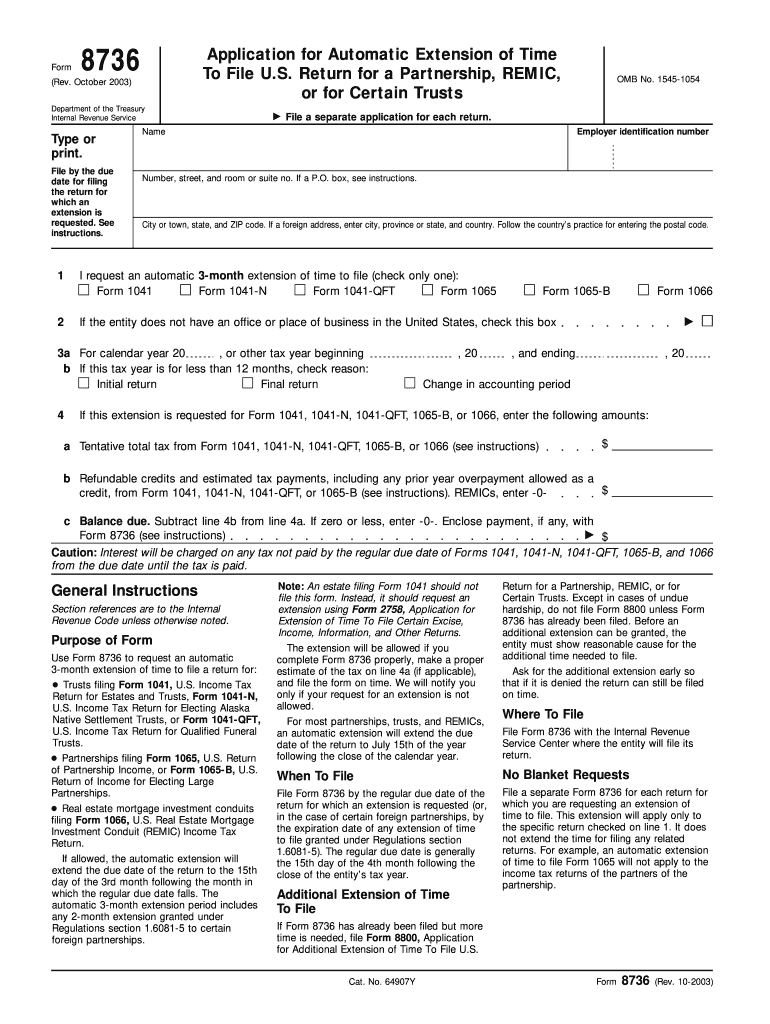
Begin by entering the entity's name and employer identification number at the top of the form. Ensure accuracy as this information is crucial for processing.
Fill in the address details, including street, city, state, and ZIP code. If applicable, follow specific instructions for foreign addresses.
Select the type of return for which you are requesting an extension by checking only one box under line 1.
Indicate the tax year for which you are applying for an extension in section 3a and check any relevant boxes regarding your tax year duration.
Complete line 4a with your estimated total tax due and line 4b with any refundable credits or payments made. Calculate balance due on line 4c if applicable.
Review all entries for accuracy before submitting. Use our platform’s features to save and share your completed form easily.
Start using our platform today to fill out IRS Form 8736 quickly and efficiently!
Irs form 8736 pdfIrs form 8736 pdf downloadIrs form 8736 instructionsIrs form 8736 downloadForm 8736 pdfCan i fax Form 7004 to the IRS7004 IRS FormIRS Form 7004 fillable PDF
Security and compliance
At DocHub, your data security is our priority. We follow HIPAA, SOC2, GDPR, and other standards, so you can work on your documents with confidence.
Trusts that file Form 1041 must use Form 8736 to apply for an extension. Where To File.File the original and one copy of this form with the Internal Revenue.Read more
This report combines the annual reports on Form 10-K for the year ended December 31, 2020 of CubeSmart (the Parent Company or. CubeSmart) and CubeSmart,Read more
Cookie consent notice
This site uses cookies to enhance site navigation and personalize your experience.
By using this site you agree to our use of cookies as described in our Privacy Notice.
You can modify your selections by visiting our Cookie and Advertising Notice.