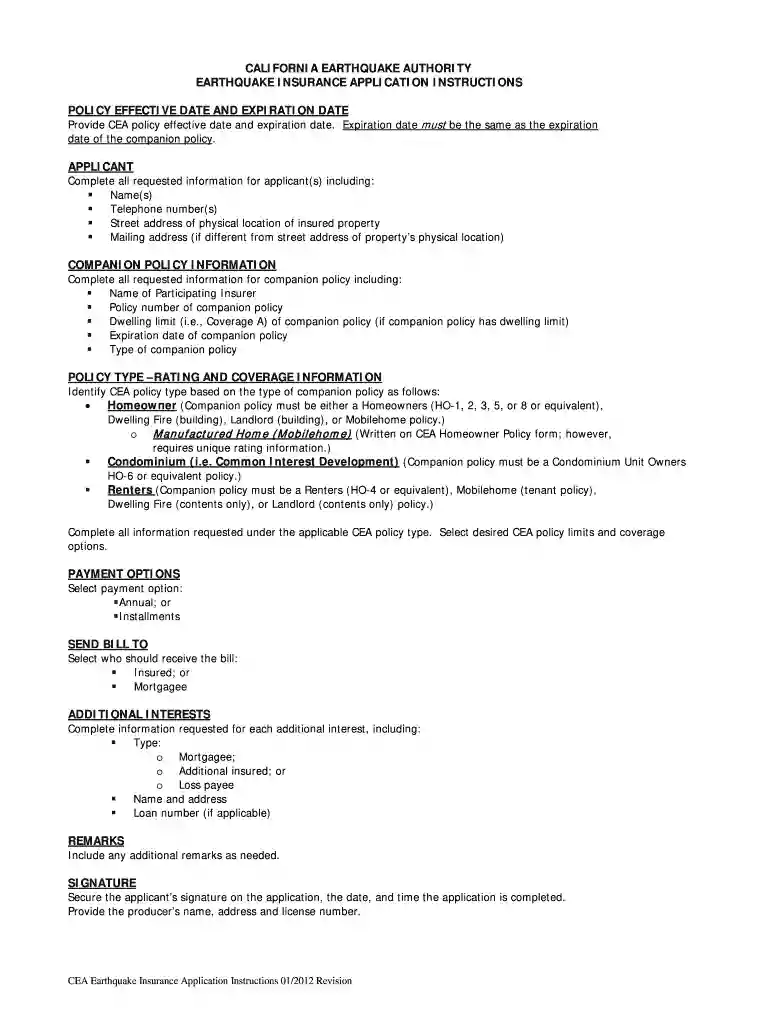
cea form Preview on Page 1

Earthquake cea application 2026

Here's how it works

  • 01. Edit your cea form online

    Type text, add images, blackout confidential details, add comments, highlights and more.

  • 02. Sign it in a few clicks

    Draw your signature, type it, upload its image, or use your mobile device as a signature pad.

  • 03. Share your form with others

    Send insurance carrier business via email, link, or fax. You can also download it, export it or print it out.

How to use or fill out earthquake cea application with our platform

Form edit decoration
9.5
Ease of Setup
DocHub User Ratings on G2
9.0
Ease of Use
DocHub User Ratings on G2
  1. Click ‘Get Form’ to open the earthquake CEA application in the editor.
  2. Begin by entering the policy effective date and expiration date. Ensure that the expiration date matches that of your companion policy.
  3. Fill in the applicant information, including names, telephone numbers, and addresses for both the physical location of the insured property and mailing address if different.
  4. Complete the companion policy information section by providing details such as the name of the participating insurer, policy number, dwelling limit, and expiration date.
  5. Select your CEA policy type based on your companion policy. Fill out all relevant fields regarding coverage limits and options.
  6. Choose your payment option: either annual or installments, and specify who should receive the bill.
  7. Provide details for any additional interests, including type, name, address, and loan number if applicable.
  8. Add any remarks necessary before securing signatures from applicants and producers along with their license numbers.

Start using our platform today to complete your earthquake CEA application easily and for free!

See more cea form versions

We've got more versions of the cea form form. Select the right cea form version from the list and start editing it straight away!

VersionsForm popularityFillable & printable
20124.9 Satisfied (468 Votes)

be ready to get more

Complete this form in 5 minutes or less

Security and compliance

At DocHub, your data security is our priority. We follow HIPAA, SOC2, GDPR, and other standards, so you can work on your documents with confidence.

insured property

California Earthquake Authority (CEA)

To receive earthquake warnings, individuals and family members can download the MyShake App and ensure phone settings are adjusted to receive emergency alerts.Read more

Learn more
PEER-CEA Project

This research study was funded by the California Earthquake Authority (CEA). This website documents the methods and findings of a multi-year, multi-Read more

Learn more
If you believe that this page should be taken down, please follow our DMCA take down process here