Complaints form 2026

Get Form
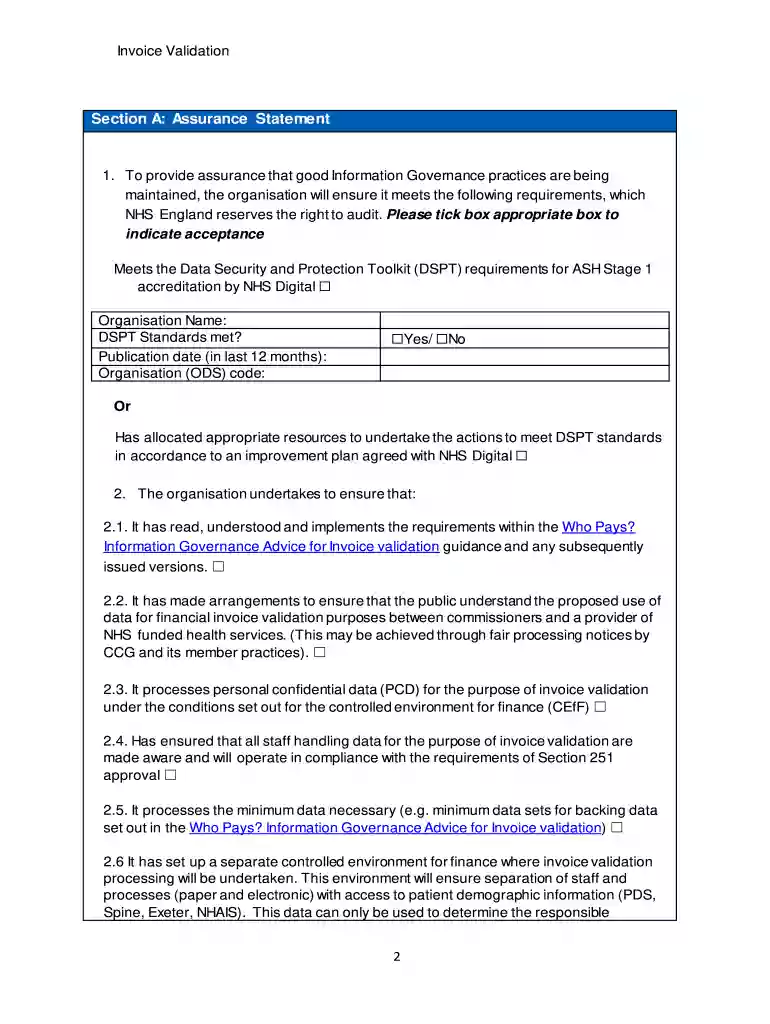
nhs complaint form pdf Preview on Page 1

Here's how it works

01. Edit your nhs complaint form pdf online
Type text, add images, blackout confidential details, add comments, highlights and more.

02. Sign it in a few clicks
Draw your signature, type it, upload its image, or use your mobile device as a signature pad.

03. Share your form with others
Send complaints form via email, link, or fax. You can also download it, export it or print it out.

How to use or fill out the complaints form with our platform

Form edit decoration
9.5
Ease of Setup
DocHub User Ratings on G2
9.0
Ease of Use
DocHub User Ratings on G2
  1. Click ‘Get Form’ to open the complaints form in the editor.
  2. Begin by filling out Section A, where you will provide your organization’s name and confirm compliance with the Data Security and Protection Toolkit requirements. Tick the appropriate box to indicate acceptance.
  3. In Section B, confirm that a data processing agreement is in place between your organization and each Clinical Commissioning Group (CCG) listed. Add additional rows as necessary.
  4. Proceed to Section C, where you will list the CCGs for which invoice validation services are being undertaken. Ensure to include their organization codes and email addresses of authorizing officers.
  5. Complete Sections D through G by providing information on any changes in circumstances, systems accessed, signatures from authorized personnel, and key contacts for CEfF queries.

Start using our platform today to easily fill out your complaints form online for free!

See more complaints form versions

We've got more versions of the complaints form form. Select the right complaints form version from the list and start editing it straight away!
Versions Form popularity Fillable & printable
2019 4.8 Satisfied (132 Votes)
be ready to get more

Complete this form in 5 minutes or less

Get form

Got questions?

We have answers to the most popular questions from our customers. If you can't find an answer to your question, please contact us.
Contact us
Information To Include in Your Letter Give the basics. Tell your story. Explain how you want to resolve the problem. Describe your next steps. Send your complaint letter. [Your Mailing Address] [Your City, State, Zip Code] [Your email address]
Notify the Better Business Bureau (BBB) in your area about your problem. The BBB tries to resolve complaints against companies. Report scams and suspicious communications to the Federal Trade Commission. Contact econsumer.gov if you are complaining about items you bought online from a seller outside the U.S.
The ideal structure to use is one that explains: the subject of your complaint. your original expectation about the subject. what went wrong. details of any attempts by the other party to put right the problem, and why they did not work. why the fault or error or action affects you so greatly. what compensation you seek.
The specific facts and any records about the incident(s), including the name and contact information of the person or entity you believe harmed you (if known); Copies of any documents or other evidence related to your complaint; and. The names and contact information of any witnesses (if known)
To write a complaint letter, you can start with the senders address followed by the date, the receivers address, the subject, salutation, body of the letter, complimentary closing, signature and name in block letters.

Security and compliance

At DocHub, your data security is our priority. We follow HIPAA, SOC2, GDPR, and other standards, so you can work on your documents with confidence.

Learn more
ccpa2
pci-dss
gdpr-compliance
hipaa
soc-compliance
be ready to get more

Complete this form in 5 minutes or less

Get form

People also ask

Short Answer: Yes, if the business has responded to BBB complaints in the past, it is worth filing a complaint with the BBB since it is free and relatively quick. But note, the BBB cannot force the business to come to an agreement with you since the BBB is not a government agency.

nhs complaints form