Michigan form 165 2026

Get Form
5080 form 2022 Preview on Page 1

Here's how it works

01. Edit your 5080 form 2022 online
Type text, add images, blackout confidential details, add comments, highlights and more.

02. Sign it in a few clicks
Draw your signature, type it, upload its image, or use your mobile device as a signature pad.

03. Share your form with others
Send form 165 via email, link, or fax. You can also download it, export it or print it out.

How to use or fill out Michigan Form 165 with DocHub

Form edit decoration
9.5
Ease of Setup
DocHub User Ratings on G2
9.0
Ease of Use
DocHub User Ratings on G2
  1. Click ‘Get Form’ to open it in the editor.
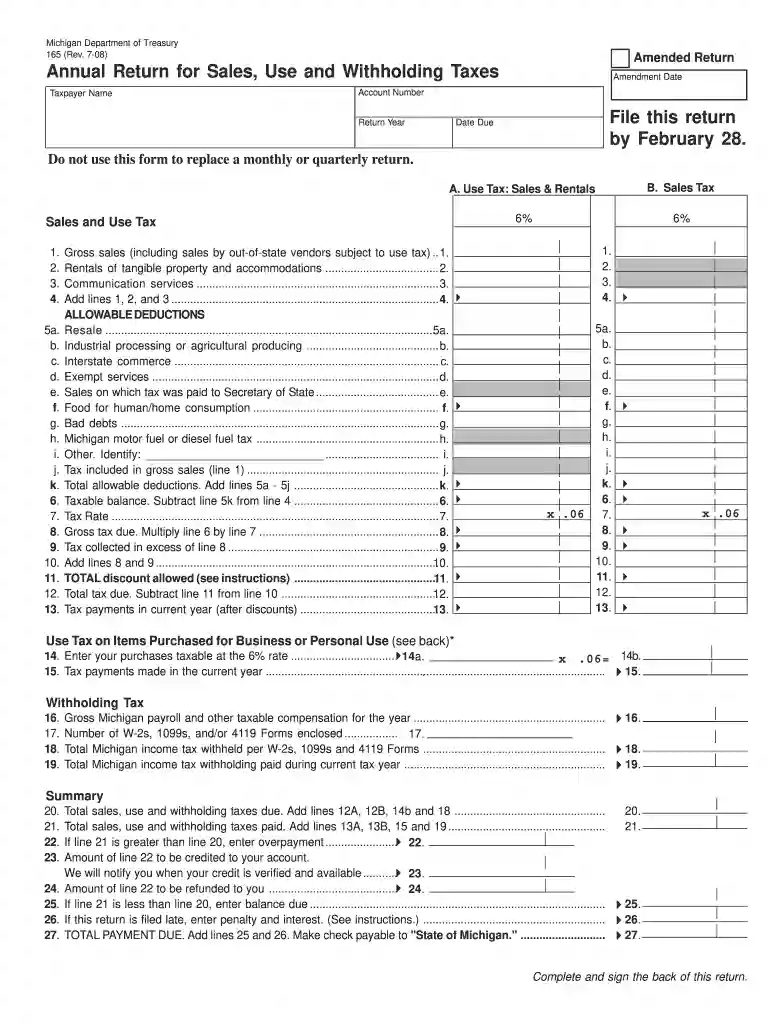
  2. Begin by entering your Taxpayer Name, Account Number, and Return Year in the designated fields. Ensure that all information is accurate to avoid processing delays.
  3. In Section A, provide details for Use Tax, Sales Tax, and Rentals. Fill in the gross sales figures and any applicable deductions as outlined in the form.
  4. Calculate your taxable balance by subtracting total allowable deductions from your gross sales. Enter this amount in the specified field.
  5. Complete the Withholding Tax section by entering your gross Michigan payroll and total income tax withheld. Make sure to include all necessary W-2s or 1099s.
  6. Review the Summary section carefully. Add up all relevant lines to determine total taxes due and any overpayments or balances owed.
  7. Finally, sign and date the form at the bottom. Ensure that you have filled out all required fields before submission.

Start using our platform today to fill out Michigan Form 165 online for free!

be ready to get more

Complete this form in 5 minutes or less

Get form

Got questions?

We have answers to the most popular questions from our customers. If you can't find an answer to your question, please contact us.
Contact us
Lowering MI Costs Plan Although subject to a temporary 4-year phase-in period beginning tax year 2023, this new law essentially restores the pre-2012 retirement and pension benefits subtraction for most taxpayers in Michigan beginning in 2026.
Exemption from withholding An employee can also use Form W-4 to tell you not to withhold any federal income tax. To qualify for this exempt status, the employee must have had no tax liability for the previous year and must expect to have no tax liability for the current year.
Every employer in this state required under the Internal Revenue Code (IRC) to withhold federal income tax on compensation of an individual must also withhold Michigan income tax.
Who Must Withhold? Every employer in this state required under the Internal Revenue Code (IRC) to withhold federal income tax on compensation of an individual must also withhold Michigan income tax.
Line 8b: Reasons wages might be exempt from withholding include: You are a nonresident spouse of military personnel stationed in Michigan. You are a resident of one of the following reciprocal states while working in Michigan: Illinois, Indiana, Kentucky, Minnesota, Ohio, or Wisconsin.

Security and compliance

At DocHub, your data security is our priority. We follow HIPAA, SOC2, GDPR, and other standards, so you can work on your documents with confidence.

Learn more
ccpa2
pci-dss
gdpr-compliance
hipaa
soc-compliance
be ready to get more

Complete this form in 5 minutes or less

Get form

People also ask

Are pensions or retirement income taxed in Michigan? Yes, but its complicated. In tax year 2023, Michigan began a four-year phase-out of its retirement income tax. By the 2026 tax year, pensions and income from 401(k) and IRA withdrawals will be fully exempt from state income tax.
Michigan has a flat income tax rate of 4.25%, meaning all residents pay the same amount regardless of their income levels.
Tax Clearance Requests File Form 5156, Request for Tax Clearance Certificate or Tax Status Letter if you: Want to know your current total tax liability with the Michigan Department of Treasury. Are selling all or part of your business.

michigan form 165