Claims easy form 2026

Get Form
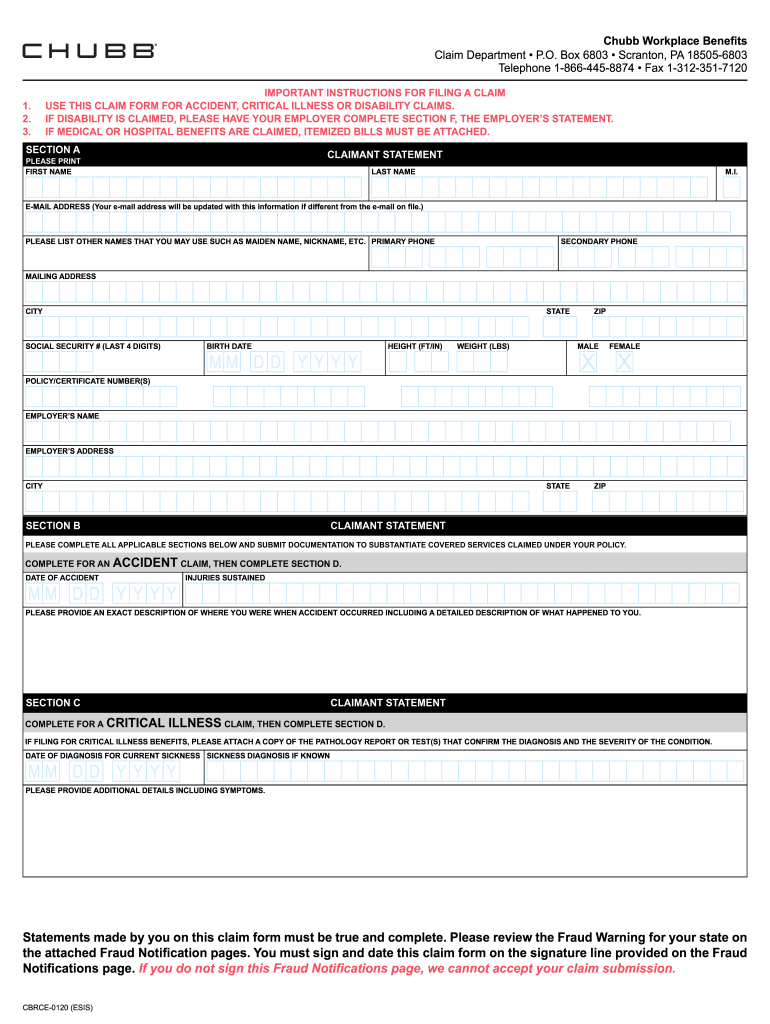
claims easy form Preview on Page 1

Here's how it works

01. Edit your claims easy form online
Type text, add images, blackout confidential details, add comments, highlights and more.
02. Sign it in a few clicks
Draw your signature, type it, upload its image, or use your mobile device as a signature pad.
03. Share your form with others
Send claims easy form via email, link, or fax. You can also download it, export it or print it out.

How to use or fill out claims easy form with our platform

Form edit decoration
9.5
Ease of Setup
DocHub User Ratings on G2
9.0
Ease of Use
DocHub User Ratings on G2
  1. Click 'Get Form' to open the claims easy form in the editor.
  2. Begin by completing Section A, where you will provide your full name, mailing address, and policy numbers. This information is crucial for processing your claim efficiently.
  3. Depending on your claim type, fill out the relevant sections: For Accident Claims, complete Sections A, B, and D; for Critical Illness Claims, complete Sections A, C, and D; and for Disability Claims, complete Sections A, D, and E.
  4. Ensure that your physician fills out Section G if required. This step is essential as incomplete information may delay your claim.
  5. Review the Fraud Notification section carefully before signing and dating the claim form at the designated line.
  6. Finally, submit your completed form along with any necessary documentation to Chubb Workplace Benefits at the provided address.

Start using our platform today to streamline your claims process effortlessly!

See more claims easy form versions

We've got more versions of the claims easy form form. Select the right claims easy form version from the list and start editing it straight away!
Versions Form popularity Fillable & printable
2020 4.8 Satisfied (111 Votes)
be ready to get more

Complete this form in 5 minutes or less

Get form

Got questions?

We have answers to the most popular questions from our customers. If you can't find an answer to your question, please contact us.
Contact us
The most common electronic form is the 837 Professional (837P) claim form. This follows the ANSI ASC X12N standard for healthcare transactions, just like its cousin, the 837I institutional form. It allows for efficient, standardized electronic submission of claims data. The old school paper claim form is the CMS-1500.
Types of Insurance Claims Burglary and Theft. Burglary and theft are the most common commercial insurance claims filed by businesses. Water and Freezing Damage. Wind and Hail Damage. Fire. Slips and Falls by Customers. Customer Injury and Property Damage. Product Liability. Struck by an Object.
💥 #2 Easiest Things to Claim for VA Disability: Musculoskeletal Conditions (Strains, Sprains, Joints, Painful Motion, Limitation of Flexion) Based on the latest 2018-2019 VA data, Musculoskeletal conditions were in the Top 5 most compensated claims for all Veterans, across all demographics.
UB-40 and CMS-1500 are the two most common claim forms for submitting to insurance companies.
A claim form is a formal written request to the government, an insurance company, or another organization for money that you think you are entitled to ing to their rules.

Security and compliance

At DocHub, your data security is our priority. We follow HIPAA, SOC2, GDPR, and other standards, so you can work on your documents with confidence.

Learn more
ccpa2
pci-dss
gdpr-compliance
hipaa
soc-compliance
be ready to get more

Complete this form in 5 minutes or less

Get form

People also ask

When a physician has a private practice but performs services at an institutional facility such as a hospital or outpatient facility, the CMS-1500 form would be used to bill for their services. The UB-04 (CMS-1450) form is the claim form for institutional facilities such as hospitals or outpatient facilities.

Related links