




Here's how it works

01. Edit your credit bid online
Type text, add images, blackout confidential details, add comments, highlights and more.

02. Sign it in a few clicks
Draw your signature, type it, upload its image, or use your mobile device as a signature pad.

03. Share your form with others
Send stihl bid assist via email, link, or fax. You can also download it, export it or print it out.
How to use or fill out account form bid with our platform

- Click ‘Get Form’ to open the account form bid in the editor.
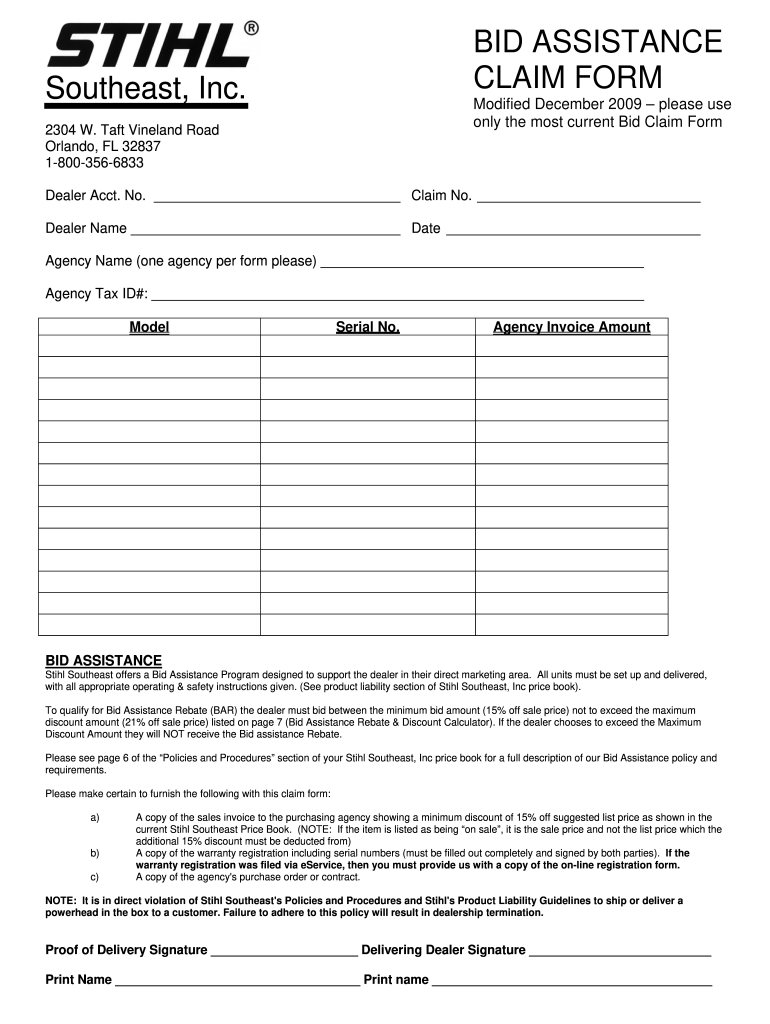
- Begin by entering your Dealer Account Number and Claim Number in the designated fields at the top of the form.
- Fill in your Dealer Name and Date, ensuring accuracy for processing.
- Next, provide the Agency Name, making sure to use one agency per form as specified.
- Input the Agency Tax ID# in the appropriate field to comply with requirements.
- Complete the Model and Serial No. sections with precise information about the product being claimed.
- Enter the Agency Invoice Amount, ensuring it reflects a minimum discount of 15% off the sale price.
- Attach necessary documents such as sales invoices, warranty registrations, and purchase orders using our platform’s upload feature.
Start filling out your account form bid today for free and streamline your claims process!
Fill out account form bid online
It's free
It's free
Security and compliance
At DocHub, your data security is our priority. We follow HIPAA, SOC2, GDPR, and other standards, so you can work on your documents with confidence.
Learn more




