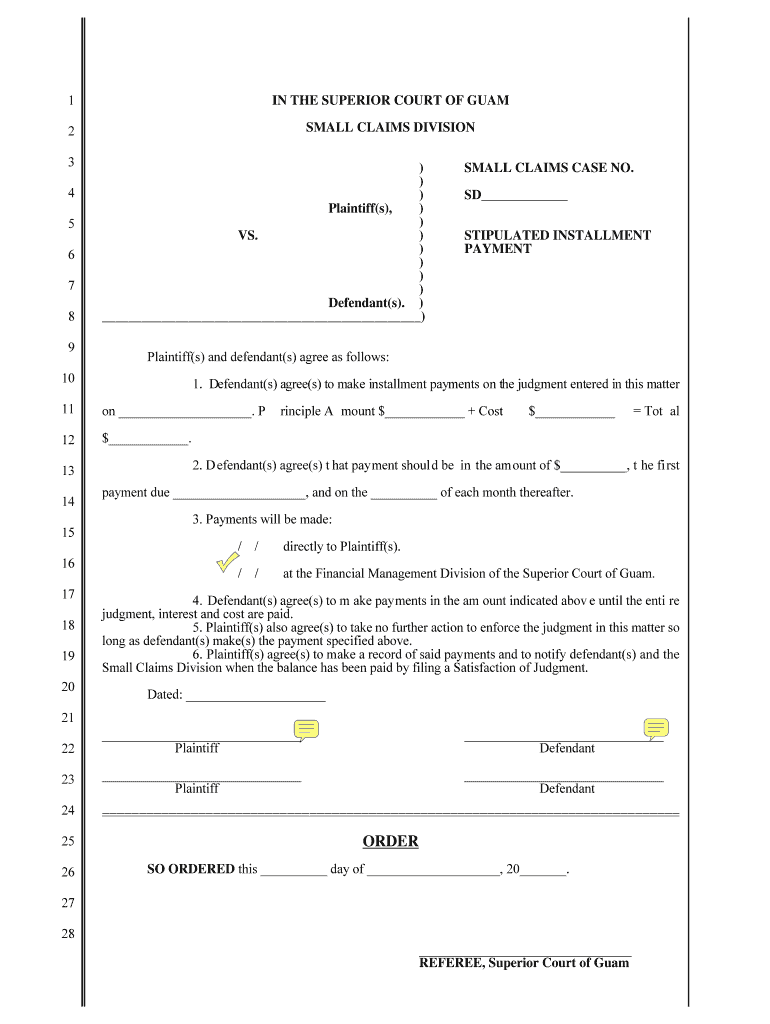
Small Claims Court - Stipulated Installment Payment Stipulated Installment Payment - guamselfhelp 2026

Get Form
Small Claims Court - Stipulated Installment Payment Stipulated Installment Payment - guamselfhelp Preview on Page 1

Here's how it works

01. Edit your form online
Type text, add images, blackout confidential details, add comments, highlights and more.
02. Sign it in a few clicks
Draw your signature, type it, upload its image, or use your mobile device as a signature pad.
03. Share your form with others
Send it via email, link, or fax. You can also download it, export it or print it out.

How to use or fill out Small Claims Court - Stipulated Installment Payment with our platform

Form edit decoration
9.5
Ease of Setup
DocHub User Ratings on G2
9.0
Ease of Use
DocHub User Ratings on G2
  1. Click ‘Get Form’ to open it in the editor.
  2. Begin by entering the case number at the top of the form. This is essential for identifying your specific case within the Small Claims Division.
  3. In section 1, specify the total principal amount agreed upon for payment. Ensure this reflects any prior agreements made between plaintiff(s) and defendant(s).
  4. For section 2, indicate the amount of each installment payment. Clearly state when the first payment is due and outline subsequent monthly payment dates.
  5. In section 3, confirm that payments will be made directly to the plaintiff(s) as per your agreement. This ensures clarity on where funds are directed.
  6. Review sections 4 through 6 carefully, ensuring all parties understand their obligations regarding payments and record-keeping.
  7. Finally, have both parties sign and date the document at the bottom to finalize your agreement.

Start using our platform today to streamline your document editing and signing process for free!

be ready to get more

Complete this form in 5 minutes or less

Get form

Got questions?

We have answers to the most popular questions from our customers. If you can't find an answer to your question, please contact us.
Contact us

Yes, and it’s really straightforward! DocHub is a web-based PDF editor with advanced document management functions that allow you rapidly modify your paperwork, fill out blank fields and add new ones for others to fill out, and create electronic signatures in several ways. Import your Small Claims Court - Stipulated Installment Payment Stipulated Installment Payment - guamselfhelp, provide information as required, and select how you want to eSign your template - by typing your name, drawing your signature, uploading its picture, or using a QR code.

If you edit your Small Claims Court - Stipulated Installment Payment Stipulated Installment Payment - guamselfhelp with DocHub, you simply will not need to look for other software or services to eSign it. An electronic signature is part of DocHub’s substantial editing toolset, which enables you to apply changes in your form without switching between platforms. Just complete your form, double-check the correctness of the information and put your electronic signature at the end to make it submission-ready within minutes.

Security and compliance

At DocHub, your data security is our priority. We follow HIPAA, SOC2, GDPR, and other standards, so you can work on your documents with confidence.

Learn more
ccpa2
pci-dss
gdpr-compliance
hipaa
soc-compliance