Type text, add images, blackout confidential details, add comments, highlights and more.
02. Sign it in a few clicks
Draw your signature, type it, upload its image, or use your mobile device as a signature pad.
03. Share your form with others
Send hpl1 form via email, link, or fax. You can also download it, export it or print it out.
How to use or fill out income tax with our platform
Ease of Setup
DocHub User Ratings on G2
Ease of Use
DocHub User Ratings on G2
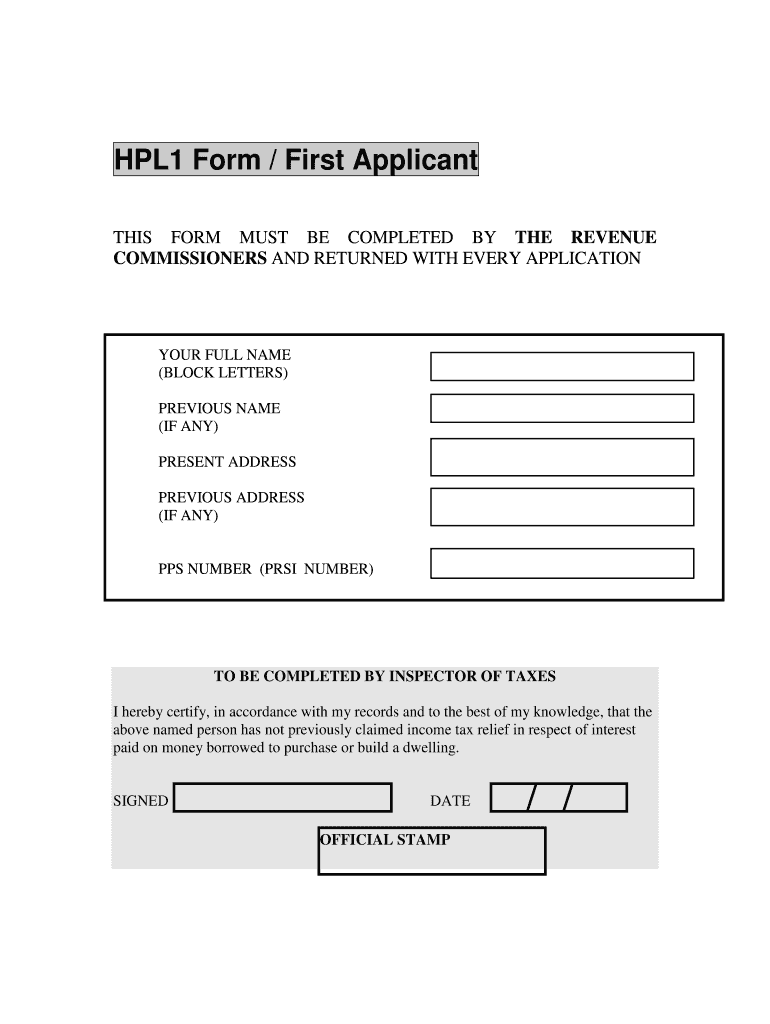
Click ‘Get Form’ to open the income tax form in the editor.
Begin by entering your full name in block letters. If you have a previous name, include it in the designated field.
Fill in your present address and any previous address if applicable. Ensure all addresses are accurate for proper processing.
Input your PPS number (PRSI number) in the specified field. This is crucial for identification purposes.
If you are a second applicant, repeat steps 2 to 4 for the second applicant's details.
The inspector of taxes will complete their section, certifying that no previous claims for income tax relief have been made. Leave this section blank for now.
Start using our platform today to fill out your income tax forms easily and for free!
Federal income tax rate calculatorEarned Income Tax2026 tax bracketsEarned income tax credit tableFederal income tax bracketsEarned income tax credit limitEarned Income Tax Credit FormEarned income Tax Credit meaning
Security and compliance
At DocHub, your data security is our priority. We follow HIPAA, SOC2, GDPR, and other standards, so you can work on your documents with confidence.
Feb 20, 2026 You pay tax as a percentage of your income in layers called tax brackets. As your income goes up, the tax rate on the next layer of income is higher.Read more
Application for Extension of Time To File U.S. Income Tax
You can get an extension of time to file your tax return by filing Form 2350 electronically. You will receive an electronic acknowledgment once you complete theRead more
Cookie consent notice
This site uses cookies to enhance site navigation and personalize your experience.
By using this site you agree to our use of cookies as described in our Privacy Notice.
You can modify your selections by visiting our Cookie and Advertising Notice.