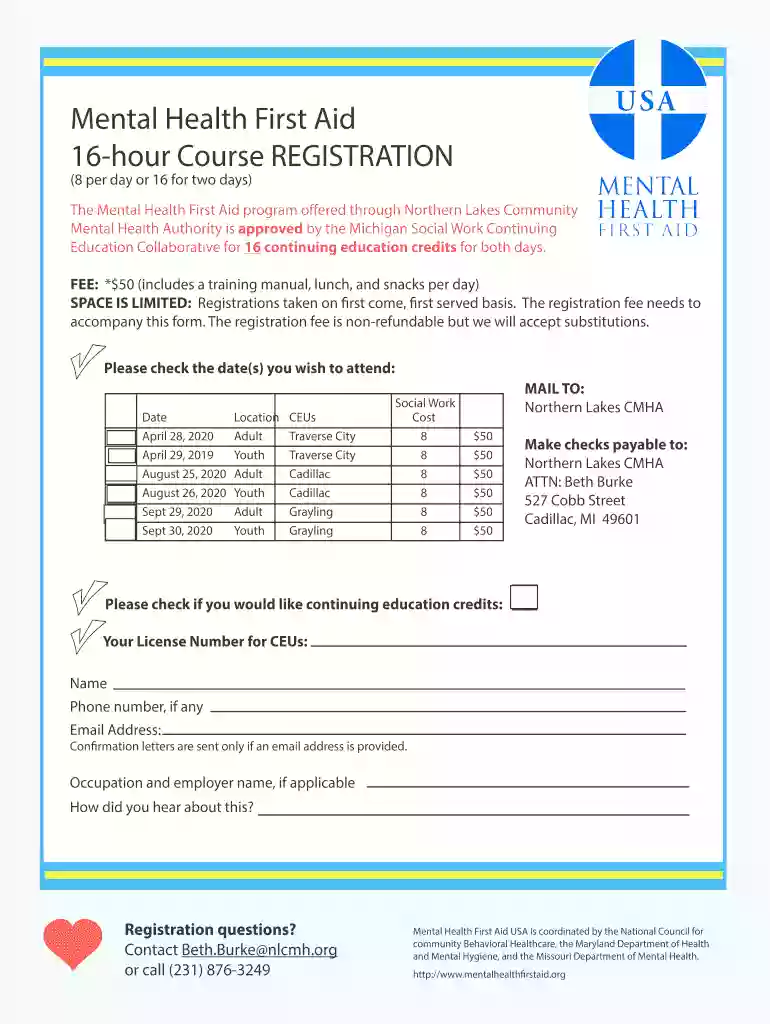
Mental health first aid - Northern Lakes Community Mental 2026

Get Form
mental health first aid - Northern Lakes Community Mental Preview on Page 1

Here's how it works

01. Edit your form online
Type text, add images, blackout confidential details, add comments, highlights and more.

02. Sign it in a few clicks
Draw your signature, type it, upload its image, or use your mobile device as a signature pad.

03. Share your form with others
Send it via email, link, or fax. You can also download it, export it or print it out.

How to use or fill out mental health first aid - Northern Lakes Community Mental with our platform

Form edit decoration
9.5
Ease of Setup
DocHub User Ratings on G2
9.0
Ease of Use
DocHub User Ratings on G2
  1. Click ‘Get Form’ to open the Mental Health First Aid registration form in the editor.
  2. Begin by selecting the date(s) you wish to attend from the options provided. Ensure you check both Adult and Youth sessions as applicable.
  3. Fill in your personal details, including your name, phone number, and email address. Providing an email is essential for receiving confirmation letters.
  4. If you are interested in continuing education credits, please enter your license number and check the appropriate box.
  5. Indicate how you heard about the course in the designated field to help improve outreach efforts.
  6. Review all entered information for accuracy before submitting. Once confirmed, print or save your completed form directly from our platform.

Start filling out your Mental Health First Aid registration form today for free and empower yourself to make a difference!

See more mental health first aid - Northern Lakes Community Mental versions

We've got more versions of the mental health first aid - Northern Lakes Community Mental form. Select the right mental health first aid - Northern Lakes Community Mental version from the list and start editing it straight away!
Versions Form popularity Fillable & printable
2020 4.8 Satisfied (40 Votes)
2019 4.2 Satisfied (51 Votes)
be ready to get more

Complete this form in 5 minutes or less

Get form

Got questions?

We have answers to the most popular questions from our customers. If you can't find an answer to your question, please contact us.
Contact us

With DocHub, you can easily sign your mental health first aid - Northern Lakes Community Mental or any other document on iOS, even without installing extra applications. You can access your DocHub account from any internet-connected browser and complete and sign your form in any preferred method with just a couple of clicks.

Document editing with DocHub is equally convenient on desktop and mobile devices. You only need an internet browser to revise your mental health first aid - Northern Lakes Community Mental on Android. Open our site and sign in to access the tools you need. Add your file and introduce your intended changes. After that, you can keep your form in your file storage or send it out immediately.

The steps are outlined below, and these actions may be used in any order. Step 1: Approach, assess for risk of suicide or harm, and assist. Step 2: Listen non-judgmentally. Step 3: Give support and information. Step 4: Encourage appropriate professional help. Step 5: Encourage self-help and other support strategies.
The core difference lies in their purpose and timing. PFA is designed for immediate, short-term crisis response. It focuses on helping people feel safe, calm, and supported right after a traumatic event. MHFA, in contrast, is meant for situations where someone is showing signs of a mental health issue.
The course covers recognising signs of mental ill-health, active listening, safeguarding, crisis intervention, signposting to professional help, and maintaining your own wellbeing.

Security and compliance

At DocHub, your data security is our priority. We follow HIPAA, SOC2, GDPR, and other standards, so you can work on your documents with confidence.

Learn more
ccpa2
pci-dss
gdpr-compliance
hipaa
soc-compliance
be ready to get more

Complete this form in 5 minutes or less

Get form