




Here's how it works



How to use or fill out 204 Thomas Boyd Hall with our platform

- Click ‘Get Form’ to open the 204 Thomas Boyd Hall document in the editor.
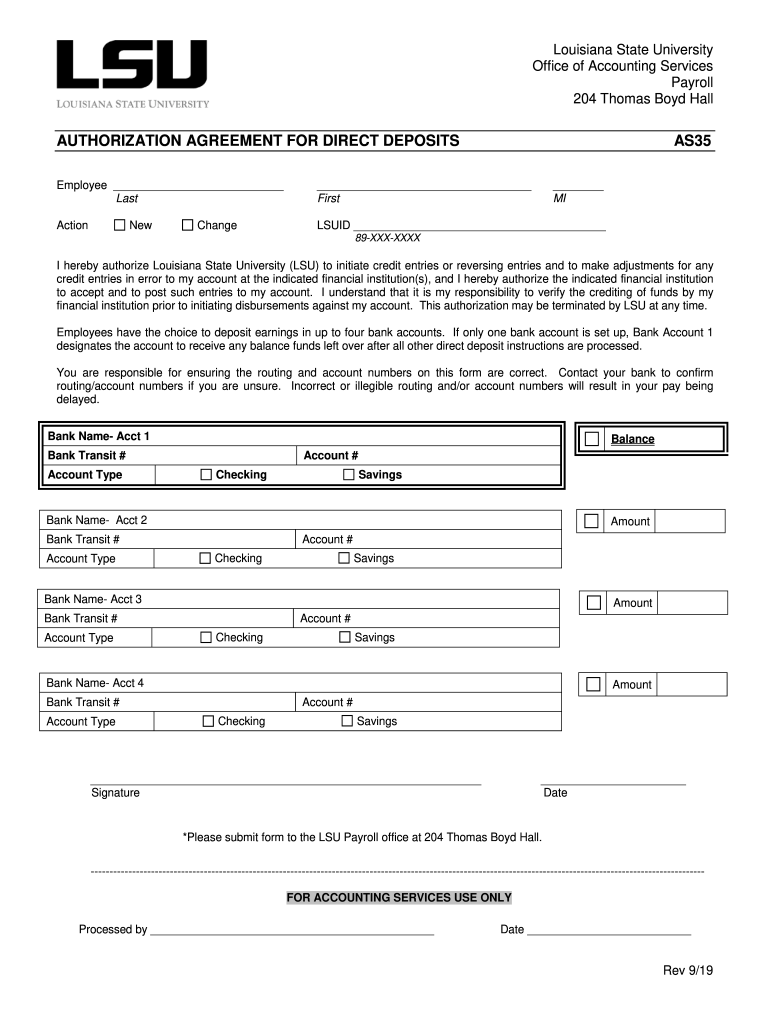
- Begin by entering your last name, first name, and middle initial in the designated fields. Ensure accuracy as this information is crucial for identification.
- Input your LSUID number and select whether this is a new authorization or a change to an existing one.
- Fill in your Social Security Number (SSN) carefully, ensuring that all digits are correct to avoid any processing delays.
- For each bank account you wish to set up, provide the bank name, account type (checking or savings), routing number, and account number. You can add up to four accounts; ensure that amounts are specified where applicable.
- Review all entered information for accuracy. Incorrect details may delay your pay. Once confirmed, sign and date the form at the bottom.
- Submit the completed form to the LSU Payroll office at 204 Thomas Boyd Hall as instructed.
Start using our platform today for free to streamline your document editing and submission process!
It's free
See more 204 Thomas Boyd Hall versions
| Versions | Form popularity | Fillable & printable |
|---|---|---|
| 2019 | 4.8 Satisfied (183 Votes) |
Got questions?
Can I sign my 204 Thomas Boyd Hall electronically?
As outlined by eSignature regulations, forms signed electronically have the same validity as those approved with pen and paper. You can eSign almost any business and private documentation. Four types of paperwork still require wet signatures only - wills and testamentary trusts, court orders and other court papers, state statutes governing divorce, adoption, or other family law, and notice of cancellation of utility services. If you adhere to the rules and utilize a trustworthy and compliant software solution, like DocHub, you can eSign your 204 Thomas Boyd Hall without printing it.
How do you edit 204 Thomas Boyd Hall on iOS?
You can easily edit and complete your 204 Thomas Boyd Hall on any iOS gadget. Open an internet browser of your choice, go to the DocHub site, authorize or create a new account, upload your file for editing, and make your required adjustments. Our service is mobile-friendly, so using its functions on your phone will be a no-brainer, even on the first try.
Who is the registrar at LSUS?
What is the phone number for LSUS Accounting Services?
Is LSUS the same as LSU?
Security and compliance
At DocHub, your data security is our priority. We follow HIPAA, SOC2, GDPR, and other standards, so you can work on your documents with confidence.
Learn more




