Claim FormsAmerican Fidelity 2026

Get Form
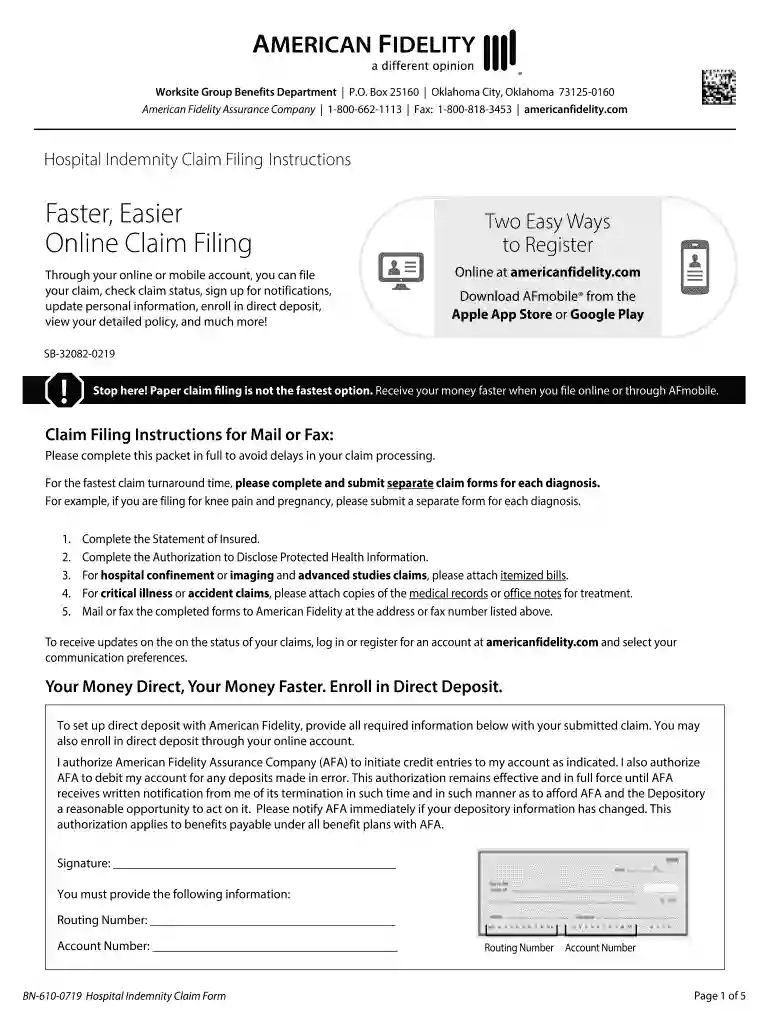
american fidelity hospital indemnity claim Preview on Page 1

Here's how it works

01. Edit your american fidelity hospital indemnity claim online
Type text, add images, blackout confidential details, add comments, highlights and more.

02. Sign it in a few clicks
Draw your signature, type it, upload its image, or use your mobile device as a signature pad.

03. Share your form with others
Send it via email, link, or fax. You can also download it, export it or print it out.

How to use or fill out Claim FormsAmerican Fidelity with our platform

Form edit decoration
9.5
Ease of Setup
DocHub User Ratings on G2
9.0
Ease of Use
DocHub User Ratings on G2
  1. Click ‘Get Form’ to open the Claim FormsAmerican Fidelity in the editor.
  2. Begin by completing the 'Statement of Insured' section. Fill in your name, Social Security number, date of birth, and contact information accurately.
  3. In Section 1, provide details about any hospital confinement. Include dates of admission and discharge, and attach itemized bills if applicable.
  4. For accident claims in Section 2, specify the date of the accident and describe how it occurred. Attach relevant medical records for treatment.
  5. In Section 3, for critical illness claims, ensure you attach all necessary medical records from your initial treatment up to the present.
  6. Complete the 'Authorization to Disclose Information' section at the end of the form to allow American Fidelity to process your claim effectively.
  7. Review all entries for accuracy before submitting. Once completed, you can easily download or send your form directly through our platform.

Start filling out your Claim FormsAmerican Fidelity today for a seamless experience!

See more Claim FormsAmerican Fidelity versions

We've got more versions of the Claim FormsAmerican Fidelity form. Select the right Claim FormsAmerican Fidelity version from the list and start editing it straight away!
Versions Form popularity Fillable & printable
2019 4.8 Satisfied (90 Votes)
be ready to get more

Complete this form in 5 minutes or less

Get form

Got questions?

We have answers to the most popular questions from our customers. If you can't find an answer to your question, please contact us.
Contact us
0:06 0:50 Goes with many accident plans youre covered both on. And off the job. Plus your plan could cover anMoreGoes with many accident plans youre covered both on. And off the job. Plus your plan could cover an annual screening benefit for completing routine checkups.
0:04 1:00 And log in then select the option to manage your reimbursement. Account next hover over the claimsMoreAnd log in then select the option to manage your reimbursement. Account next hover over the claims menu. And click add claim follow the prompts to enter your claim.
Weve got the support you need right now. Follow this simple process to file a claim for your American Fidelity benefits. Claims are usually processed within seven business days once all required documentation is received.
The fastest way to file a reimbursement claim is through your online account, or on our mobile app, AFmobile. Download and complete the appropriate claim form from our claim form page. Please note, paper claim filing is not the fastest option. File a claim online or through AFmobile to get your money faster.

Security and compliance

At DocHub, your data security is our priority. We follow HIPAA, SOC2, GDPR, and other standards, so you can work on your documents with confidence.

Learn more
ccpa2
pci-dss
gdpr-compliance
hipaa
soc-compliance
be ready to get more

Complete this form in 5 minutes or less

Get form