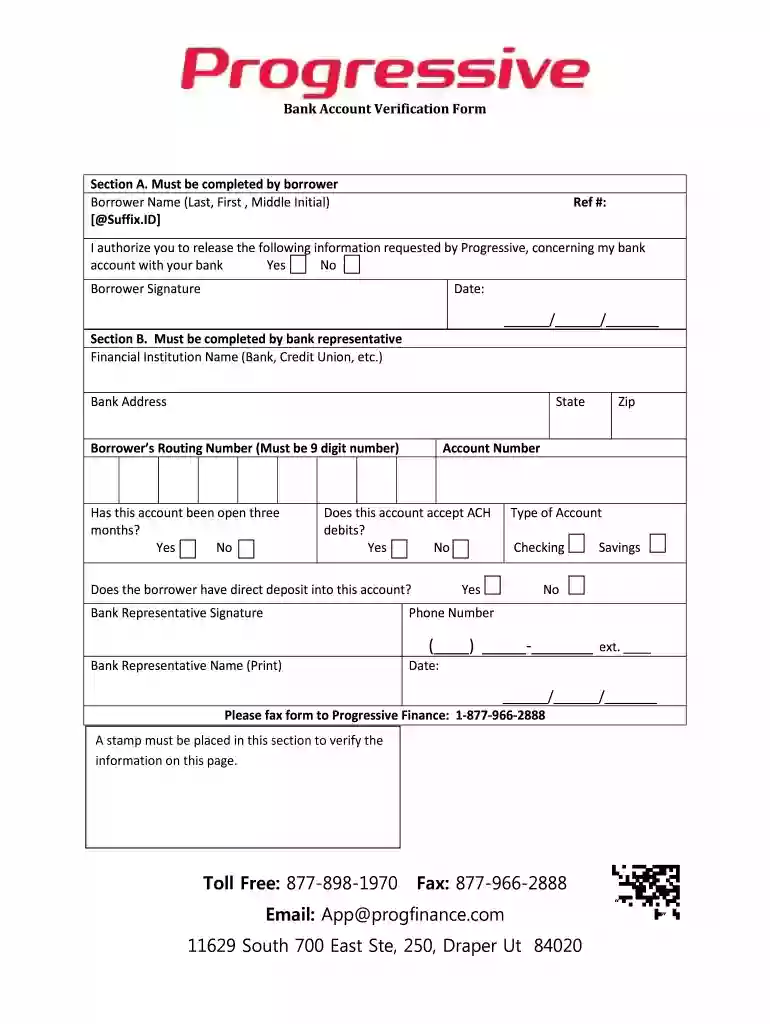
progressive leasing bank account verification form Preview on Page 1

Progressive leasing bank account verification form 2026

Here's how it works

  • 01. Edit your progressive leasing bank account verification form online

    Type text, add images, blackout confidential details, add comments, highlights and more.

  • 02. Sign it in a few clicks

    Draw your signature, type it, upload its image, or use your mobile device as a signature pad.

  • 03. Share your form with others

    Send progressive leasing bank verification form via email, link, or fax. You can also download it, export it or print it out.

How to use or fill out progressive leasing bank account verification form with our platform

Form edit decoration
9.5
Ease of Setup
DocHub User Ratings on G2
9.0
Ease of Use
DocHub User Ratings on G2
  1. Click ‘Get Form’ to open the progressive leasing bank account verification form in the editor.
  2. In Section A, enter your name in the format of Last, First, and Middle Initial. Fill in your reference number if applicable.
  3. Authorize the release of your bank information by selecting 'Yes' or 'No'. Sign and date the form at the bottom of Section A.
  4. Move to Section B, where a bank representative will complete their section. They should provide the financial institution's name and address, including state and zip code.
  5. The bank representative must enter your routing number (a 9-digit number), account number, and type of account (checking or savings).
  6. Confirm whether the account has been open for three months and if it accepts ACH debits. Indicate if there is direct deposit into this account.
  7. The bank representative should sign, print their name, provide their phone number, and date the form before submission.
  8. Finally, fax the completed form to Progressive Finance at 1-877-966-2888 as instructed.

Start using our platform today for free to streamline your document editing and signing process!

be ready to get more

Complete this form in 5 minutes or less

Security and compliance

At DocHub, your data security is our priority. We follow HIPAA, SOC2, GDPR, and other standards, so you can work on your documents with confidence.

bank signature verification form

Annual Report

Dec 31, 2019 We sometimes use information derived from consolidated financial data but not presented in our financial statements prepared in accordanceRead more

Learn more
If you believe that this page should be taken down, please follow our DMCA take down process here