




Here's how it works

01. Edit your tax clearance online
Type text, add images, blackout confidential details, add comments, highlights and more.

02. Sign it in a few clicks
Draw your signature, type it, upload its image, or use your mobile device as a signature pad.

03. Share your form with others
Send tax clearance certificate via email, link, or fax. You can also download it, export it or print it out.
How to use or fill out income tax clearance form with our platform

- Click ‘Get Form’ to open the income tax clearance form in the editor.
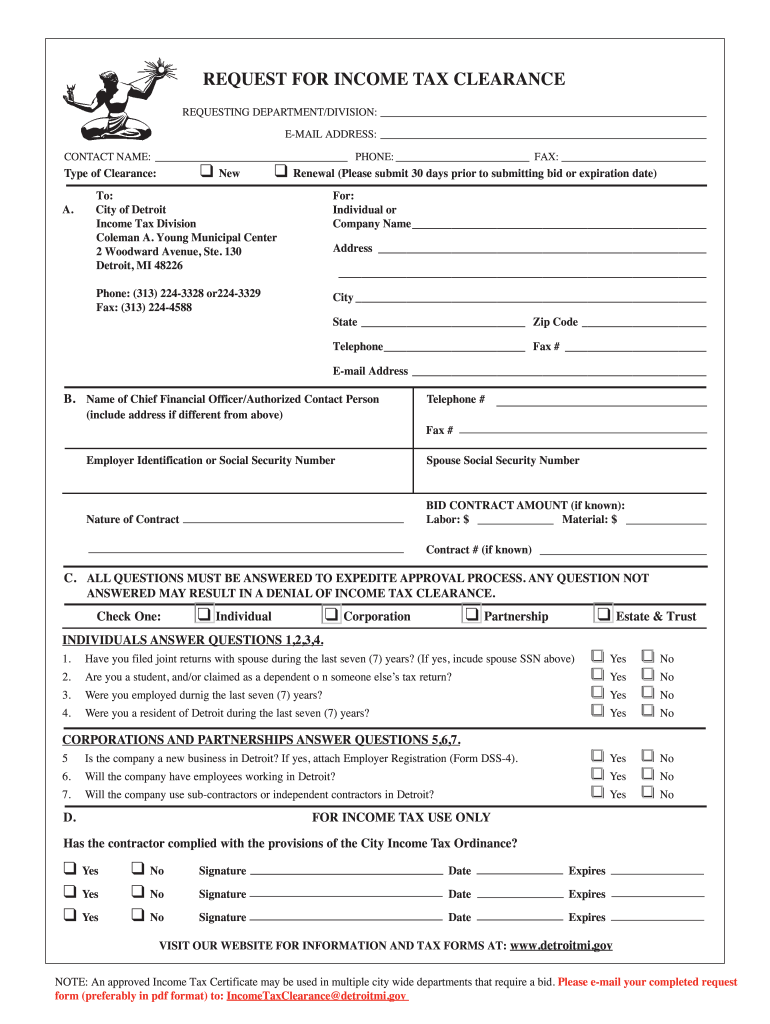
- Begin by filling in the 'Requesting Department/Division' and your email address. Ensure that you provide a contact name along with a phone number and fax number for any follow-up.
- Select the type of clearance you are requesting: either 'New' or 'Renewal'. Remember, if renewing, submit this request at least 30 days before your bid submission or expiration date.
- Provide details about the individual or company requesting the clearance, including name, address, and contact information. This section is crucial for identification purposes.
- Answer all questions in Section C thoroughly. Each question must be addressed to expedite the approval process. Missing answers may lead to denial of your request.
- For businesses, ensure you include information about your Chief Financial Officer and any relevant contract details. This includes employer identification numbers and nature of contracts.
- Once completed, review all entries for accuracy before submitting your form via email as a PDF attachment to IncomeTaxClearance@detroitmi.gov.
Start using our platform today to streamline your income tax clearance form submission!
Fill out income tax clearance form online
It's free
Security and compliance
At DocHub, your data security is our priority. We follow HIPAA, SOC2, GDPR, and other standards, so you can work on your documents with confidence.
Learn more


