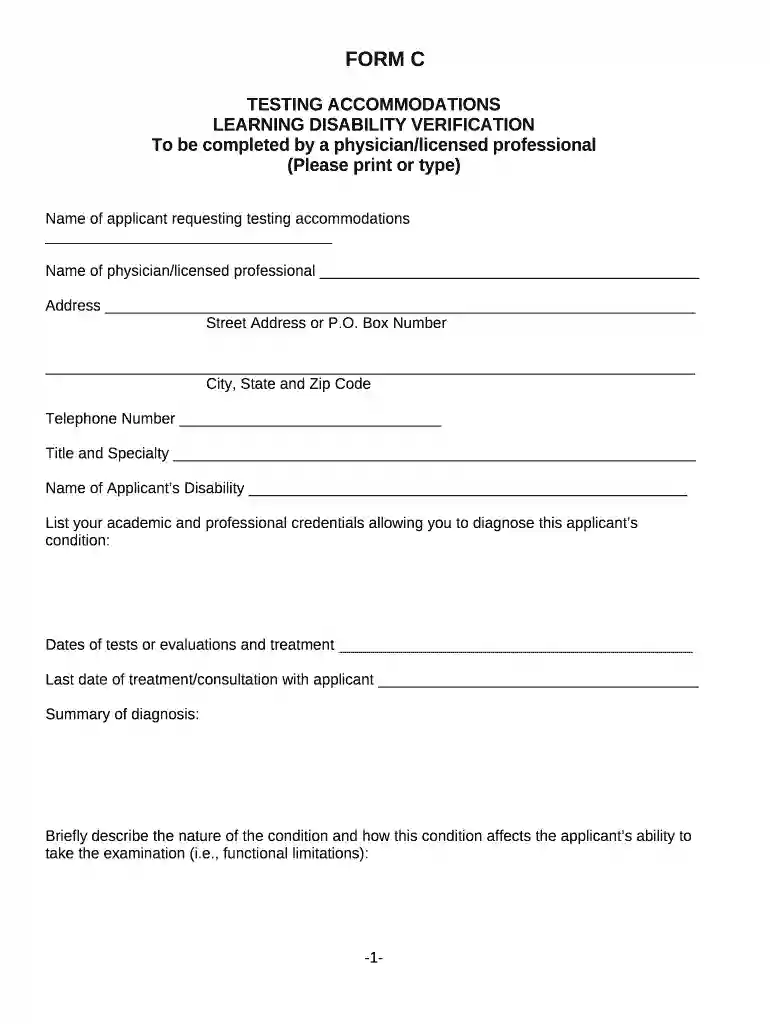
LEARNING DISABILITY VERIFICATION Preview on Page 1

LEARNING DISABILITY VERIFICATION 2026

Here's how it works

  • 01. Edit your form online

    Type text, add images, blackout confidential details, add comments, highlights and more.

  • 02. Sign it in a few clicks

    Draw your signature, type it, upload its image, or use your mobile device as a signature pad.

  • 03. Share your form with others

    Send it via email, link, or fax. You can also download it, export it or print it out.

How to use or fill out LEARNING DISABILITY VERIFICATION with our platform

Form edit decoration
9.5
Ease of Setup
DocHub User Ratings on G2
9.0
Ease of Use
DocHub User Ratings on G2
  1. Click ‘Get Form’ to open the LEARNING DISABILITY VERIFICATION in the editor.
  2. Begin by entering the applicant's name in the designated field. This is crucial for identifying who is requesting testing accommodations.
  3. Next, fill in the physician or licensed professional's name, address, and contact information. Ensure accuracy as this information may be verified.
  4. In the section regarding the applicant’s disability, provide a clear description of the condition and its impact on examination performance. Be specific about functional limitations.
  5. Detail your academic and professional credentials that qualify you to diagnose this condition. This adds credibility to your assessment.
  6. Complete sections on treatment history and effectiveness, specifying any corrective measures that could enhance examination performance under standard conditions.
  7. Finally, attach any required reports that support your evaluation, ensuring all necessary documentation is included before submission.

Start using our platform today for free to streamline your document editing and form completion!

See more LEARNING DISABILITY VERIFICATION versions

We've got more versions of the LEARNING DISABILITY VERIFICATION form. Select the right LEARNING DISABILITY VERIFICATION version from the list and start editing it straight away!

VersionsForm popularityFillable & printable
20004.8 Satisfied (21 Votes)

be ready to get more

Complete this form in 5 minutes or less

Security and compliance

At DocHub, your data security is our priority. We follow HIPAA, SOC2, GDPR, and other standards, so you can work on your documents with confidence.

Related links

Learning Disability | Student Access Office

Adelphi University provides ADA guidelines for our students documenting a learning disability.

Learn more
Meazure Learning - Remote Proctoring Software - RFP.wiki

Pilot with courses representing your highest-risk assessments, include disability services in configuration, and model total cost

Learn more
Learning Disability Verification - Supreme Court of Ohio

1. Provide the date the applicant was first diagnosed with a learning disability. 2. Did you make the initial diagnosis? Yes No.Read more

Learn more
If you believe that this page should be taken down, please follow our DMCA take down process here