
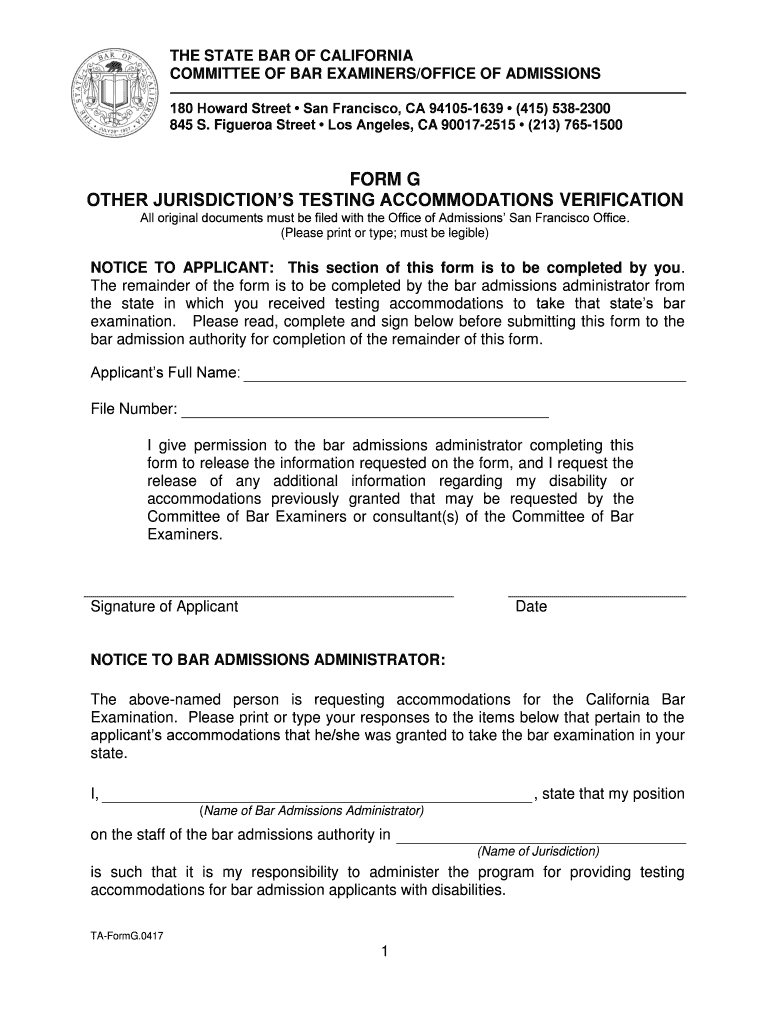



Ca form g 2026

Get Form
ca form g Preview on Page 1

Here's how it works

01. Edit your ca form g online
Type text, add images, blackout confidential details, add comments, highlights and more.

02. Sign it in a few clicks
Draw your signature, type it, upload its image, or use your mobile device as a signature pad.

03. Share your form with others
Send it via email, link, or fax. You can also download it, export it or print it out.

How to use or fill out CA Form G with our platform

Form edit decoration
9.5
Ease of Setup
DocHub User Ratings on G2
9.0
Ease of Use
DocHub User Ratings on G2
  1. Click ‘Get Form’ to open CA Form G in the editor.
  2. Begin by filling out your personal information in the 'Applicant’s Full Name' and 'File Number' fields. Ensure that all entries are legible.
  3. In the section labeled 'NOTICE TO APPLICANT', read the instructions carefully, then provide your signature and date to authorize the release of information regarding your accommodations.
  4. Next, move to the 'NOTICE TO BAR ADMISSIONS ADMINISTRATOR' section. This part will be completed by the bar admissions administrator from your jurisdiction.
  5. The administrator will indicate whether you were granted testing accommodations during your examination and specify any disabilities and accommodations provided.
  6. Finally, ensure that the administrator signs and dates the form, providing their contact information before submission.

Start using our platform today for free to streamline your form completion process!

See more ca form g versions

We've got more versions of the ca form g form. Select the right ca form g version from the list and start editing it straight away!
Versions Form popularity Fillable & printable
2017 4.8 Satisfied (41 Votes)
be ready to get more

Complete this form in 5 minutes or less

Get form

Got questions?

We have answers to the most popular questions from our customers. If you can't find an answer to your question, please contact us.
Contact us
Form G - Register of Employment Remuneration. All establishments should maintain Form G - Register of Employment Remuneration. In this register details like Name of the establishment,employee, Nature of work, Wage period, fines deductions Overtime are mentioned.
You should always report 1099-G income on your tax return. If you omit this income, you could face a penalty for not reporting it on your return. If you receive Form 1099-G and dont report the total amount shown on your tax return, the IRS could send a CP2000, Underreported Income notice.
Your Form 1099G will show the total benefits paid to you and any federal taxes withheld or child support you owed. So, your 1099G may show more than the EDD payments you received for your claim. You can confirm the amount on your Form 1099G by viewing your Payment History in UI Online.
Why you received a 1099-G. You received this form because both of the following happened: You claimed state income tax payments as an itemized deduction on Schedule A of your Federal Income Tax Return for the tax year listed in Box 3. You received a refund, credit, or offset of $10 or more.
Information Required for Form G Name: Full name of the individual or entity. Address: Complete address of the individual or entity. PAN: Permanent Account Number (PAN) of the taxpayer. Aadhaar Number: Government-issued unique identification number for individuals (if available).

Security and compliance

At DocHub, your data security is our priority. We follow HIPAA, SOC2, GDPR, and other standards, so you can work on your documents with confidence.

Learn more
ccpa2
pci-dss
gdpr-compliance
hipaa
soc-compliance

People also ask

Google Forms is a survey administration software included as part of the free, web-based Google Docs Editors suite offered by Google. The service also includes Google Docs, Google Sheets, Google Slides, Google Drawings, Google Sites, and Google Keep. Google Forms is only available as a web application.

Related links