LOR docx 2026

Get Form
LOR docx Preview on Page 1

Here's how it works

01. Edit your form online
Type text, add images, blackout confidential details, add comments, highlights and more.

02. Sign it in a few clicks
Draw your signature, type it, upload its image, or use your mobile device as a signature pad.

03. Share your form with others
Send it via email, link, or fax. You can also download it, export it or print it out.

How to use or fill out LOR docx with our platform

Form edit decoration
9.5
Ease of Setup
DocHub User Ratings on G2
9.0
Ease of Use
DocHub User Ratings on G2
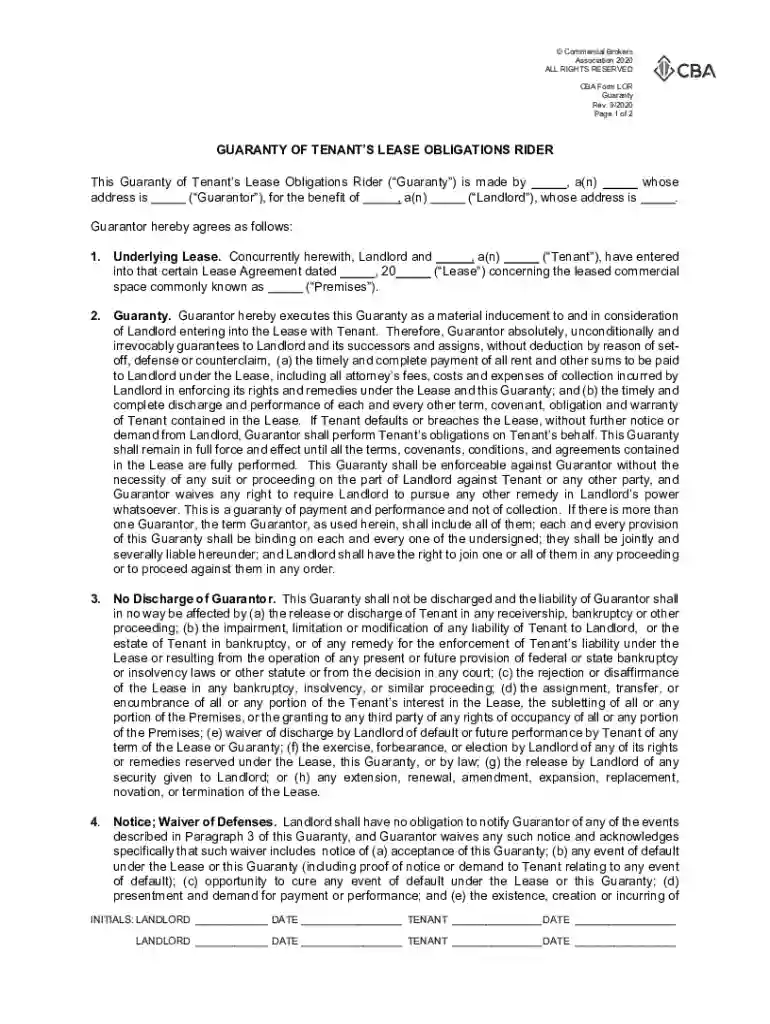
  1. Click ‘Get Form’ to open the LOR docx in the editor.
  2. Begin by filling in the Guarantor's name and type of entity in the designated fields. Ensure that you provide a complete address for accurate identification.
  3. Next, enter the Landlord's name and type of entity, along with their address. This information is crucial for establishing the parties involved.
  4. In the section regarding the Underlying Lease, specify the Tenant's name and type of entity, along with the date of the Lease Agreement and a description of the leased commercial space.
  5. Proceed to fill out any additional obligations or guarantees as outlined in the document. Make sure to review each clause carefully to understand your commitments.
  6. Finally, ensure all parties sign and date where indicated. This step is essential for validating the agreement.

Start using our platform today to streamline your document editing and signing process for free!

See more LOR docx versions

We've got more versions of the LOR docx form. Select the right LOR docx version from the list and start editing it straight away!
Versions Form popularity Fillable & printable
2020 4.4 Satisfied (53 Votes)
2011 4.1 Satisfied (32 Votes)
be ready to get more

Complete this form in 5 minutes or less

Get form

Got questions?

We have answers to the most popular questions from our customers. If you can't find an answer to your question, please contact us.
Contact us
The purpose of a LOR is to provide insight into the applicants qualifications from a third-party perspective, helping the recipient (such as a university or employer) understand the applicants potential for success in the new role or academic program.
How to format a letter of recommendation Date. Recipient Name. Recipient Title. Recipient Address. Greeting: Address the recipient by name if possible (Dear Ms/Mr). Personal introduction: Begin the body of your letter by introducing who you are and your relationship to the applicant.
How to Request an LOR Certificate? Choose the Right Recommender. Choose a person who can provide you with the details you need. Provide Context. Share your achievements, your goals, and the details of the opportunity. Allow Ample Time. Lor can be requested at least 3-4 weeks in advance. Offer Guidance. Express Gratitude.
A letter of recommendation or recommendation letter, also known as a letter of reference, reference letter, or simply reference, is a document in which the writer assesses the qualities, characteristics, and capabilities of the person being recommended in terms of that individuals ability to perform a particular task
As the name implies, a letter of recommendation is a letter that endorses a student, employee, colleague, or co-worker. Its also referred to as a letter of reference or LOR for short.

Security and compliance

At DocHub, your data security is our priority. We follow HIPAA, SOC2, GDPR, and other standards, so you can work on your documents with confidence.

Learn more
ccpa2
pci-dss
gdpr-compliance
hipaa
soc-compliance
be ready to get more

Complete this form in 5 minutes or less

Get form

People also ask

A LOR for Masters courses is generally a single-page document of roughly 400-500 words. The letters structure is broadly classified into 4 or 5 short paragraphs: introduction, body (2-3 paras), and conclusion/summary. Most universities accept this general Letter of Recommendation format for students.

Related links