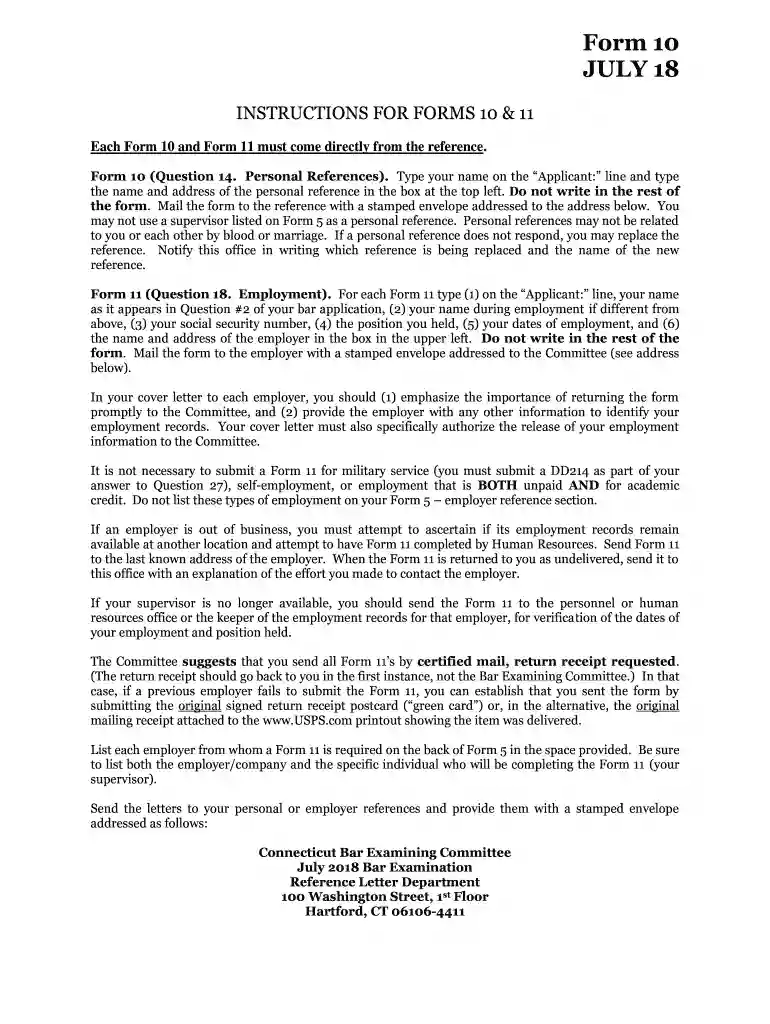
mf 001 Preview on Page 1

Ct form 10 2026

Here's how it works

  • 01. Edit your mf 001 online

    Type text, add images, blackout confidential details, add comments, highlights and more.

  • 02. Sign it in a few clicks

    Draw your signature, type it, upload its image, or use your mobile device as a signature pad.

  • 03. Share your form with others

    Send ct form 10 via email, link, or fax. You can also download it, export it or print it out.

How to use or fill out ct form 10 with our platform

Form edit decoration
9.5
Ease of Setup
DocHub User Ratings on G2
9.0
Ease of Use
DocHub User Ratings on G2
  1. Click ‘Get Form’ to open ct form 10 in the editor.
  2. In the 'Applicant:' line, type your name as it appears on your application. This is crucial for identification.
  3. In the top left box, enter the name and address of your personal reference. Ensure this person is not related to you or each other by blood or marriage.
  4. Complete questions 1 through 4 as required by the form. Make sure to provide accurate information regarding your relationship with the applicant and any relevant details.
  5. Once completed, do not send the form back to yourself. Instead, mail it directly to the Connecticut Bar Examining Committee using the prepaid envelope provided.

Start filling out ct form 10 today for free using our platform!

See more mf 001 versions

We've got more versions of the mf 001 form. Select the right mf 001 version from the list and start editing it straight away!

VersionsForm popularityFillable & printable
20184.8 Satisfied (191 Votes)

be ready to get more

Complete this form in 5 minutes or less

Got questions?

We have answers to the most popular questions from our customers. If you can't find an answer to your question, please contact us.

HOW TO OBTAIN CONNECTICUT TAX FORMS Connecticut state tax forms can be downloaded at the Department of Revenue Services (DRS) website: .ct.gov/drs/ Connecticut tax forms and publications are available at any DRS offices, during tax filing season.
A Connecticut estate tax return must be filed after your death, regardless of the size of your estate. It will be your executors responsibility to file either Form CT-706 (for taxable estates) or CT-706 NT (for nontaxable estates). Both the return and any tax owed are due six months after the death.
IRS fill-in PDF forms use some of the features provided with docHub software, such as the ability to save the data you input (document rights).
Connecticut Resident Income Tax Return.
Get, Create, Make and Sign ct 1040 form Type text, complete fillable fields, insert images, highlight or blackout data for discretion, add comments, and more. Draw or type your signature, upload a signature image, or capture it with your digital camera. Email, fax, or share your ct 1040 form via URL.

Security and compliance

At DocHub, your data security is our priority. We follow HIPAA, SOC2, GDPR, and other standards, so you can work on your documents with confidence.

People also ask

If you are a resident and you meet the requirements for Who Must File a Connecticut Resident Return for the taxable year, you must file Form CT-1040, Connecticut Resident Income Tax Return.
Answer: Yes, you can file an original Form 1040 series tax return electronically using any filing status. Filing your return electronically is faster, safer, and more accurate than mailing your tax return because its transmitted electronically to the IRS computer systems.

Related links

Tax Form 1098-T

Mar 21, 2024 The Form 1098-T is a tuition statement that colleges and universities are required to issue to most students who paid for qualified tuition and relatedRead more

Learn more
Form CT-10 Commonwealth of Virginia Communications

The Virginia Communications Sales and Use Tax does not apply to (1) a purchaser who purchases communication services for resale; (2) a provider of InternetRead more

Learn more
If you believe that this page should be taken down, please follow our DMCA take down process here