Personal Financial Statement I 2026

Get Form
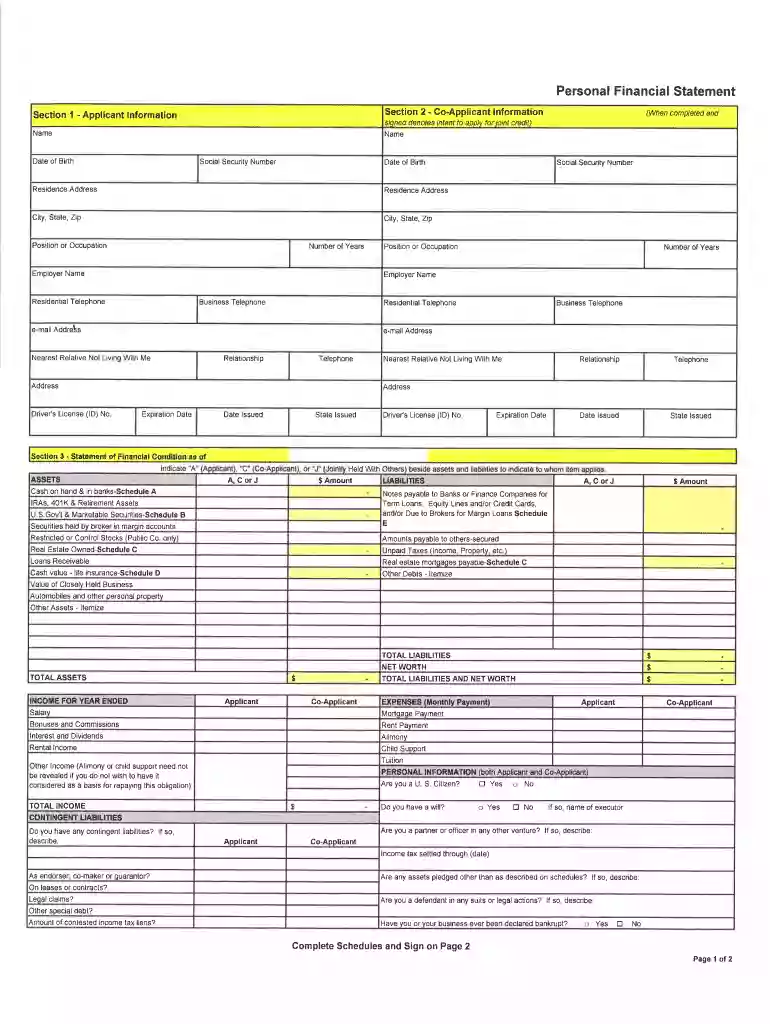
Personal Financial Statement I Preview on Page 1

Here's how it works

01. Edit your form online
Type text, add images, blackout confidential details, add comments, highlights and more.

02. Sign it in a few clicks
Draw your signature, type it, upload its image, or use your mobile device as a signature pad.

03. Share your form with others
Send it via email, link, or fax. You can also download it, export it or print it out.

How to use or fill out Personal Financial Statement I with our platform

Form edit decoration
9.5
Ease of Setup
DocHub User Ratings on G2
9.0
Ease of Use
DocHub User Ratings on G2
  1. Click ‘Get Form’ to open the Personal Financial Statement I in the editor.
  2. Begin by filling out the Applicant Information section. Enter your name, date of birth, social security number, and residence address. Ensure accuracy as this information is crucial for identification.
  3. Next, complete the Co-Applicant Information section with similar details for your co-applicant. This includes their name, date of birth, and contact information.
  4. Proceed to the Assets section. List all assets including cash on hand, securities, and real estate owned. Use the provided schedules (A, B, C) to detail each asset type.
  5. In the Liabilities section, itemize any debts such as loans or mortgages. Be thorough to ensure a clear financial picture.
  6. Finally, review all sections for completeness and accuracy before signing. Utilize our platform’s features to save your progress and make edits as needed.

Start using our platform today to effortlessly complete your Personal Financial Statement I online for free!

be ready to get more

Complete this form in 5 minutes or less

Get form

Security and compliance

At DocHub, your data security is our priority. We follow HIPAA, SOC2, GDPR, and other standards, so you can work on your documents with confidence.

Learn more
ccpa2
pci-dss
gdpr-compliance
hipaa
soc-compliance
be ready to get more

Complete this form in 5 minutes or less

Get form