Sunlife claim form 2025

Get Form
sun life dental claim form Preview on Page 1

Here's how it works

01. Edit your sun life dental claim form online
Type text, add images, blackout confidential details, add comments, highlights and more.

02. Sign it in a few clicks
Draw your signature, type it, upload its image, or use your mobile device as a signature pad.

03. Share your form with others
Send sunlife dental claim form via email, link, or fax. You can also download it, export it or print it out.

How to use or fill out sunlife claim form with our platform

Form edit decoration
9.5
Ease of Setup
DocHub User Ratings on G2
9.0
Ease of Use
DocHub User Ratings on G2
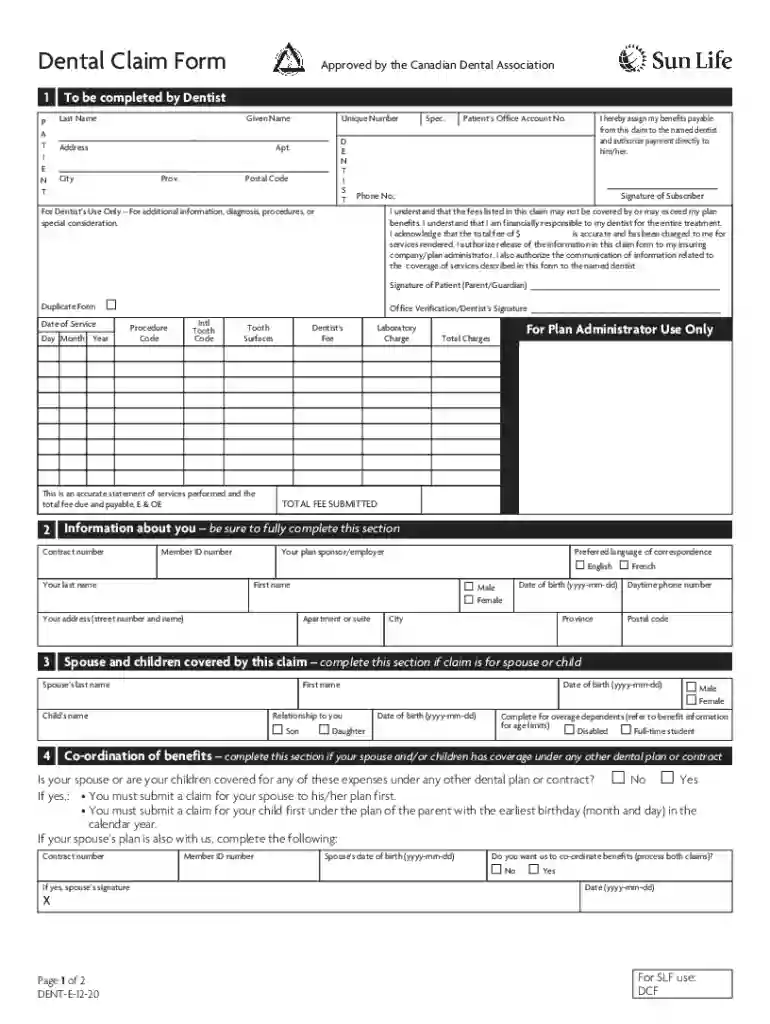
  1. Click ‘Get Form’ to open the sunlife claim form in the editor.
  2. Begin by filling out the patient information section. Enter the patient's last name, given name, address, city, and postal code. Ensure all fields are completed accurately.
  3. Next, provide details about the dentist. Fill in their last name, given name, unique number, and contact information. This ensures that benefits can be assigned correctly.
  4. In the authorization section, both the subscriber and patient (or guardian) must sign to confirm understanding of financial responsibilities and consent for information release.
  5. Complete the details of the claim by indicating if any expenses are due to an accident or covered by another plan. Provide necessary dates and additional documentation as required.
  6. Finally, review all entered information for accuracy before submitting your claim through our platform.

Start using our platform today to fill out your sunlife claim form easily and for free!

See more sunlife claim form versions

We've got more versions of the sunlife claim form form. Select the right sunlife claim form version from the list and start editing it straight away!
Versions Form popularity Fillable & printable
2020 4.8 Satisfied (124 Votes)
2017 4.2 Satisfied (59 Votes)
2010 4.3 Satisfied (67 Votes)
be ready to get more

Complete this form in 5 minutes or less

Get form

Got questions?

We have answers to the most popular questions from our customers. If you can't find an answer to your question, please contact us.
Contact us
To get your claim forms: Sign in to my Sun Life . Under Benefits, choose Submit a Claim, then Print claim form. Choose the PDF claim form you need and fill it out online, or print it and fill it out by hand.
Contacting your Financial Advisor; Visiting our nearest Client Service Center; Calling SUNLINK Client Care at (+632) 8849-9888 (calls outside the Philippines may incur additional charges) or at toll-free (using PLDT Line) 1-800-10-SUNLIFE (7865433) for outside Metro Manila from Mondays to Fridays 8:00 AM to 5:00 PM; or.
If you have your banking information on file with Sun Life (if you have registered on the mysunlife.ca site for electronic funds transfer), youll receive reimbursement directly into your bank account typically within 48 hours.
If your loved one has benefits with Sun Life, call us at 800-247-6875, Monday through Friday from 8 a.m. to 8 p.m. ET and we can help you with your claim. Information we will need: Copy of the death certificate. Beneficiary designation (your loved ones employer should have this information)
Sign in to my Sun Life . Go to the Benefits tab. Select Submit a claim under the Benefits tab. Select the type of claim youre looking to submit (such as medical, dental, or vision) and then follow the steps to submit your claim.

People also ask

Visiting our nearest Client Service Center; Calling SUNLINK Client Care at (+632) 8849-9888 (calls outside the Philippines may incur additional charges) or at toll-free (using PLDT Line) 1-800-10-SUNLIFE (7865433) for outside Metro Manila from Mondays to Fridays 8:00 AM to 5:00 PM; or.
How to submit a claim online. Sign in to my Sun Life . Go to the Benefits tab. Select Submit a claim under the Benefits tab.

2020 sunlife form