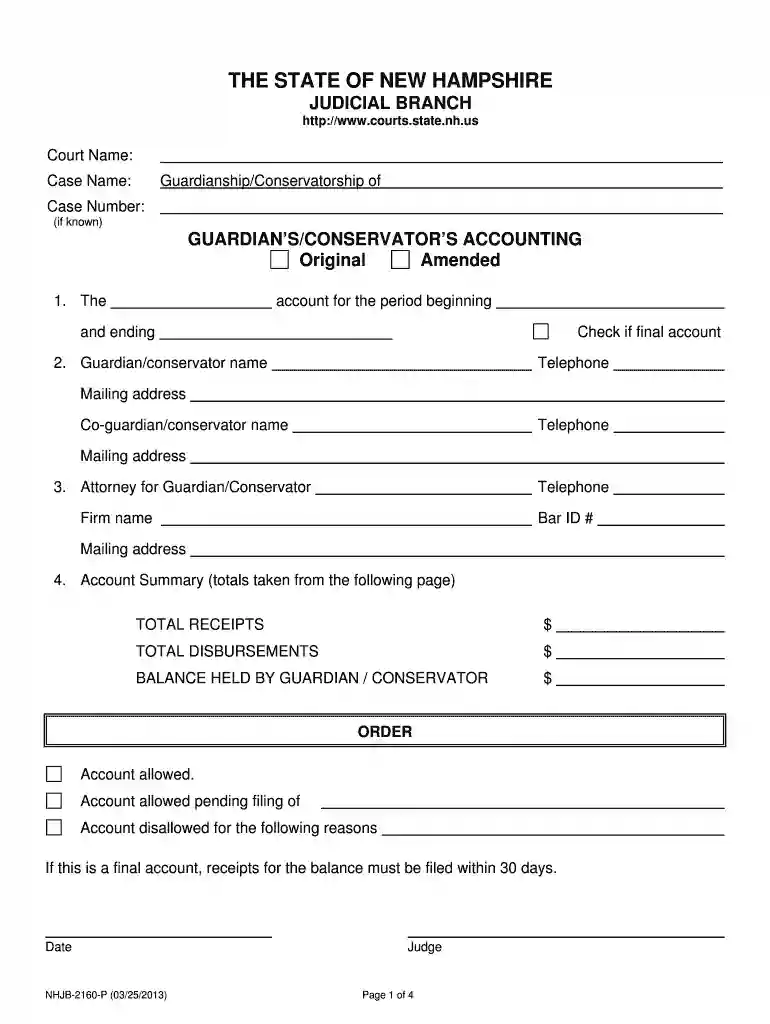
nh guardian Preview on Page 1

Nh form guardian 2026

Here's how it works

  • 01. Edit your nh guardian online

    Type text, add images, blackout confidential details, add comments, highlights and more.

  • 02. Sign it in a few clicks

    Draw your signature, type it, upload its image, or use your mobile device as a signature pad.

  • 03. Share your form with others

    Send nhjb branch form via email, link, or fax. You can also download it, export it or print it out.

How to use or fill out nh form guardian with our platform

Form edit decoration
9.5
Ease of Setup
DocHub User Ratings on G2
9.0
Ease of Use
DocHub User Ratings on G2
  1. Click ‘Get Form’ to open the nh form guardian in the editor.
  2. Begin by entering the Court Name and Case Name at the top of the form. This identifies your specific case.
  3. Fill in the Guardian’s/Conservator’s name, telephone number, and mailing address. If applicable, include co-guardian details.
  4. In Section 1, specify whether this is an original or amended account and indicate the accounting period dates.
  5. Complete Section 4 by summarizing total receipts and disbursements from subsequent schedules. Ensure accuracy as this reflects your financial management.
  6. For each schedule (A-G for receipts and 1-5 for disbursements), provide detailed information on transactions, including dates, amounts, and descriptions.
  7. Review all entries for completeness before signing at the bottom of the form. Ensure you have attached any necessary documents as indicated.

Start using our platform today to simplify your document editing and ensure a smooth completion of your nh form guardian!

See more nh guardian versions

We've got more versions of the nh guardian form. Select the right nh guardian version from the list and start editing it straight away!

VersionsForm popularityFillable & printable
20134.8 Satisfied (22 Votes)

be ready to get more

Complete this form in 5 minutes or less

Got questions?

We have answers to the most popular questions from our customers. If you can't find an answer to your question, please contact us.

Yes, electronically drawing your signature is appropriate, but only if you use a tool that complies with industry laws and regulations. Try DocHub, which guarantees eSignature validity under ESIGN and UETA requirements. All you need to approve your nh form guardian electronically is an account with DocHub and an internet connection. After you open your file in our editor, click Sign and choose the Draw option.

If you need to edit your nh form guardian on the internet quickly, it does not matter what internet browser you use. DocHub’s straightforward editing tools are available using any internet browser. Just open the appropriate tab within our editor, add your file, and fill it out without stress.

Guardianship is a legal relationship in which a person(s) or agency (the guardian) is appointed by the court to make decisions and act on behalf of a person who does not have adequate capacity to make such decisions involving the management of personal affairs, property, or both.
A Declaration of Guardian is a legal document where you tell the court who you want to serve as your guardian if there is ever a guardianship proceeding for you. There are two types of guardians: Guardian of your estate, and guardian of your person.
The petitioner must show that the proposed ward has or will come to substantial harm as a result of the incapacity, that the incapacity is not the result of informed judgment on the part of the proposed ward, and that no less restrictive alternatives to guardianship are available as a remedy to the situation.

Security and compliance

At DocHub, your data security is our priority. We follow HIPAA, SOC2, GDPR, and other standards, so you can work on your documents with confidence.

People also ask

WHAT ARE GUARDIANS REPORTS? Your Guardians Reports tell the judge how the protected person is doing and how you are performing your guardianship duties. Filing these reports is one of your most important responsibilities as a guardian.
Guardianship is a legal relationship in which a person(s) or agency (the guardian) is appointed by the court to make decisions and act on behalf of a person who does not have adequate capacity to make such decisions involving the management of personal affairs, property, or both.
Any competent adult may file with the court a petition to determine another persons incapacity. Once the petition is filed, the court will then appoint an examining committee consisting of three members. The examining committee will conduct an evaluation and report back to the court.
Any child under the age of 18 who is not married will need a legal guardian. Once this guardian has been appointed, often with the assistance of a family lawyer, the individual will have the same power as a parent for that child when making decisions about their future.
There are generally two types of guardianships: guardianship of a minor and guardianship of an incapacitated person. Guardianships of minors are done in the Family Division, unless the guardianship involves both the person and estate of the minor in which case it would be done in the Probate Division.

Related links

N.H. Admin. Code Saf-C 204.05 - Parent or Guardian

N.H. Admin. Code Saf-C 204.05 - Parent or Guardian Authorization Certificate ; (1) The withdrawal of consent; ; (2) The name of the parent or guardian; and ; (3)Read more

Learn more
Annual List of Distributors For Motor Vehicle Fuels Tax

GUARDIAN FUEL AND ENERGY SYSTEMS INC. GUARDIAN FUEL AND ENERGY SYSTEMS INC. PO BOX 2972. WESTERLY RI 028910933. GULF COAST ENERGY LLC. GULF COAST ENERGY LLC.Read more

Learn more
If you believe that this page should be taken down, please follow our DMCA take down process here