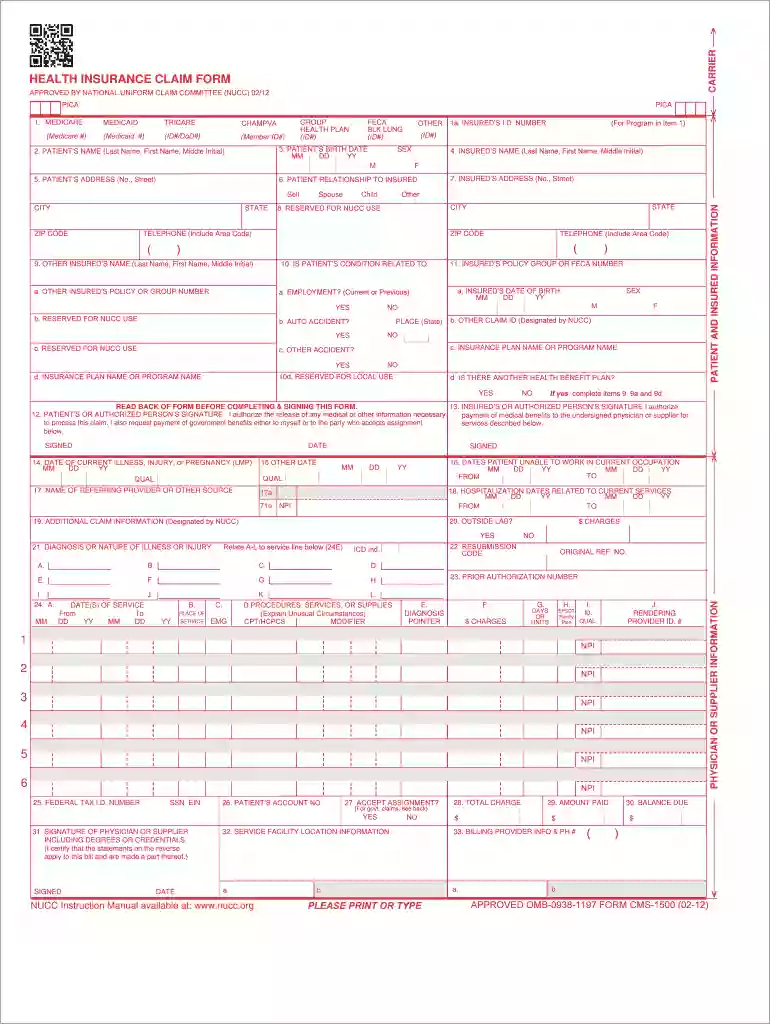
Form health claim form 2026

Get Form
nucc form 1500 Preview on Page 1

Here's how it works

01. Edit your nucc form 1500 online
Type text, add images, blackout confidential details, add comments, highlights and more.

02. Sign it in a few clicks
Draw your signature, type it, upload its image, or use your mobile device as a signature pad.

03. Share your form with others
Send nucc 1500 form via email, link, or fax. You can also download it, export it or print it out.

How to use or fill out form health claim form with our platform

Form edit decoration
9.5
Ease of Setup
DocHub User Ratings on G2
9.0
Ease of Use
DocHub User Ratings on G2
  1. Click ‘Get Form’ to open the health claim form in the editor.
  2. Begin by entering the patient’s name in the designated field, ensuring you include the last name, first name, and middle initial.
  3. Fill in the patient’s birth date using the MM/DD/YY format. This is crucial for identifying age-related coverage.
  4. Provide the patient’s address, including street number, city, state, and ZIP code. Accurate information here is essential for correspondence.
  5. Next, complete the insured's details. Include their name and relationship to the patient (self, spouse, child).
  6. Indicate if the patient's condition is related to employment or an accident by selecting 'Yes' or 'No' as applicable.
  7. Finally, ensure all signatures are completed at the bottom of the form before submitting it for processing.

Start filling out your health claim form online for free today!

See more form health claim form versions

We've got more versions of the form health claim form form. Select the right form health claim form version from the list and start editing it straight away!
Versions Form popularity Fillable & printable
2012 4.8 Satisfied (128 Votes)
2005 4 Satisfied (42 Votes)
be ready to get more

Complete this form in 5 minutes or less

Get form

Got questions?

We have answers to the most popular questions from our customers. If you can't find an answer to your question, please contact us.
Contact us
They ensure patients healthcare costs are covered, providing financial security. Insurance companies use these forms to verify services and process claims accurately. Healthcare providers rely on these forms to receive prompt payment for their services.
For example, if a surgeon performs a procedure in a facility such as a hospital or ASC, a CMS-1500 will be submitted for the surgeons services only, while a separate UB-04 form will be submitted for the use of the facility. Both forms will be needed to fully bill out for a procedure.
Documentation: Medical claim forms provide a detailed record of the medical services provided to patients, including procedures, treatments, and medications administered. This documentation is vital for accurately billing insurance companies and patients for services rendered.
Printing your CMS 1500 form After saving your claim form, you can submit it electronically through SimplePractice, or download it to print. Important: If you are downloading a secondary claim form, you will notice that the downloaded PDF does not match that of the claim form you see in SimplePractice.
What are the 837P and Form CMS-1500? The 837P (Professional) is the standard format used by health care professionals and suppliers to transmit health care claims electronically. The Form CMS-1500 is the standard paper claim form to bill Medicare Fee-For-Service (FFS) Contractors when a paper claim is allowed.

Security and compliance

At DocHub, your data security is our priority. We follow HIPAA, SOC2, GDPR, and other standards, so you can work on your documents with confidence.

Learn more
ccpa2
pci-dss
gdpr-compliance
hipaa
soc-compliance
be ready to get more

Complete this form in 5 minutes or less

Get form

People also ask

A Letter to File a Medical Claim provides you the means to submit your health care claim to an insurance company, HMO, or anywhere else that may require it. Sometimes your physician or other health care provider may not submit forms on your behalf.

Related links