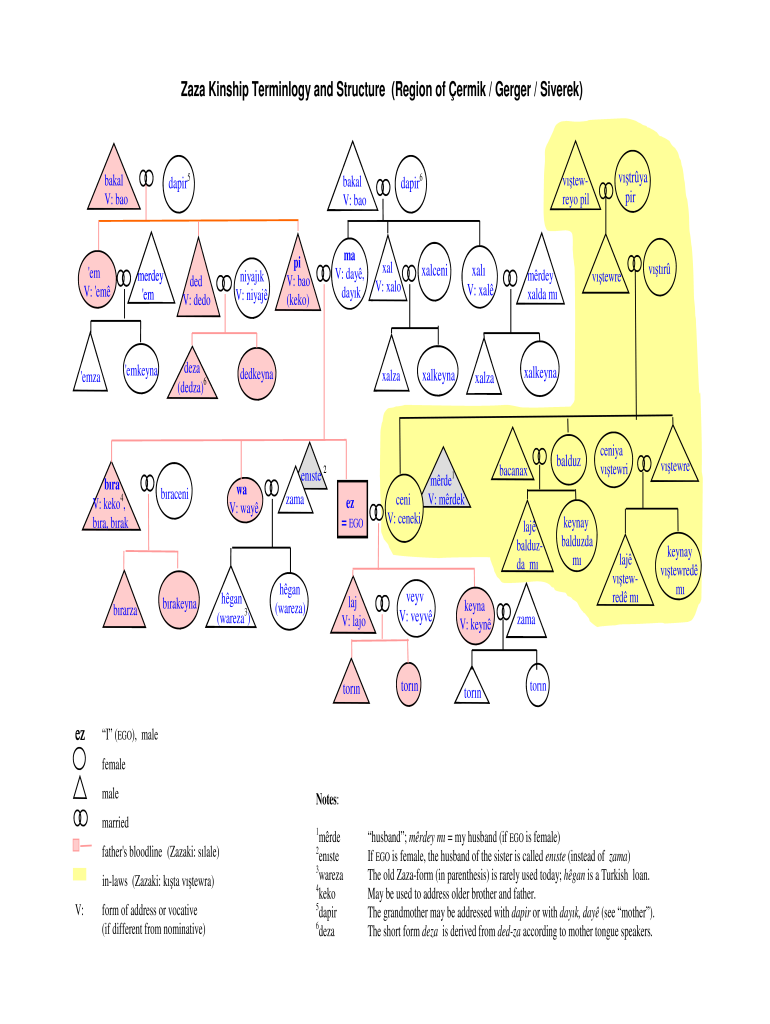
Kinship diagram maker 2026

Get Form
kinship diagram maker Preview on Page 1

Here's how it works

01. Edit your kinship diagram maker online
Type text, add images, blackout confidential details, add comments, highlights and more.
02. Sign it in a few clicks
Draw your signature, type it, upload its image, or use your mobile device as a signature pad.
03. Share your form with others
Send kinship chart maker via email, link, or fax. You can also download it, export it or print it out.

How to use or fill out kinship diagram maker with our platform

Form edit decoration
9.5
Ease of Setup
DocHub User Ratings on G2
9.0
Ease of Use
DocHub User Ratings on G2
  1. Click ‘Get Form’ to open the kinship diagram maker in the editor.
  2. Begin by identifying the central figure, labeled as 'EGO'. This represents you in the kinship structure. Use the text box to input your name.
  3. Next, fill in the relationships surrounding EGO. Use the provided fields to denote family members such as parents, siblings, and children. Ensure you select appropriate terms from the Zaza terminology for accuracy.
  4. For each family member, specify their gender and relationship type (e.g., father, mother). Utilize dropdown menus if available for ease of selection.
  5. Review your entries for clarity and correctness. Make any necessary adjustments using our platform's editing tools.
  6. Once satisfied with your diagram, save your work. You can also export it directly to Google Workspace for further use or sharing.

Start creating your kinship diagram today for free and experience seamless document editing!

be ready to get more

Complete this form in 5 minutes or less

Get form

Got questions?

We have answers to the most popular questions from our customers. If you can't find an answer to your question, please contact us.
Contact us
An example of a kinship relationship is that held between grandparent and grandchild. Other common terms used in describing kinship are parents, siblings, uncles, aunts, and cousins.
Kinship Chart Symbols Use a circle for a female. Use a triangle for a male. Use a square for someone who identifies as neither sex nor both sexes. Use a line to cross the symbol if the individual is deceased. Use an equal sign (=) between two individuals to indicate marriage.
Create your own kinship diagram Step 1: Add Ego, or the starting point of your kinship diagram. Step 2: Build out Egos immediate relationships. Step 3: Continue to build out the diagram using kinship notation. Step 4: Mark various life events. Step 5: Add notes or comments to record additional information.
Use a circle for a female. Use a triangle for a male. Use a square for someone who identifies as neither sex or both sexes. Place a line through the appropriate symbol if the individual is deceased.
Kinship diagrams allow cultural anthropologists to quickly sketch out relationships between people during the interview process. It also provides a means to visually present a cultures kinship pattern without resorting to names, which can be confusing, and allows for anonymity for the people.

Security and compliance

At DocHub, your data security is our priority. We follow HIPAA, SOC2, GDPR, and other standards, so you can work on your documents with confidence.

Learn more
ccpa2
pci-dss
gdpr-compliance
hipaa
soc-compliance

People also ask

Kinship diagrams use a specific person, who by convention is called Ego, as a starting point. The people shown on the chart are Egos relatives.

kinship diagram generator