Type text, add images, blackout confidential details, add comments, highlights and more.
02. Sign it in a few clicks
Draw your signature, type it, upload its image, or use your mobile device as a signature pad.
03. Share your form with others
Send ct sales and use tax form via email, link, or fax. You can also download it, export it or print it out.
How to use or fill out ct sales and use tax form fillable with our platform
Ease of Setup
DocHub User Ratings on G2
Ease of Use
DocHub User Ratings on G2
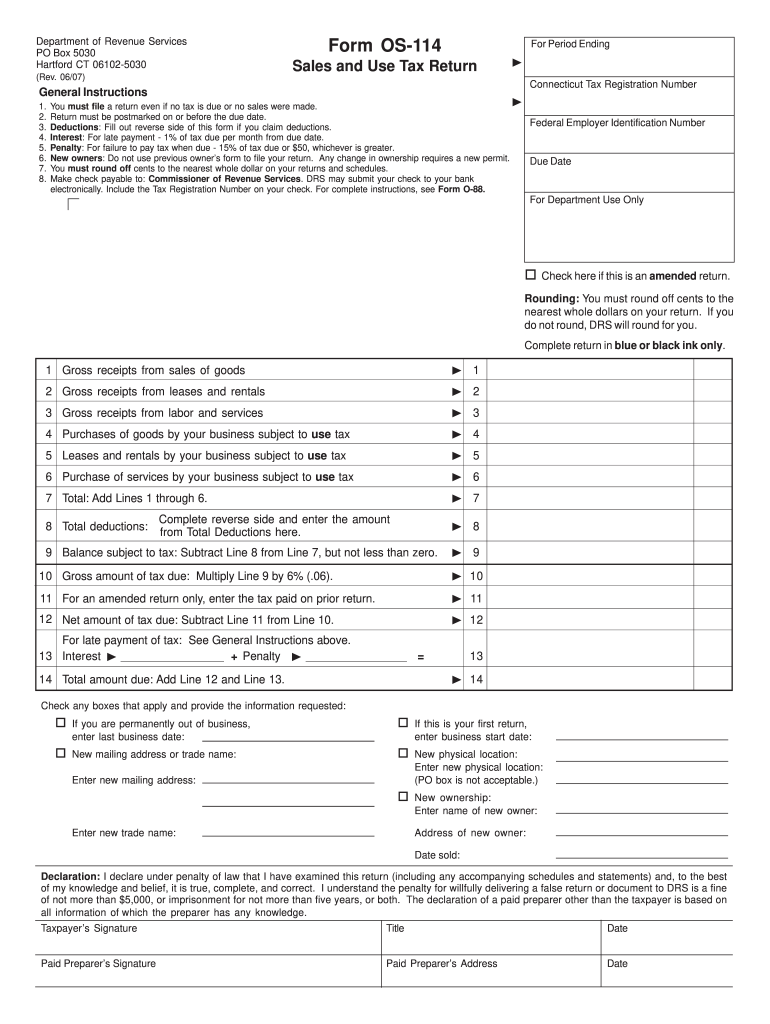
Click ‘Get Form’ to open the ct sales and use tax form fillable in the editor.
Begin by entering your Connecticut Tax Registration Number at the top of the form. This is essential for identifying your business.
Fill in the period ending date for which you are filing the return. Ensure this matches your accounting records.
Complete each section by entering gross receipts from sales, leases, rentals, and services as applicable. Be sure to round off cents to the nearest whole dollar.
If claiming deductions, complete the reverse side of the form and enter the total deductions on Line 8.
Calculate your total tax due by multiplying your balance subject to tax by 6% and enter this amount on Line 10.
Finally, sign and date the declaration section at the bottom of the form before submitting it.
Start filling out your ct sales and use tax form today for free using our platform!
Fill out ct sales and use tax form fillable online It's free
Ct sales and use tax form fillable pdfCt sales and use tax form fillable onlineCT Sales and Use Tax resale certificateCT OS-114 fillable FormSales and Use tax permit CTmyconneCT CT Sales TaxCT OS-114 onlineFile CT sales tax online
Security and compliance
At DocHub, your data security is our priority. We follow HIPAA, SOC2, GDPR, and other standards, so you can work on your documents with confidence.
See Form O-88, Instructions for Form OS-114 Connecticut Sales and Use Tax Return. For period ending. Due date. Connecticut Tax Registration Number. (MMDDYYYY).Read more
Sales and Use Tax Exemption Certificate Instructions. CONNECTICUT FORM CERT-119. 1. Check the appropriate box for blanket certificate or certificateRead more
Cookie consent notice
This site uses cookies to enhance site navigation and personalize your experience.
By using this site you agree to our use of cookies as described in our Privacy Notice.
You can modify your selections by visiting our Cookie and Advertising Notice.