Court of Appeals No 76201-0-I IN THE SUPREME COURT 2026

Get Form
Court of Appeals No 76201-0-I IN THE SUPREME COURT Preview on Page 1

Here's how it works

01. Edit your form online
Type text, add images, blackout confidential details, add comments, highlights and more.
02. Sign it in a few clicks
Draw your signature, type it, upload its image, or use your mobile device as a signature pad.
03. Share your form with others
Send it via email, link, or fax. You can also download it, export it or print it out.

How to use or fill out Court of Appeals No 76201-0-I IN THE SUPREME COURT with our platform

Form edit decoration
9.5
Ease of Setup
DocHub User Ratings on G2
9.0
Ease of Use
DocHub User Ratings on G2
  1. Click ‘Get Form’ to open it in the editor.
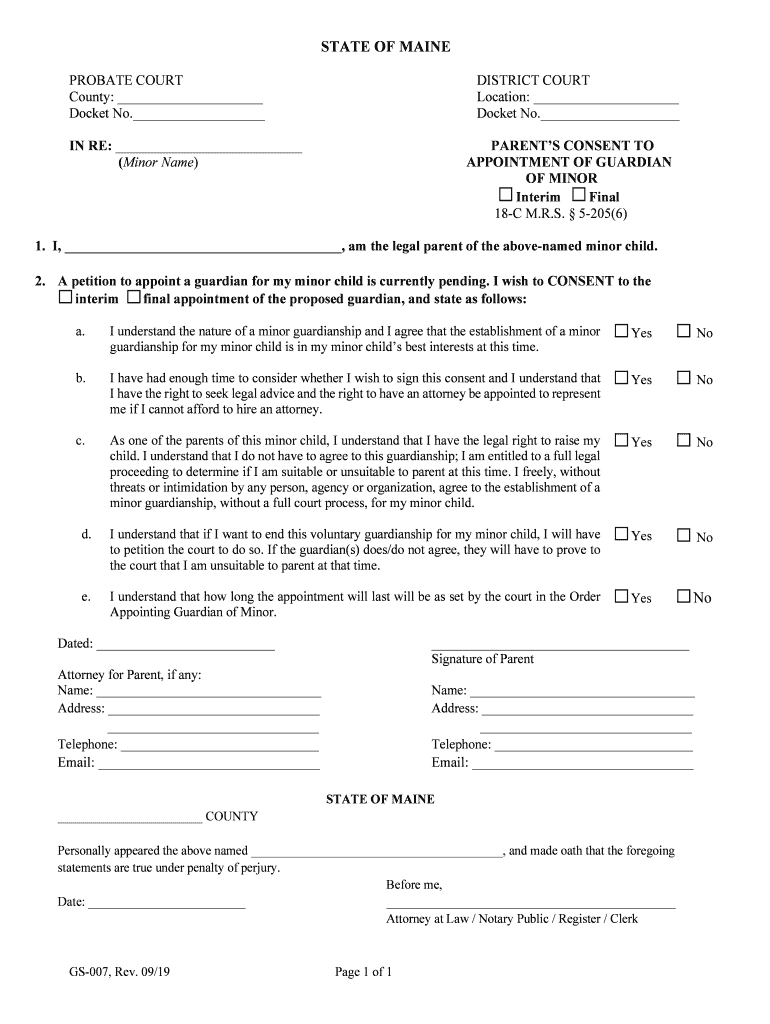
  2. Begin by filling in the County and Docket Number at the top of the form. This information is essential for identifying your case.
  3. In the section labeled 'IN RE:', enter the name of the minor child for whom you are consenting to guardianship.
  4. Complete the first statement by entering your name as the legal parent of the minor child.
  5. Indicate whether you consent to an interim or final appointment of a guardian by selecting the appropriate option.
  6. For each subsequent question regarding your understanding and agreement, select 'Yes' or 'No' based on your situation. Ensure you read each statement carefully.
  7. Date and sign at the bottom of the form, confirming your consent and understanding of the guardianship process.
  8. If applicable, fill in details for your attorney, including their name, address, telephone number, and email.

Start using our platform today to easily complete your Court of Appeals No 76201-0-I IN THE SUPREME COURT form online for free!

See more Court of Appeals No 76201-0-I IN THE SUPREME COURT versions

We've got more versions of the Court of Appeals No 76201-0-I IN THE SUPREME COURT form. Select the right Court of Appeals No 76201-0-I IN THE SUPREME COURT version from the list and start editing it straight away!
Versions Form popularity Fillable & printable
2019 4.9 Satisfied (27 Votes)
be ready to get more

Complete this form in 5 minutes or less

Get form

Got questions?

We have answers to the most popular questions from our customers. If you can't find an answer to your question, please contact us.
Contact us

Managing your paperwork with DocHub this way is extremely straightforward once you have downloaded its extension for Google Chrome. Navigate to the Chrome Web Store and install DocHub - Sign PDF from Gmail to get it. Give our tool access to your Google account, and then open an email containing Court of Appeals No 76201-0-I IN THE SUPREME COURT as an attachment and point to the file with your cursor - the DocHub extension key will automatically appear there. Click on it to open your file in our editor. Make any required edits, complete the blanks, and click Sign to create your legally-binding eSignature.

If you edit your Court of Appeals No 76201-0-I IN THE SUPREME COURT with DocHub, you will not need to look for other applications or solutions to eSign it. An electronic signature is a component of DocHub’s extensive editing toolset, which allows you to apply changes in your form without jumping between websites. Just complete your form, double-check the correctness of your data and put your electronic signature at the end to make it submission-ready within minutes.

The Law Reporting Bureau publishes in the New York Official Reports all state appellate court decisions and selected state trial court decisions, as well as Court of Appeals motion decisions.
The appeals court judges meet and decide the case by a majority vote. One of the judges writes an opinion giving the decision and the reasons supporting it. They can affirm or reverse the trial courts rulings.
Unlike circuit court appeals, however, the Supreme Court is usually not required to hear the appeal. Parties may file a writ of certiorari to the court, asking it to hear the case. If the writ is granted, the Supreme Court will take briefs and conduct oral argument.

Security and compliance

At DocHub, your data security is our priority. We follow HIPAA, SOC2, GDPR, and other standards, so you can work on your documents with confidence.

Learn more

People also ask

Finding Pending Cases Bloomberg Law Docket Search. Open the Dockets Litigation tab. WebCivil Supreme, New York State Unified Court System. WebCivil Local, New York State Unified Court System. New York State Courts E-Filing (NYCSEF), New York State Unified Court System. WebCrims, New York State Unified Court System.
An appellate court is the higher court that hears and reviews the appeals from legal cases that have already been heard and ruled on in a lower court. Appellate courts are present at both the state and federal levels and feature only a committee of judges without a jury.
Appellate jurisdiction refers to the power of a court to hear appeals from lower courts.
Only about 10% of appeals are successful. You will have to balance the costs of the appeal versus the likelihood that you will win.

Related links