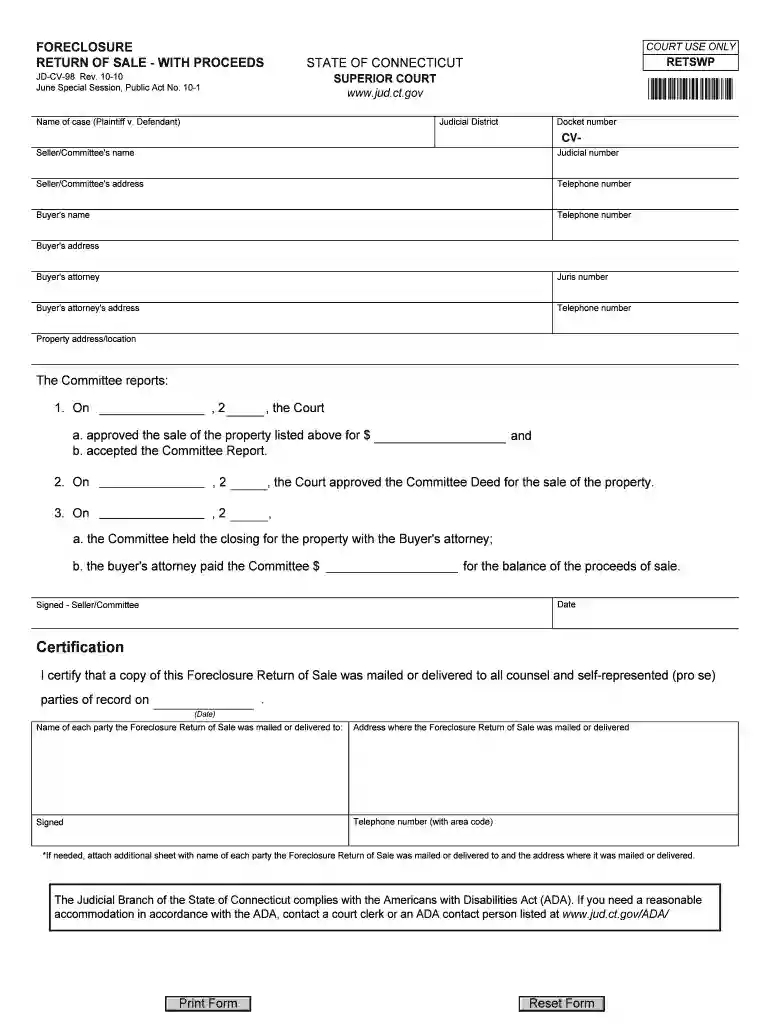
jd cv 98 Preview on Page 1

Connecticut proceeds 2026

Here's how it works

  • 01. Edit your jd cv 98 online

    Type text, add images, blackout confidential details, add comments, highlights and more.

  • 02. Sign it in a few clicks

    Draw your signature, type it, upload its image, or use your mobile device as a signature pad.

  • 03. Share your form with others

    Send return proceeds via email, link, or fax. You can also download it, export it or print it out.

How to use or fill out Connecticut Proceeds with Our Platform

Form edit decoration
9.5
Ease of Setup
DocHub User Ratings on G2
9.0
Ease of Use
DocHub User Ratings on G2
  1. Click ‘Get Form’ to open the Connecticut Proceeds document in the editor.
  2. Begin by entering the name of the case in the format 'Plaintiff v. Defendant' at the top of the form.
  3. Fill in the Judicial District and Docket number, ensuring accuracy for proper identification.
  4. Provide details for the Seller/Committee, including their name, address, and telephone number.
  5. Next, input the Buyer's information: name, address, telephone number, and attorney's details including their Juris number.
  6. Document the property address/location clearly to avoid any confusion regarding the sale.
  7. In the Committee reports section, fill in dates and amounts as required by referencing court approvals and transactions.
  8. Complete the certification section by listing all parties who received a copy of this document along with their addresses.

Start using our platform today to streamline your document editing and signing process for free!

See more jd cv 98 versions

We've got more versions of the jd cv 98 form. Select the right jd cv 98 version from the list and start editing it straight away!

VersionsForm popularityFillable & printable
20104.8 Satisfied (195 Votes)

be ready to get more

Complete this form in 5 minutes or less

Security and compliance

At DocHub, your data security is our priority. We follow HIPAA, SOC2, GDPR, and other standards, so you can work on your documents with confidence.

connecticut proceeds

Connecticut Department of Revenue Services

Department of Revenue Services. 450 Columbus Blvd. Suite 1. Hartford CT 06103. Phone Number: 860-297-5962 Contact DRS Policies Accessibility About CTRead more

Learn more
Conn. Agencies Regs. 12-568a-11 - The CLCs proceeds

As used in this section, proceeds means any moneys received from the sale, both actual and presumed, of tickets. In accordance with the provisions ofRead more

Learn more
If you believe that this page should be taken down, please follow our DMCA take down process here