Self employment form 2026

Get Form
self employment form Preview on Page 1

Here's how it works

01. Edit your self employment form online
Type text, add images, blackout confidential details, add comments, highlights and more.

02. Sign it in a few clicks
Draw your signature, type it, upload its image, or use your mobile device as a signature pad.

03. Share your form with others
Send form self employment via email, link, or fax. You can also download it, export it or print it out.

How to use or fill out self employment form with our platform

Form edit decoration
9.5
Ease of Setup
DocHub User Ratings on G2
9.0
Ease of Use
DocHub User Ratings on G2
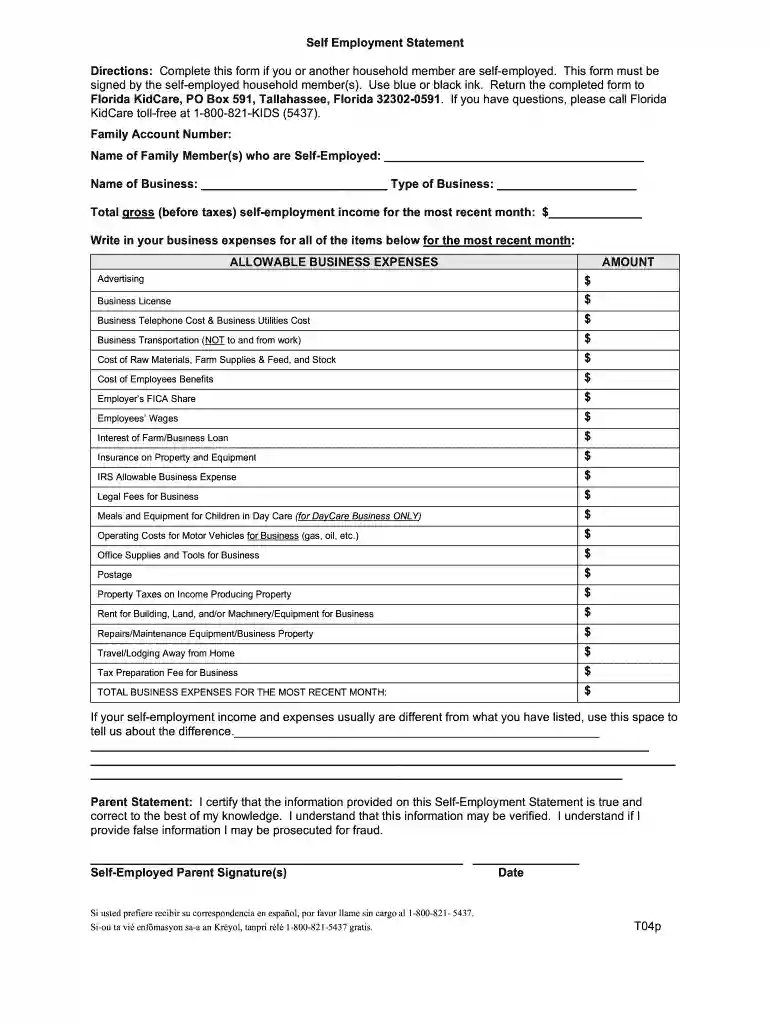
  1. Click ‘Get Form’ to open the Self Employment Statement in the editor.
  2. Begin by entering your Family Account Number at the top of the form. This helps in identifying your application.
  3. Fill in the names of all self-employed household members in the designated field. Ensure accuracy for verification purposes.
  4. Next, provide the Name of Business and Type of Business. This information is crucial for understanding your self-employment context.
  5. Input your total gross self-employment income for the most recent month. Be precise as this affects your financial assessment.
  6. List all allowable business expenses in their respective fields. Make sure to include accurate amounts for each category, such as Advertising, Business License, and more.
  7. If there are discrepancies between usual income/expenses and what you’ve listed, use the provided space to explain these differences clearly.
  8. Finally, sign and date the Parent Statement section to certify that all information is true and correct before submitting it.

Start using our platform today to fill out your Self Employment Statement easily and efficiently!

be ready to get more

Complete this form in 5 minutes or less

Get form

Got questions?

We have answers to the most popular questions from our customers. If you can't find an answer to your question, please contact us.
Contact us
Not only does the 1099-NEC serve as a record of an independent contractors salary verification, but it also gives them a form to attach their Form 1040 to. Form 1099-NECs are also used for self employment verification letter purposes.
If payment for services you provided is listed on Form 1099-NEC, Nonemployee Compensation, the payer is treating you as a self-employed worker, also referred to as an independent contractor.
The T2125 form is a Statement of Business or Professional Activities that is used to calculate your income as a self-employed person.
When you work on a 1099 contract basis, the IRS considers you to be self-employed. That means that in addition to income tax, youll need to pay self-employment tax. As of 2024, the self-employment tax is 15.3% of the first $168,600 in net profits, plus 2.9% of anything earned over that amount.
To file your annual income tax return, you will need to use Schedule C (Form 1040), Profit or Loss from Business (Sole Proprietorship), to report any income or loss from a business you operated or profession you practiced as a sole proprietor, or gig work performed.

People also ask

Schedule SE (Form 1040), Self-Employment Tax. In most cases, self-employed people who earned at least $400 in net self-employment income have to pay self-employment tax (SE tax). You can do this by filing Schedule SE with your Form 1040.
Use supplementary pages SA103F to record self-employment income on your SA100 Tax Return if your annual turnover was above the VAT threshold for the tax year.
You must report all income to the IRS. You may receive a 1099-K, 1099-NEC, or 1099-MISC reporting your income, but many self-employed people dont - it depends on how you make your money. Regardless, youre responsible for recording your income and expenses so that you can accurately report them on your return.

form employment self