Stipulation re 2026

Get Form
stipulation re Preview on Page 1

Here's how it works

01. Edit your stipulation re online
Type text, add images, blackout confidential details, add comments, highlights and more.

02. Sign it in a few clicks
Draw your signature, type it, upload its image, or use your mobile device as a signature pad.

03. Share your form with others
Send stipulation re via email, link, or fax. You can also download it, export it or print it out.

How to use or fill out stipulation re with our platform

Form edit decoration
9.5
Ease of Setup
DocHub User Ratings on G2
9.0
Ease of Use
DocHub User Ratings on G2
  1. Click ‘Get Form’ to open the stipulation re document in the editor.
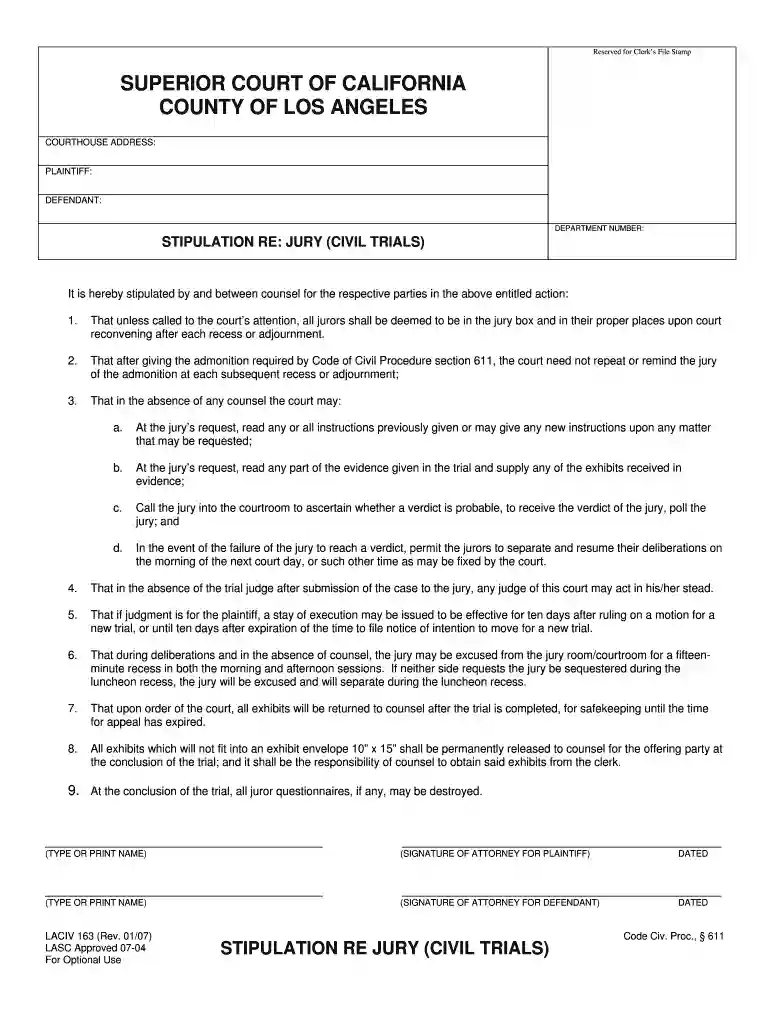
  2. Begin by filling in the COURTHOUSE ADDRESS, PLAINTIFF, DEFENDANT, and DEPARTMENT NUMBER at the top of the form. Ensure all details are accurate for proper identification of the case.
  3. In Section 1, confirm that all jurors will be considered present unless otherwise noted. This is a standard agreement between parties.
  4. Proceed to Section 2 and acknowledge that the court need not repeat jury admonitions after recesses. This helps streamline court proceedings.
  5. For Sections 3 and 4, outline any requests regarding jury instructions and actions in the absence of counsel. Be specific about what you agree upon.
  6. Complete Sections 5 through 9 by detailing any agreements on judgment stays, jury recesses, exhibit handling, and destruction of juror questionnaires as necessary.
  7. Finally, ensure both attorneys sign and date the document at the bottom to validate the stipulation.

Start using our platform today for free to simplify your document editing and signing process!

See more stipulation re versions

We've got more versions of the stipulation re form. Select the right stipulation re version from the list and start editing it straight away!
Versions Form popularity Fillable & printable
2007 4.8 Satisfied (138 Votes)
be ready to get more

Complete this form in 5 minutes or less

Get form

Got questions?

We have answers to the most popular questions from our customers. If you can't find an answer to your question, please contact us.
Contact us
If a dispute has already escalated to court, a stipulation can be used to settle the case out of court. This saves both parties time and legal expenses while resolving the issue amicably.
Stipulation generally means an agreement, a bargain, proviso, or condition. If the stipulation complies with an applicable statute or rule of court, it will be binding.
Unlike a settlement where you negotiate a lower amount to pay and the case is dismissed, a stipulated judgment remains on your record. It gives the creditor more power to collect if you fall behind. If you settle a debt before a lawsuit docHubes judgment, it typically doesnt appear as a judgment on your credit report.