




Here's how it works



How to use or fill out hi amended ignition form with our platform

- Click ‘Get Form’ to open the hi amended ignition form in the editor.
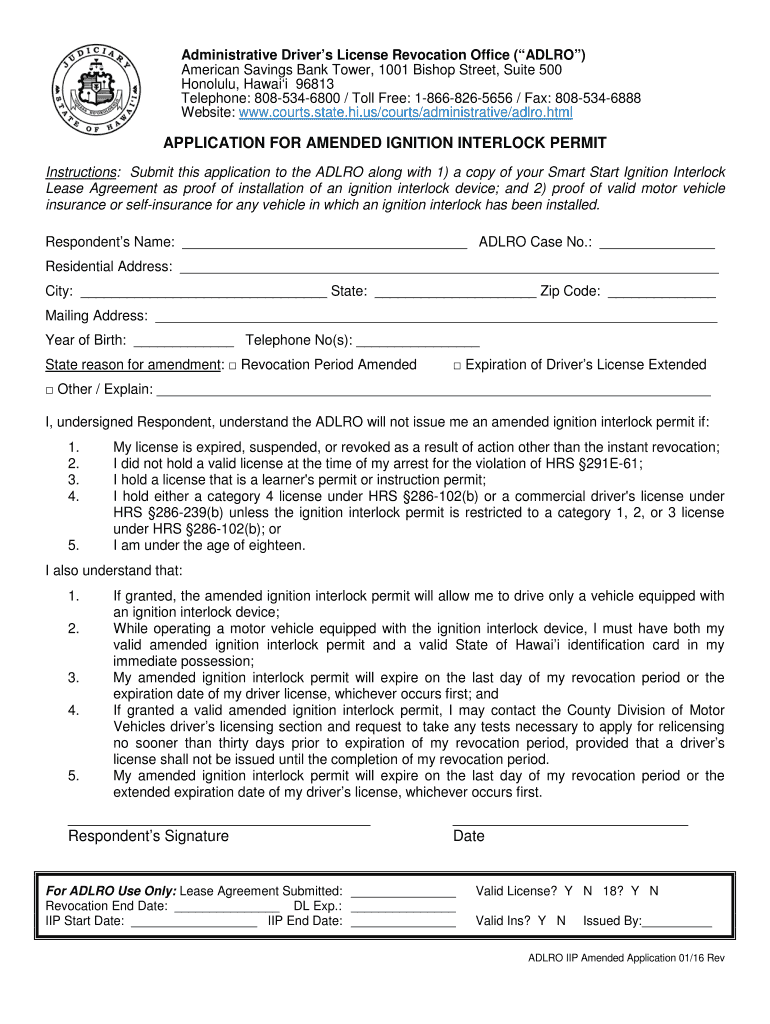
- Begin by entering your Respondent’s Name and ADLRO Case Number in the designated fields.
- Fill in your Residential Address, including City, State, and Zip Code. If your mailing address is different, provide that information as well.
- Enter your Year of Birth and Telephone Number(s) for contact purposes.
- Select the reason for amendment by checking the appropriate box. If 'Other', please provide a brief explanation in the space provided.
- Review the understanding statements regarding eligibility and requirements for obtaining an amended ignition interlock permit. Ensure you acknowledge these by signing at the bottom of the form.
- Finally, submit any required documents such as your Smart Start Ignition Interlock Lease Agreement and proof of valid motor vehicle insurance through our platform's upload feature.
Start filling out your hi amended ignition form today for free using our platform!
It's free
See more hi amended ingnition form versions
| Versions | Form popularity | Fillable & printable |
|---|---|---|
| 2016 | 4.8 Satisfied (231 Votes) |
Got questions?
Can I sign my interlock permit adlro with my mobile phone?
Of course, it is possible with DocHub. This safe and compliant online service features a phone-based signing option. After you log in to your DocHub account and import your interlock permit adlro to our editor, fill out all empty fields and utilize the Sign feature on the upper barf. Click on Create your signature and select Phone from the available choices. Here, you scan a QR code with your smartphone and draw your signature on your phone screen, as you usually do when approving physical papers. If you access DocHub right from your mobile device, you can electronically sign your document by drawing your electronic signature, adding its picture, or simply with a typed name.
How do you edit hi amended ingnition form on Android?
Document editing with DocHub is equally convenient on desktop and mobile devices. You just need an internet browser to edit your hi amended ingnition form on Android. Open our website and sign in to access the instruments you require. Add your document and introduce your intended modifications. Next, you can keep your form in your document storage or send it out immediately.
Security and compliance
At DocHub, your data security is our priority. We follow HIPAA, SOC2, GDPR, and other standards, so you can work on your documents with confidence.
Learn more


