Ak tr218 2026

Get Form
tr 218 form editable copy Preview on Page 1

Here's how it works

01. Edit your tr 218 form editable copy online
Type text, add images, blackout confidential details, add comments, highlights and more.
02. Sign it in a few clicks
Draw your signature, type it, upload its image, or use your mobile device as a signature pad.
03. Share your form with others
Send alaska tr 218 via email, link, or fax. You can also download it, export it or print it out.

How to use or fill out ak tr218 with our platform

Form edit decoration
9.5
Ease of Setup
DocHub User Ratings on G2
9.0
Ease of Use
DocHub User Ratings on G2
  1. Click ‘Get Form’ to open the ak tr218 in the editor.
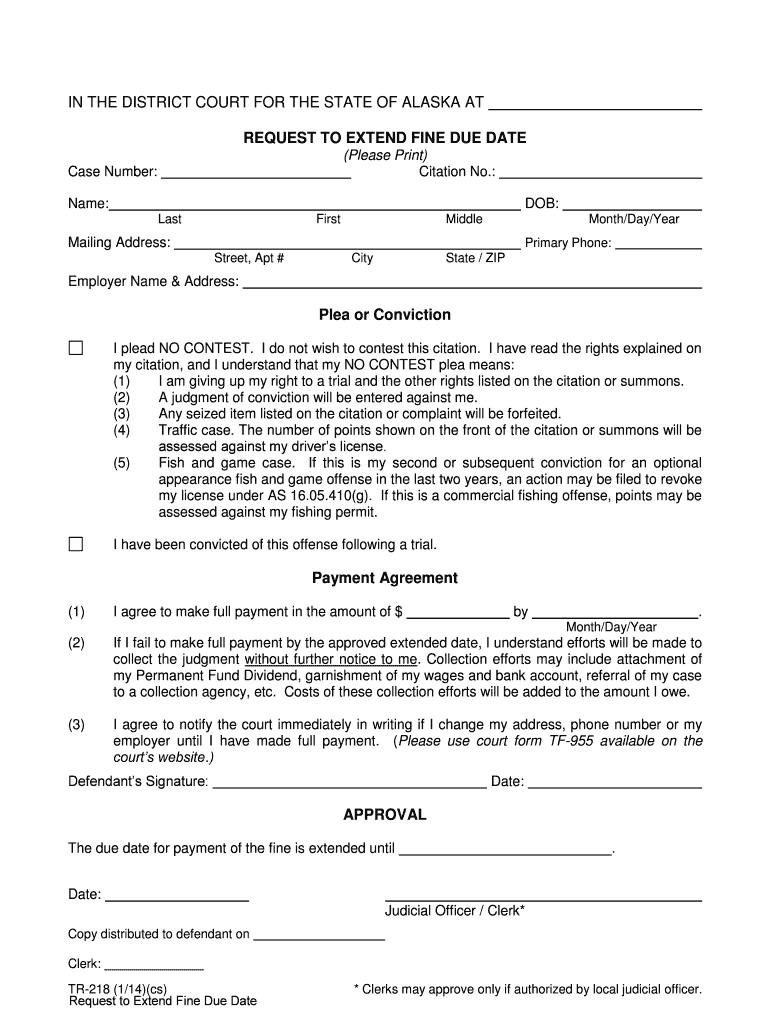
  2. Begin by entering your Citation No. and Case Number at the top of the form. This information is crucial for identifying your case.
  3. Fill in your personal details, including your name, date of birth, mailing address, and primary phone number. Ensure all information is accurate for effective communication.
  4. In the Plea or Conviction section, select whether you plead NO CONTEST or have been convicted following a trial. Carefully read the implications of each option before making your selection.
  5. Complete the Payment Agreement section by specifying the amount you agree to pay and the due date for this payment. Be mindful of any consequences outlined if payment is not made on time.
  6. Sign and date the form at the bottom to confirm your agreement and understanding of the terms outlined.
  7. Once completed, save your changes and utilize our platform’s features to submit or share your form as needed.

Start using our platform today to fill out your ak tr218 form easily and for free!

See more ak tr218 versions

We've got more versions of the ak tr218 form. Select the right ak tr218 version from the list and start editing it straight away!
Versions Form popularity Fillable & printable
2014 4.9 Satisfied (323 Votes)
be ready to get more

Complete this form in 5 minutes or less

Get form

Got questions?

We have answers to the most popular questions from our customers. If you can't find an answer to your question, please contact us.
Contact us

Yes, and it’s really straightforward! DocHub is a web-based PDF editor with advanced document management capabilities that allow you quickly edit your documents, fill out blank fields and add new ones for other people to fill out, and create eSignatures in several ways. Upload your alaska tr218, give information as requested, and select how you want to eSign your document - by typing your name, drawing your signature, uploading its image, or utilizing a QR code.

With DocHub, there are several convenient methods to edit your tr 218 form online. You can drag and drop the form and modify it directly at the DocHub website or use our browser extension to fill out your form immediately. Additionally, you can modify your PDF on your phone, as DocHub works with all the accessible mobile platforms.

If your ticket indicates that your offense is an optional court appearance offense and is payable to the court, within 30 days you must: Plead No Contest and pay the listed fine and surcharge within. By pleading no contest, you give up your rights listed below. enter a plea.
Interested persons can pay Alaska tickets online through the Court View Public Access Website. Each ticket contains information about the appropriate court to which payment should be made and the available payment options. On the Court View Public Access Website, users typically need to first conduct a case search.
Traffic ticket details in Alaska are publicly available online for free. The case name (where a mandatory court appearance or the case is being tried in court), vehicle license, drivers license, or ticket number can be used as search terms to locate the citation on the site.

Security and compliance

At DocHub, your data security is our priority. We follow HIPAA, SOC2, GDPR, and other standards, so you can work on your documents with confidence.

Learn more