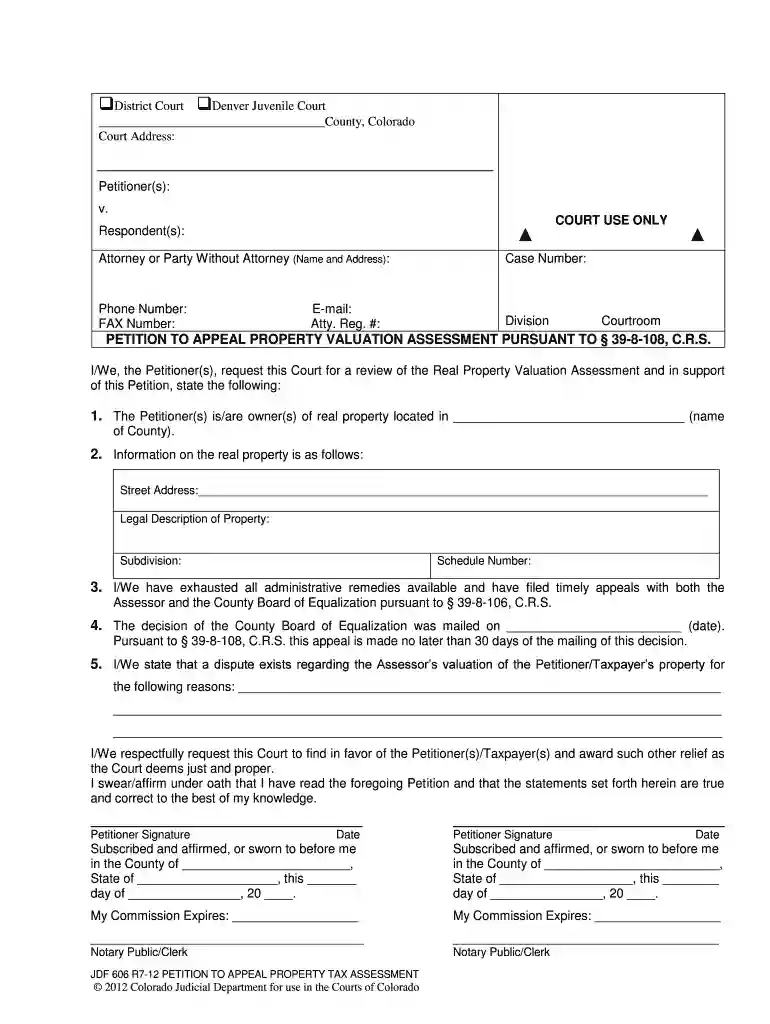
Jdf 606 2026

Get Form
jdf 606 assessment form Preview on Page 1

Here's how it works

01. Edit your jdf 606 assessment form online
Type text, add images, blackout confidential details, add comments, highlights and more.

02. Sign it in a few clicks
Draw your signature, type it, upload its image, or use your mobile device as a signature pad.

03. Share your form with others
Send jdf 606 tax form via email, link, or fax. You can also download it, export it or print it out.

How to use or fill out jdf 606 with our platform

Form edit decoration
9.5
Ease of Setup
DocHub User Ratings on G2
9.0
Ease of Use
DocHub User Ratings on G2
  1. Click ‘Get Form’ to open the jdf 606 in the editor.
  2. Begin by entering the court address and selecting either 'District Court' or 'Denver Juvenile Court'.
  3. Fill in the Petitioner(s) and Respondent(s) sections, ensuring all names are accurate.
  4. Provide your case number, phone number, fax number, email, and attorney registration number if applicable.
  5. In section 2, input the street address and legal description of the property you are appealing.
  6. State the reasons for your appeal regarding the Assessor’s valuation in section 5. Be clear and concise.
  7. Sign and date where indicated. Ensure that any required notary public signatures are completed before submission.

Start using our platform today to fill out your jdf 606 form online for free!

See more jdf 606 versions

We've got more versions of the jdf 606 form. Select the right jdf 606 version from the list and start editing it straight away!
Versions Form popularity Fillable & printable
2012 4.8 Satisfied (123 Votes)
be ready to get more

Complete this form in 5 minutes or less

Get form

Got questions?

We have answers to the most popular questions from our customers. If you can't find an answer to your question, please contact us.
Contact us

You need to use only reliable software solutions with strong security compliance to sign your documents electronically. DocHub is just the type of service you need! It stores data on Amazon Web Servers and complies with all required security requirements and eSignature laws, so it’s a trustworthy way to eSign your jdf 606 or other documents with this tool.

You may find and edit your jdf 606 form online by using DocHub. Its simple but feature-rich design allows you to start effective work right after you register your account. Create your account and add your file, then our user interface will guide you through our stress-free form completion experience.

Start with an outline of your motion so that you can lay out your argument in a logical order. This can likely be as simple as the headings for your main sections. This will make it easier to fill in the substance of your arguments, because you can see how everything fits into the whole of the motion. How to Write a Motion for Court - Clio Clio blog write-motion-for-court Clio blog write-motion-for-court
Determine What is Relevant to Your Case First, determine what is most important to you. Second, organize your declaration. Third, proofread condense. Know what your audience is focused on. Tell the truth. Anticipate opposing partys response. Advocate for yourself. Use proof to validate your case. How to Write a Declaration for Court - Truce Law Truce Law how-to-write-a-declaration-for-court Truce Law how-to-write-a-declaration-for-court
JDF 1019 Decree (divorce or legal separation)

Security and compliance

At DocHub, your data security is our priority. We follow HIPAA, SOC2, GDPR, and other standards, so you can work on your documents with confidence.

Learn more
ccpa2
pci-dss
gdpr-compliance
hipaa
soc-compliance

People also ask

Begin by filling out your personal information and contact details. Provide the details of the case including case number and parties involved. Indicate whether other parties agree with your request. Clearly state your request to the Court in the designated section.
If using a custom form, be sure to cover essential information, such as: Case name and number. Description of documents served. The servers full name, contact details, and signature. Name of the person served. Time, date, and location of service. Confirmation that the server is over 18 and not a party to the case. Different Types of Proof of Service - DR Legal Process Service DR Legal Process Service different-types-of-proof-of-s DR Legal Process Service different-types-of-proof-of-s
Begin by filling out your personal information and contact details. Provide the details of the case including case number and parties involved. Indicate whether other parties agree with your request. Clearly state your request to the Court in the designated section. JDF 76 General Motion Instructions for Use - Print Friendly PrintFriendly document jdf-76-gen PrintFriendly document jdf-76-gen

colorado jdf606