ETF WRS Annual Statement of Benefits Introduction Letter 2026

Get Form
ETF WRS Annual Statement of Benefits Introduction Letter Preview on Page 1

Here's how it works

01. Edit your form online
Type text, add images, blackout confidential details, add comments, highlights and more.
02. Sign it in a few clicks
Draw your signature, type it, upload its image, or use your mobile device as a signature pad.
03. Share your form with others
Send it via email, link, or fax. You can also download it, export it or print it out.

How to use or fill out ETF WRS Annual Statement of Benefits Introduction Letter with our platform

Form edit decoration
9.5
Ease of Setup
DocHub User Ratings on G2
9.0
Ease of Use
DocHub User Ratings on G2
  1. Click ‘Get Form’ to open the ETF WRS Annual Statement of Benefits Introduction Letter in the editor.
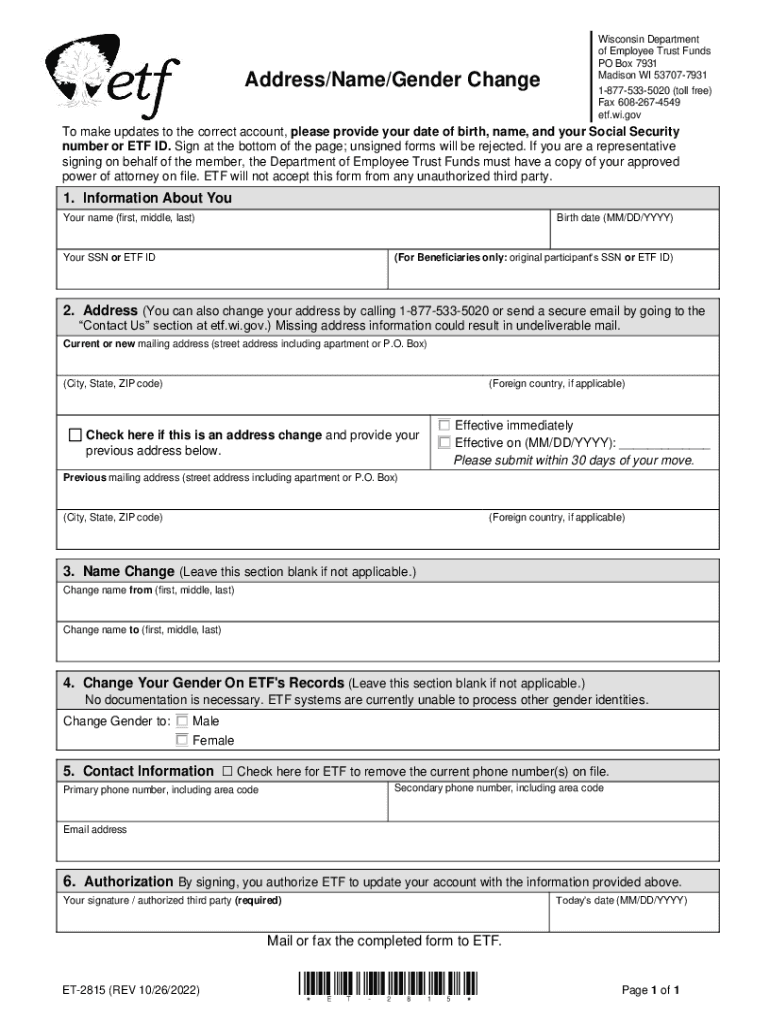
  2. Begin by filling out 'Information About You'. Enter your full name, birth date, and either your Social Security number or ETF ID. If you are a beneficiary, include the original participant’s SSN or ETF ID.
  3. Next, provide your current or new mailing address. Ensure all fields are filled accurately to avoid undeliverable mail. If this is an address change, check the appropriate box and include your previous address if applicable.
  4. If you need to change your name, complete the 'Name Change' section with both your current and new names. Leave it blank if not applicable.
  5. For gender changes, select the appropriate option under 'Change Your Gender On ETF's Records'. No documentation is necessary for this update.
  6. Fill in your contact information, including phone numbers and email address. Check the box if you wish to remove existing phone numbers on file.
  7. Finally, sign and date the form at the bottom. Remember that unsigned forms will be rejected. Mail or fax the completed form to ETF as instructed.

Start using our platform today for free to easily fill out and submit your ETF WRS Annual Statement of Benefits Introduction Letter!

See more ETF WRS Annual Statement of Benefits Introduction Letter versions

We've got more versions of the ETF WRS Annual Statement of Benefits Introduction Letter form. Select the right ETF WRS Annual Statement of Benefits Introduction Letter version from the list and start editing it straight away!
Versions Form popularity Fillable & printable
2023 4.3 Satisfied (39 Votes)
2022 4.2 Satisfied (46 Votes)
2018 4.2 Satisfied (41 Votes)
2010 4.9 Satisfied (61 Votes)
be ready to get more

Complete this form in 5 minutes or less

Get form

Got questions?

We have answers to the most popular questions from our customers. If you can't find an answer to your question, please contact us.
Contact us
Retirees of the Wisconsin Retirement System (WRS) will receive an increase in their pension benefits this year.
By taking a separation benefit, you are closing your WRS account. If you later begin working in an eligible WRS position, your WRS account will be treated as if you are a new employee for all programs.
There are many possibilities here, ranging from scam to error to legitimate issue. It could be an error due to a mis-keyed SSN, it could be due to a retirement pension they actually receive and the letter could be a ``slippage letter related to the pension.
In 2012, 180,718 residents of Wisconsin received a total of $4.6 billion in pension benefits from state and local pension plans. The average pension benefit received was $2,143 per month or $25,711 per year.

Security and compliance

At DocHub, your data security is our priority. We follow HIPAA, SOC2, GDPR, and other standards, so you can work on your documents with confidence.

Learn more
ccpa2
pci-dss
gdpr-compliance
hipaa
soc-compliance