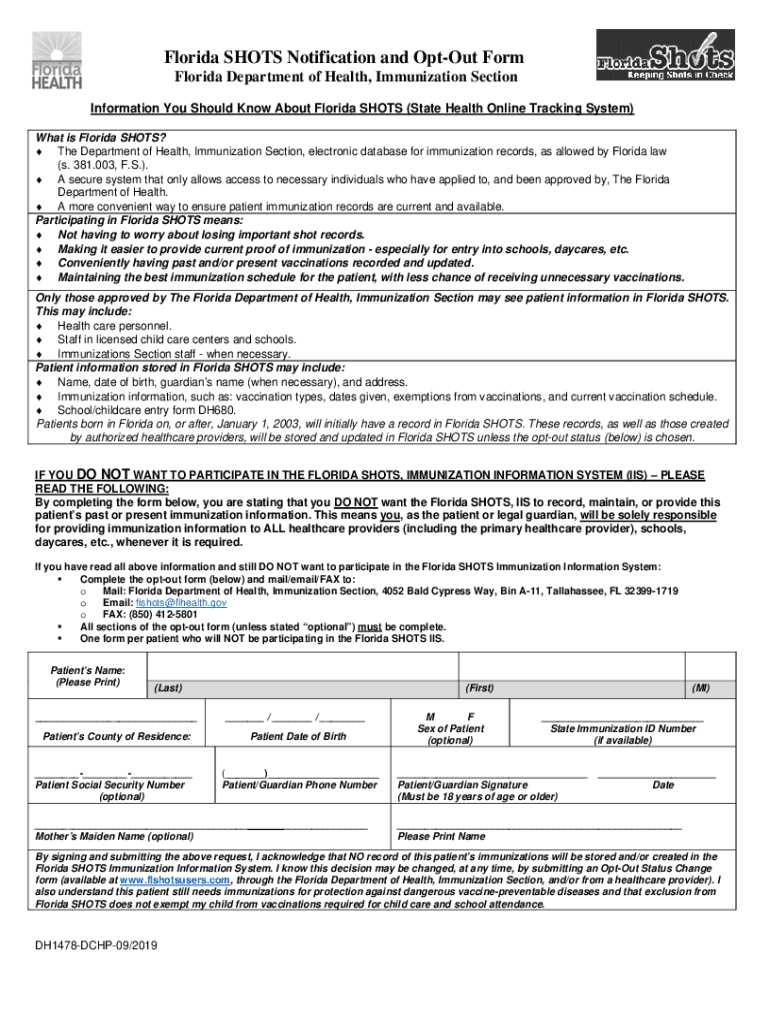
Vaccine Information Statements (VIS)Florida Department 2026

Get Form
Vaccine Information Statements (VIS)Florida Department Preview on Page 1

Here's how it works

01. Edit your form online
Type text, add images, blackout confidential details, add comments, highlights and more.
02. Sign it in a few clicks
Draw your signature, type it, upload its image, or use your mobile device as a signature pad.
03. Share your form with others
Send it via email, link, or fax. You can also download it, export it or print it out.

How to use or fill out Vaccine Information Statements (VIS) Florida Department

Form edit decoration
9.5
Ease of Setup
DocHub User Ratings on G2
9.0
Ease of Use
DocHub User Ratings on G2
  1. Click ‘Get Form’ to open it in the editor.
  2. Begin by entering the patient's name in the designated fields, ensuring accuracy with both first and last names.
  3. Fill in the patient’s date of birth using the format provided. This is crucial for identifying immunization records.
  4. Provide the patient’s county of residence. This information helps in local record management.
  5. Optionally, include the patient’s Social Security Number and mother’s maiden name for additional identification.
  6. Indicate the sex of the patient by selecting M or F as applicable.
  7. If available, enter the State Immunization ID Number to link existing records.
  8. Ensure that a guardian or patient over 18 signs and dates the form at the bottom, acknowledging their decision to opt-out.

Start using our platform today to easily fill out your Vaccine Information Statements for free!

See more Vaccine Information Statements (VIS)Florida Department versions

We've got more versions of the Vaccine Information Statements (VIS)Florida Department form. Select the right Vaccine Information Statements (VIS)Florida Department version from the list and start editing it straight away!
Versions Form popularity Fillable & printable
2019 4.7 Satisfied (32 Votes)
2014 4 Satisfied (40 Votes)
be ready to get more

Complete this form in 5 minutes or less

Get form

Got questions?

We have answers to the most popular questions from our customers. If you can't find an answer to your question, please contact us.
Contact us
Vaccination records (sometimes called immunization records) provide a history of all the vaccines you or your child received. This record may be required for certain jobs, travel abroad, or school registration.
Vaccine Information Statements are information sheets produced by CDC that explain both the benefits and risks of a vaccine to vaccine recipients. In the case of recipients under 18, they are provided to a parent or legal guardian. Federal law requires that VISs be handed out before each dose of certain vaccinations.
VISs are required by law 300aa-26 [2 pages]) to give the appropriate VIS to the patient (or parent or legal representative) prior to every dose of specific vaccines. The appropriate VIS must be given prior to the vaccination, and must be given prior to each dose of a multi-dose series.
Contact the Immunization Section 1-877-888-7468. Immunization@FLHealth.gov. 850-922-4195. Florida Department of Health. Immunization Section. 4052 Bald Cypress Way, Bin A11. Tallahassee, FL 32399-1719.
Go to My Record Health Summary and select the Immunizations tab. You can see the immunizations youve received and the dates on which you received them. Click the immunization name to learn more. If your immunizations are not up to date, please reach out to your clinic directly to have your information updated.

Security and compliance

At DocHub, your data security is our priority. We follow HIPAA, SOC2, GDPR, and other standards, so you can work on your documents with confidence.

Learn more
ccpa2
pci-dss
gdpr-compliance
hipaa
soc-compliance
be ready to get more

Complete this form in 5 minutes or less

Get form

People also ask

You can request your vaccination records directly from Florida SHOTS by filling out the Florida Department of Health form DH3203 Authorization to Disclose Confidential Information form online, electronically sign and submit it. Request your vaccination records.
Contact your health care provider or county health department. Records maintained by the health care providers office may only be available for a limited number of years. Contact your local county health department to determine if you have immunizations recorded in the Florida SHOTS system.

Related links